
In the previous post, we provided an overview of Spring Batch and the new features introduced in Spring Batch 5.x.
In this story, we are going to implement a code with Spring Batch 5 and MongoDB.
· Prerequisites
· Real-world examples
· Getting Started
∘ Setup project
∘ Source code implementation
· Spring batch application Demo
· Conclusion
· References
Prerequisites
This is the list of all the prerequisites:
- Spring Boot 3+
- Maven 3.6.+
- Java 17 or later
- Mongo 5.x or later
Real-world examples
We will take bicycle trip data from the Citibike service in New York City as an example.
CitiBike is New York City’s bike-share system, and the largest in the nation. CitiBike launched in May 2013 and has become an essential part of the transportation network.
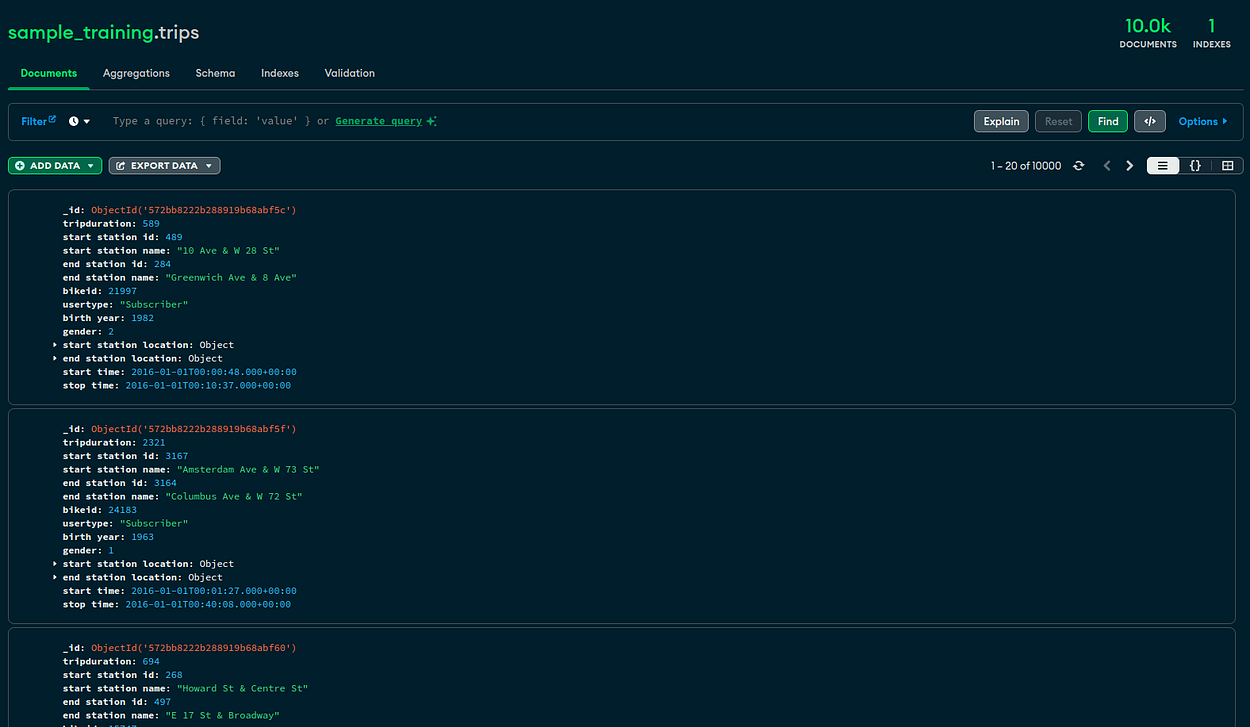
Let’s suppose Citibike uses MongoDB as the database to store bike trip data. The trip documents are composed of:
- Bicycle unique identifier,
- Trip start and stop time and date,
- Trip start and end station names and geospatial location,
- User type — (Customer = 24-hour pass or 3-day pass user; Subscriber = Annual Member)
- Gender — (Zero=unknown; 1=male; 2=female)
- User Year of Birth
Sample Document
{
    "_id" : "572bb8222b288919b68abf68",
    "tripduration" : 539,
    "start station id" : 3117,
    "start station name" : "Franklin St & Dupont St",
    "end station id" : 3104,
    "end station name" : "Kent Ave & N 7 St",
    "bikeid" : 15061,
    "usertype" : "Subscriber",
    "birth year" : 1989,
    "gender" : 1,
    "start station location" : {
        "type" : "Point",
        "coordinates" : [
            -73.95866,
            40.73564
        ]
    },
    "end station location" : {
        "type" : "Point",
        "coordinates" : [
            -73.96150225,
            40.72057658
        ]
    },
    "start time" : "2016-01-01T00:07:39.000+0000",
    "stop time" : "2016-01-01T00:16:39.000+0000"
}
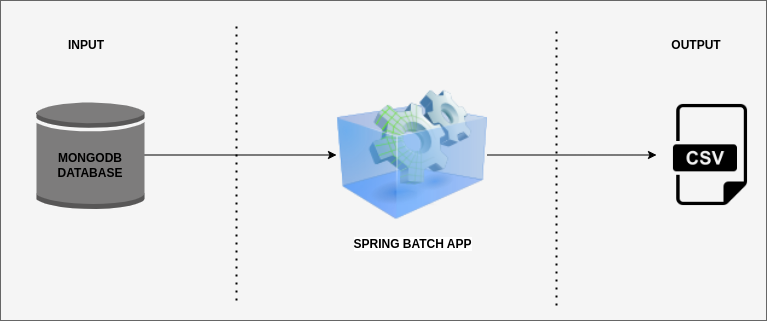
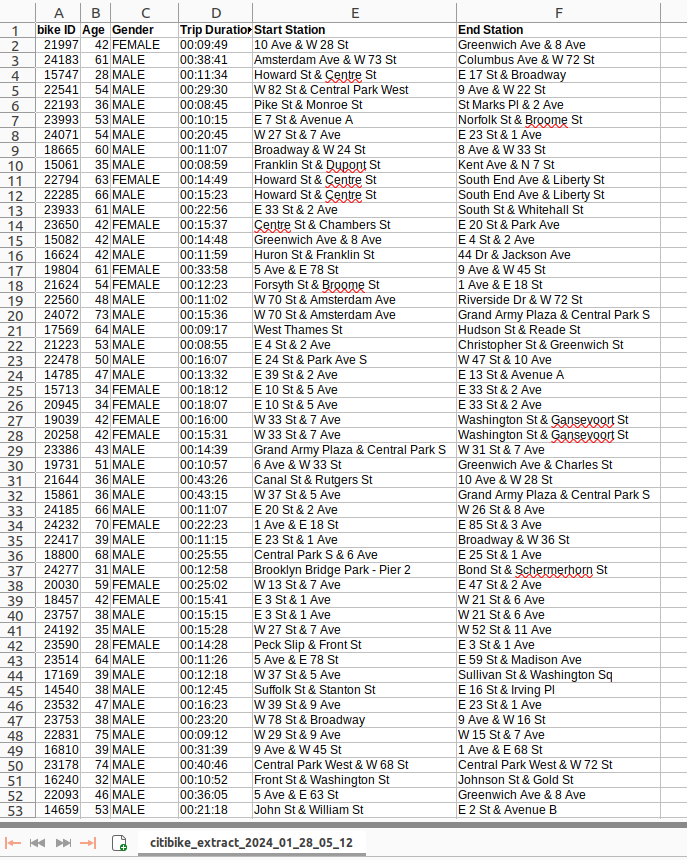
The company received millions of pieces of data per month. The company decided to use Spring Batch to extract trip data from the database to a CSV file every weekend.
Getting Started
Setup project
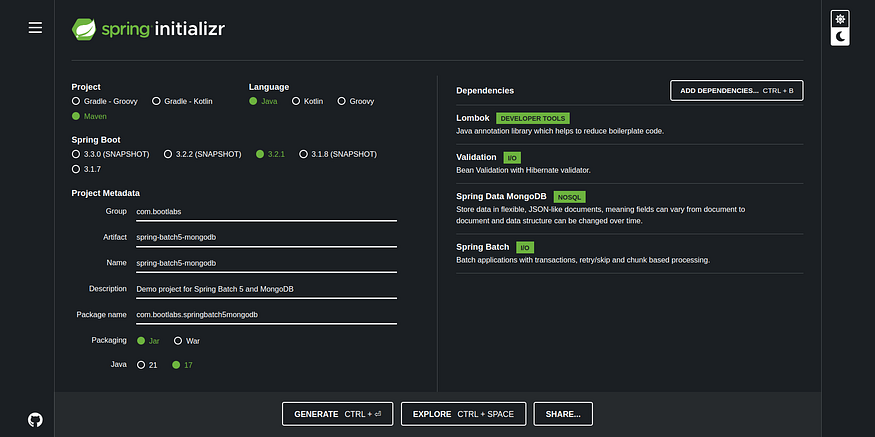
We will start by creating a simple Spring Boot project from start.spring.io.
For this story, we need to populate the database with data. For this, we will use the MongoDB database sample_training that contains the trips collection. We can find the full MongoDB sample training dataset in this GitHub repository.
Source code implementation
We will implement a batch step with the extraction criteria in the MongoDB database.
Find all documents with:
- User type = “Subscriber”,
- Trip duration > 500 seconds,
- The names of the start and end stations which are not identical
db.getCollection('trips').find({
    'birth year': { $ne: '' },
    'usertype': { $eq: 'Subscriber' },
    'tripduration': { $gt: 500 },
    $expr: {
        $ne: [
            '$start station name',
            '$end station name'
        ]
    }
});
MongoDB Configuration class
First, we need to create a configuration class for the MongoDB database.
@Configuration
public class MongodbConfig {
    private final MongodbProperties mongodbProperties;

    public MongodbConfig(MongodbProperties mongodbProperties) {
        this.mongodbProperties = mongodbProperties;
    }

    @Bean
    public MongoClient mongoClient() {
        var connectionString =MessageFormat.format("mongodb://{0}:{1}@{2}:{3}/{4}",
                mongodbProperties.getUsername(), mongodbProperties.getPassword(), mongodbProperties.getHost(), mongodbProperties.getPort(), mongodbProperties.getDatabase());

        return MongoClients.create(connectionString);
    }

    @Bean
    public MongoTemplate mongoTemplate(MongoClient mongoClient) {
        return new MongoTemplate(mongoClient, mongodbProperties.getDatabase());
    }

    @Bean
    public MongoDatabaseFactory mongoDatabaseFactory(MongoClient mongoClient) {
        return new SimpleMongoClientDatabaseFactory(mongoClient, mongodbProperties.getDatabase());
    }

    @Bean
    public MongoTransactionManager transactionManager(MongoDatabaseFactory mongoDatabaseFactory) {
        return new MongoTransactionManager(mongoDatabaseFactory);
    }

}
TripItemReader class
We have created a Reader class that will read data from the MongoDB database with Query Documents. To do this, the TripItemReader class extends MongoCursorItemReader<T>. This is the new implementation in Spring Batch 5.1.0 that uses cursors instead of paging to read data from MongoDB, which improves the performance of reads on large collections.
@Component
public class TripItemReader extends MongoCursorItemReader<Trips> {

    public TripItemReader(@Autowired MongoTemplate mongoTemplate) {

        Criteria criteria = Criteria.where("birth year").ne("").and("usertype").is("Subscriber").and("tripduration").gt(500);
        BasicQuery query = new BasicQuery("{ $expr: {'$ne': ['$start station name', '$end station name']}}");
        query.addCriteria(criteria);

        setName("reader");
        setTargetType(Trips.class);
        setTemplate(mongoTemplate);
        setCollection("trips");
        setBatchSize(DEFAULT_CHUNK_SIZE);
        setQuery(query);
        setLimit(DEFAULT_LIMIT_SIZE);
        Map<String, Sort.Direction> sortOptions = new HashMap<>();
        sortOptions.put("birth year", Sort.Direction.ASC);
        setSort(sortOptions);

    }

}
TripItemProcessor class
The TripItemProcessor class is a Processor class that implements ItemProcessor<T> and overrides its process() method to format each input data into CSV output data.
@Slf4j
@Component
public class TripItemProcessor implements ItemProcessor<Trips, TripCsvLine> {


 @Override
 public TripCsvLine process(Trips item) {
  LOGGER.info("Trips processor {}", item.toString());

  var age = LocalDate.now().getYear() - item.getBirthYear();
  var gender = UserGender.getType(item.getGender()).name();
  Duration duration = Duration.ofSeconds(item.getDuration());
  String formattedDuration= String.format("%02d:%02d:%02d", duration.toHoursPart(), duration.toMinutesPart(), duration.toSecondsPart());

  return new TripCsvLine(item.getBikeId(), age, gender, formattedDuration, item.getStartStationName(), item.getEndStationName());
 }
}
TripItemWriter class
The TripItemWriter class is the class responsible for writing data to a CSV file.
@Slf4j
@Component
public class TripItemWriter implements ItemWriter<TripCsvLine>, StepExecutionListener {

    private StepExecution stepExecution;

    private int totalWriteTrip = 0;

    private final List<TripCsvLine> writeTrips = new ArrayList<>();

 private final DateFormat fileDateFormat = new SimpleDateFormat("yyyy_MM_dd_hh_mm");
    private static final String CSV_HEADER = "bike ID,Age,Gender,Trip Duration,Start Station,End Station";

    @Override
    public void write(Chunk<? extends TripCsvLine> tripsChunk) {
        totalWriteTrip += tripsChunk.getItems().size();

        writeTrips.addAll(tripsChunk.getItems());
    }


    @BeforeStep
    public void beforeStepExecution(StepExecution stepExecution) {
        this.stepExecution = stepExecution;
    }

    @AfterStep
    public void afterStepExecution() {
        LOGGER.info("logger {}", stepExecution.getExecutionContext().get(ExecutionContextKey.TRIP_TOTAL.getKey()));
        JobParameters parameters = stepExecution.getJobExecution().getJobParameters();
        String directoryPath = parameters.getString(JobParametersKey.PATH_DIRECTORY.getKey());

  String csvFileName = getFilePath(directoryPath, parameters.getDate(JobParametersKey.CURRENT_TIME.getKey()));
  if(stepExecution.getStatus().equals(BatchStatus.COMPLETED)){
   generateCsvFile(writeTrips, csvFileName);
  }
        stepExecution.getExecutionContext().put(ExecutionContextKey.TRIP_TOTAL.getKey(), totalWriteTrip);
    }

 private String getFilePath(String directoryPath, Date jobCurrentTime){

  String strDate = fileDateFormat.format(jobCurrentTime);

  String fileName = MessageFormat.format("{0}_{1}.csv", CSV_BASE_NAME, strDate);

  return MessageFormat.format("{0}/{1}", directoryPath, fileName);
 }


    public String buildCsvLine(TripCsvLine trips) {
        return String.join(",", trips.bikeId().toString(), trips.age().toString(), trips.gender(), trips.durationTime(), trips.startStationName(), trips.endStationName());
    }

    private void generateCsvFile(List<TripCsvLine> trips, @NonNull String filePathName) {

        if (!CollectionUtils.isEmpty(trips)) {
   File csvOutputFile = new File(filePathName);

            try (PrintWriter pw = new PrintWriter(csvOutputFile)) {
                pw.println(CSV_HEADER);
                trips.stream()
                        .map(this::buildCsvLine)
                        .forEach(pw::println);
            } catch (FileNotFoundException e) {
                LOGGER.error("CSV file not found {} ", e.getMessage());
            } finally {
                writeTrips.clear();
            }
        }
    }
}
JobConfig class
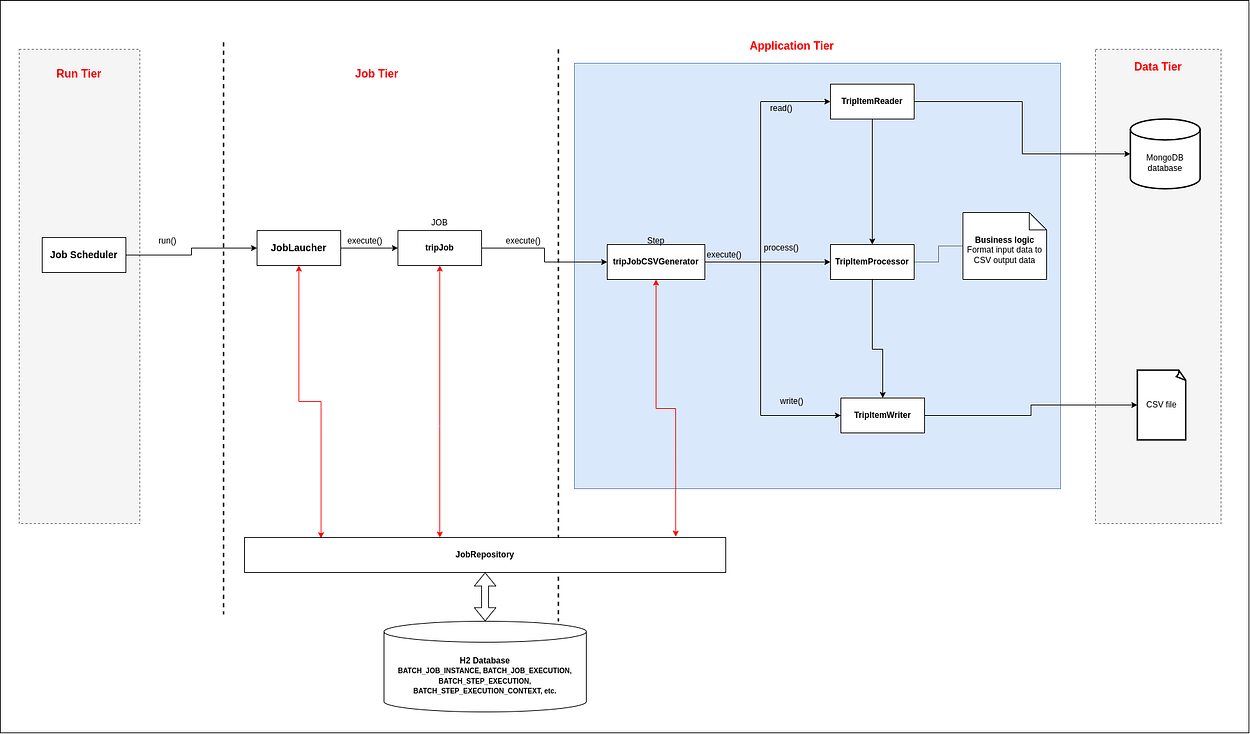
At this point, we need to configure our job and step for batch processing. For this, we create a JobConfig class and add bean definitions to configure batch jobs and steps.
@Configuration
public class JobConfig {

    @Bean
    public DataSource getDataSource() {
        return new EmbeddedDatabaseBuilder()
                .addScript("classpath:org/springframework/batch/core/schema-drop-h2.sql")
                .addScript("classpath:org/springframework/batch/core/schema-h2.sql")
                .setType(EmbeddedDatabaseType.H2)
                .build();
    }


    @Bean
    public Job tripJob(JobRepository jobRepository, PlatformTransactionManager transactionManager,
                       MongoTemplate mongoTemplate) {
        return new JobBuilder("tripJob", jobRepository)
                .incrementer(new RunIdIncrementer())
                .start(tripJobStep(jobRepository, transactionManager, mongoTemplate))
                .listener(new TripJobCompletionListener())
                .build();
    }

    @Bean
    public Step tripJobStep(JobRepository jobRepository, PlatformTransactionManager transactionManager,
                            MongoTemplate mongoTemplate) {
        return new StepBuilder("tripJobCSVGenerator", jobRepository)
                .startLimit(DEFAULT_LIMIT_SIZE)
                .<Trips, TripCsvLine>chunk(DEFAULT_CHUNK_SIZE, transactionManager)

                .reader(new TripItemReader(mongoTemplate))
                .processor(new TripItemProcessor())
                .writer(new TripItemWriter())
                .listener(new TripStepListener())
                .build();
    }

}
As we write this story, Spring Batch does not support MongoDB as a JobRepository due to the transactionality requirements of the job repository. The JobRepository is used for basic CRUD operations of the various persisted domain objects within Spring Batch, such as JobExecution and StepExecution. It is required by many of the major framework features, such as the JobLauncher, Job, and Step.
We used the H2 embedded database for data persistence in JobRepository.
The tripJobStep is the step that contains all the information needed to define and control the actual batch processing. It supports the reader, processor, and writer.
Spring batch application Demo
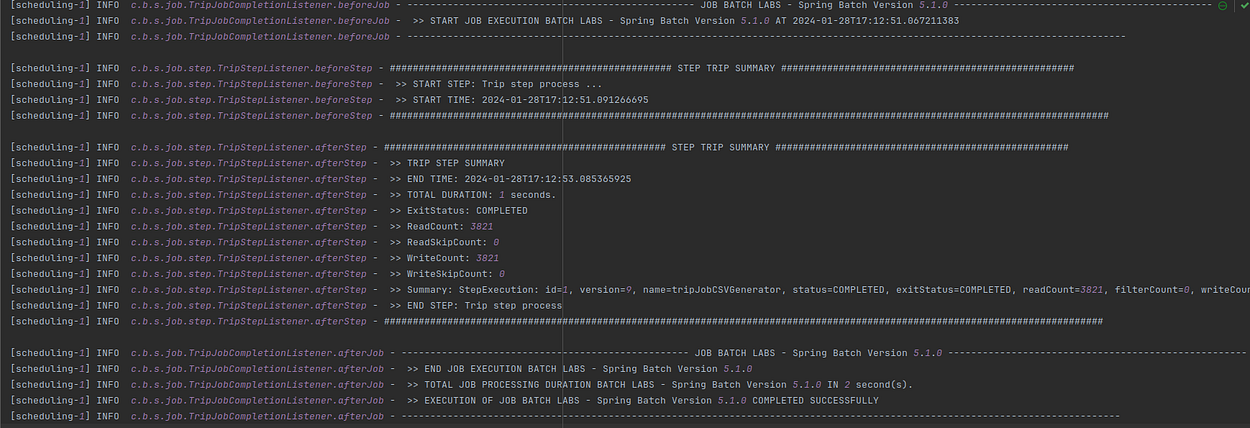
Let’s start the application. For this demo, we’ve added a scheduler that starts the job every 2 minutes.
@Component
public class ScheduledJobLauncher {

    private static final Logger LOGGER = LoggerFactory.getLogger(ScheduledJobLauncher.class);

    @Value("${batch.csv-path-directory}")
    private String pathDirectory;
    private final Job job;

    private final JobLauncher jobLauncher;

    ScheduledJobLauncher(Job job, JobLauncher jobLauncher) {
        this.job = job;
        this.jobLauncher = jobLauncher;
    }

    // run every 2 min
    @Scheduled(fixedRate = 120000)
    void launchFileToJob() throws JobParametersInvalidException, JobExecutionAlreadyRunningException, JobInstanceAlreadyCompleteException, JobRestartException {
        LOGGER.info("Scheduled Starting job");

        JobParameters params = new JobParametersBuilder()
                .addLong(JobParametersKey.JOB_ID.getKey(), System.currentTimeMillis())
                .addDate(JobParametersKey.CURRENT_TIME.getKey(),new Date())
                .addString(JobParametersKey.PATH_DIRECTORY.getKey(), pathDirectory)
                .toJobParameters();

        jobLauncher.run(job, params);

        LOGGER.info("Scheduled Stopping job");
    }

}
Logs generated by the application
File generated
Well done !!.💪
Conclusion
In this post, We have implemented a code with Spring Batch 5 and MongoDB.
This post is Part 2 of a 2-part series on Spring Batch 5 with MongoDB.
← Back to Part 1: Spring Batch 5 — Read from MongoDB and Generate CSV Files (Part 1)
The complete source code is available on GitHub.
You can reach out to me and follow me on Medium, Twitter, GitHub
Thanks for reading!

