
In this post, we’ll move beyond the basics and dive deep into the advanced world of extending Keycloak.
· Prerequisites
· Overview
· Understanding Keycloak SPIs
∘ What is an SPI?
∘ Why Use an SPI Instead of Custom Code?
∘ SPIs for Database Extensions
· Let’s code
∘ Use Case Example: Subscriptions
∘ Project Setup
∘ Creating a Custom Entity (New Table)
∘ Integrating Liquibase for Database Migration
∘ Registering the Entity with Keycloak
· Deploying the Custom SPI (Provider + Factory) in Keycloak
∘ Build the JAR
∘ Copy the JAR into Keycloak
∘ Verifying Deployment in the Logs
· Conclusion
· References
Prerequisites
This is the list of all the prerequisites:
- Docker / Docker-compose installed (optional if you’ve already downloaded and installed Keycloak from https://www.keycloak.org/downloads)
- Basic knowledge of Keycloak
- Maven 3.6.3 or higher
- Java 17+ (Keycloak 20+ requires at least Java 17)
- A code editor such as IntelliJ IDEA or VS Code
- Database (PostgreSQL, MySQL, or your preferred Keycloak database. In this post, we’ll use PostgreSQL)
⚠️ Note: This post is based on Quarkus-based Keycloak distribution (Keycloak 26+).
Overview
Keycloak has emerged as the de facto open-source standard for handling authentication and authorization, offering a powerful out-of-the-box solution for managing users, roles, and clients. While its default capabilities cover a wide range of use cases, real-world projects often demand customizations that go beyond what Keycloak provides out of the box. This is where the true power of Keycloak reveals itself. Its modular architecture is built for extension, not just out-of-the-box use. Through Custom Service Provider Interfaces (SPIs) and database extensions, you can seamlessly weave your own data tables directly into the Keycloak ecosystem. This allows you to enrich user entities without compromising the centralized security and protocol management that Keycloak provides.
By the end of this post, you’ll have a solid foundation for integrating your own domain-specific data directly within Keycloak.
Understanding Keycloak SPIs
What is an SPI?
Service Provider Interfaces (SPIs) in Keycloak serve as contracts that define how various services can be extended or replaced. They allow developers to plug in their own implementations for specific functionalities without modifying the core Keycloak codebase.
Why Use an SPI Instead of Custom Code?
The use of SPIs in Keycloak offers several advantages:
- Modular: SPIs allow you to tailor Keycloak’s behavior to meet your organization’s specific requirements. Whether you need to integrate with a legacy system or implement a unique authentication method, SPIs provide the flexibility to do so.
- Maintainable: By using SPIs, you can keep your custom logic separate from the core Keycloak code. This separation makes it easier to maintain and upgrade your Keycloak instance without losing your customizations.
- Reusability: Custom implementations of SPIs can be reused across different Keycloak instances or projects, promoting consistency and reducing development time.
- Community and Support: As Keycloak is an open-source project, there is a vibrant community of developers who share their custom SPIs and extensions. This community support can be invaluable when developing your own solutions
SPIs for Database Extensions
In the context of this post, the SPI we’re most interested in is the JPA Entity Provider SPI. This extension point allows you to register new entities (tables) into Keycloak’s persistence layer. Once registered, your new table behaves like any other Keycloak-managed entity — you can use JPA’s EntityManager to query, insert, and update data.
Let’s code
Use Case Example: Subscriptions
To make this post concrete, let’s walk through a real-world example: managing user subscriptions inside Keycloak.
Imagine you’re building a SaaS application where users can sign up for different subscription plans — for example:
- Free: Limited features
- Pro: Paid plan with advanced features
- Enterprise: Custom agreements for large customers
While Keycloak lets you store simple values like "plan=pro" as a user attribute, that approach quickly becomes limiting:
- You should track the history of subscriptions (e.g., when a user upgraded or downgraded).
- You may need to store relational data like subscription start/end dates or associated invoices.
- You may want to query subscriptions across users, e.g., “list all Pro users whose plan is expiring this month.”
Storing all of that as flat attributes is messy and inefficient. Instead, we’ll extend Keycloak with a new database table calledcustom_subscription, managed via JPA.
This table will hold structured subscription data linked to Keycloak users. Once in place, your SPI will be able to:
- Create a subscription record when a new user registers.
- Update subscription plans when users upgrade or downgrade.
- Query subscription data using JPA.
Project Setup
I’ve created a Maven project based on the quickstart archetype using the mvn command like this:
mvn archetype:generate -DgroupId=com.bootlabs \
 -DartifactId=keycloak-subscription-spi \
 -DarchetypeArtifactId=maven-archetype-quickstart \
 -DinteractiveMode=false
Your pom.xml needs to include Keycloak Server SPI and JPA dependencies.
<project xmlns="http://maven.apache.org/POM/4.0.0" xmlns:xsi="http://www.w3.org/2001/XMLSchema-instance"
  xsi:schemaLocation="http://maven.apache.org/POM/4.0.0 http://maven.apache.org/maven-v4_0_0.xsd">
  <modelVersion>4.0.0</modelVersion>

  <groupId>com.bootlabs</groupId>
  <artifactId>keycloak-subscription-spi</artifactId>
  <packaging>jar</packaging>
  <version>1.0-SNAPSHOT</version>

  <name>keycloak-subscription-spi</name>
  <url>http://maven.apache.org</url>


  <properties>
    <project.build.sourceEncoding>UTF-8</project.build.sourceEncoding>
    <keycloak.version>26.3.1</keycloak.version>
    <liquibase.version>4.27.0</liquibase.version>
    <maven.compiler.source>17</maven.compiler.source>
    <maven.compiler.target>17</maven.compiler.target>
  </properties>

  <dependencies>

    <!-- Keycloak Core Dependencies (CRITICAL - provided scope)  -->
    <dependency>
      <groupId>org.keycloak</groupId>
      <artifactId>keycloak-core</artifactId>
      <version>${keycloak.version}</version>
      <scope>provided</scope>
    </dependency>
    <dependency>
      <groupId>org.keycloak</groupId>
      <artifactId>keycloak-server-spi</artifactId>
      <version>${keycloak.version}</version>
      <scope>provided</scope>
    </dependency>
    <dependency>
      <groupId>org.keycloak</groupId>
      <artifactId>keycloak-server-spi-private</artifactId>
      <version>${keycloak.version}</version>
      <scope>provided</scope>
    </dependency>
    <dependency>
      <groupId>org.keycloak</groupId>
      <artifactId>keycloak-model-jpa</artifactId>
      <version>${keycloak.version}</version>
      <scope>provided</scope>
    </dependency>
    <dependency>
      <groupId>org.keycloak</groupId>
      <artifactId>keycloak-services</artifactId>
      <version>${keycloak.version}</version>
      <scope>provided</scope>
    </dependency>


    <!-- Database Migrations -->
    <dependency>
      <groupId>org.liquibase</groupId>
      <artifactId>liquibase-core</artifactId>
      <version>${liquibase.version}</version>
    </dependency>

    <!--  Jakarta APIs  -->
    <dependency>
      <groupId>jakarta.persistence</groupId>
      <artifactId>jakarta.persistence-api</artifactId>
      <version>3.1.0</version>
      <scope>provided</scope>
    </dependency>
    <dependency>
      <groupId>jakarta.ws.rs</groupId>
      <artifactId>jakarta.ws.rs-api</artifactId>
      <version>3.1.0</version>
      <scope>provided</scope>
    </dependency>

    <!-- Testing -->
    <dependency>
      <groupId>junit</groupId>
      <artifactId>junit</artifactId>
      <version>3.8.1</version>
      <scope>test</scope>
    </dependency>
  </dependencies>
</project>
We declare the dependencies provided because they are already bundled with the Keycloak server.
Creating a Custom Entity (New Table)
We’ll create a new class CustomSubscriptionEntity inside the entity/ package.
@Entity
@Table(name = "custom_subscription")
public class CustomSubscriptionEntity {

    @Id
    @Column(name = "ID", length = 36, nullable = false, updatable = false)
    private String id;

    // Many subscriptions can belong to one user
    @ManyToOne(fetch = FetchType.LAZY, optional = false)
    @JoinColumn(name = "user_id", nullable = false)
    private UserEntity user;

    @Column(name = "plan_type", nullable = false)
    private String planType;  // e.g., FREE, PRO, ENTERPRISE

    @Column(name = "start_date", nullable = false)
    private LocalDateTime startDate;

    @Column(name = "end_date")
    private LocalDateTime endDate;

    @Column(name = "created_at", nullable = false, updatable = false)
    private LocalDateTime createdAt = LocalDateTime.now();

    public String getId() {
        return id;
    }

    public void setId(String id) {
        this.id = id;
    }

    public UserEntity getUser() {
        return user;
    }

    public void setUser(UserEntity user) {
        this.user = user;
    }

    public String getPlanType() {
        return planType;
    }

    public void setPlanType(String planType) {
        this.planType = planType;
    }

    public LocalDateTime getStartDate() {
        return startDate;
    }

    public void setStartDate(LocalDateTime startDate) {
        this.startDate = startDate;
    }

    public LocalDateTime getEndDate() {
        return endDate;
    }

    public void setEndDate(LocalDateTime endDate) {
        this.endDate = endDate;
    }

    public LocalDateTime getCreatedAt() {
        return createdAt;
    }

    public void setCreatedAt(LocalDateTime createdAt) {
        this.createdAt = createdAt;
    }
}
Integrating Liquibase for Database Migration
Keycloak (since the Quarkus distribution) uses Liquibase to manage database schema updates. To ensure your custom table is created consistently across environments, we’ll provide a Liquibase changelog.
Inside src/main/resources/META-INF/custom-subscription-changelog.xml
<?xml version="1.0" encoding="UTF-8"?>
<databaseChangeLog
        xmlns="http://www.liquibase.org/xml/ns/dbchangelog"
        xmlns:xsi="http://www.w3.org/2001/XMLSchema-instance"
        xsi:schemaLocation="
          http://www.liquibase.org/xml/ns/dbchangelog
          http://www.liquibase.org/xml/ns/dbchangelog/dbchangelog-4.8.xsd">

    <changeSet id="1" author="bootlabs">
        <createTable tableName="custom_subscription">
            <!-- Primary key as UUID string -->
            <column name="id" type="VARCHAR(36)">
                <constraints primaryKey="true" nullable="false"/>
            </column>

            <!-- FK to Keycloak USER_ENTITY -->
            <column name="user_id" type="VARCHAR(36)">
                <constraints nullable="false"/>
            </column>

            <column name="plan_type" type="VARCHAR(50)">
                <constraints nullable="false"/>
            </column>

            <column name="start_date" type="TIMESTAMP">
                <constraints nullable="false"/>
            </column>

            <column name="end_date" type="TIMESTAMP"/>

            <column name="created_at" type="TIMESTAMP" defaultValueComputed="CURRENT_TIMESTAMP">
                <constraints nullable="false"/>
            </column>
        </createTable>

        <!-- Add foreign key to USER_ENTITY -->
        <addForeignKeyConstraint
                baseTableName="custom_subscription"
                baseColumnNames="user_id"
                constraintName="fk_subscription_user"
                referencedTableName="USER_ENTITY"
                referencedColumnNames="ID"/>
    </changeSet>

</databaseChangeLog>
Registering the Entity with Keycloak
Defining the entity is only the first step. Keycloak won’t automatically know about your CustomSubscriptionEntity. To integrate it into Keycloak’s persistence layer, we need to create a JPA Entity Provider and a Factory.
Inside provider/CustomJpaEntityProvider.java:
public class CustomJpaEntityProvider implements JpaEntityProvider {

    @Override
    public List<Class<?>> getEntities() {
        // Register our entity here
        return Collections.singletonList(CustomSubscriptionEntity.class);
    }

    @Override
    public String getChangelogLocation() {
        // Make sure this file exists in src/main/resources/META-INF
        return "META-INF/custom-subscription-changelog.xml";
    }

    @Override
    public String getFactoryId() {
        // This must match the ID in your factory
        return CustomJpaEntityProviderFactory.ID;
    }

    @Override
    public void close() {
        // Nothing to clean up
    }

}
Inside factory/CustomJpaEntityProviderFactory.java
public class CustomJpaEntityProviderFactory implements JpaEntityProviderFactory {

    public static final String ID = "custom-subscription-provider";

    @Override
    public String getId() {
        return ID;
    }

    @Override
    public JpaEntityProvider create(KeycloakSession keycloakSession) {
        return new CustomJpaEntityProvider();
    }

    @Override
    public void init(Config.Scope scope) {
    // No special configuration required
    }

    @Override
    public void postInit(KeycloakSessionFactory keycloakSessionFactory) {
        // No post-initialization actions required
    }

    @Override
    public void close() {
        // Nothing to close
    }
}
The factory creates an instance of your provider and gives it an ID that Keycloak uses for discovery.
Register the Provider in META-INF/services
Now, Keycloak needs to discover your factory. Create the following file:
org.keycloak.connections.jpa.entityprovider.JpaEntityProviderFactoryInside, add the fully qualified name of your factory:
com.bootlabs.factory.CustomJpaEntityProviderFactoryDeploying the Custom SPI (Provider + Factory) in Keycloak
Build the JAR
mvn clean packageThis will generate a JAR in target/keycloak-subscription-spi-1.0-SNAPSHOT.jar
Copy the JAR into Keycloak
- Locate your Keycloak installation directory.
- If using Docker: The directory is
/opt/keycloak/providers/inside the container. - If using a local installation: The directory is
$KEYCLOAK_HOME/providers/
2. Copy the JAR file:
# For Docker, you would mount a volume or copy it in during build
# For a local installation, simply copy it:
cp target/keycloak-subscription-spi-*.jar $KEYCLOAK_HOME/providers/
3. Restart Keycloak. The provider will be loaded during startup.
Verifying Deployment in the Logs
After restarting Keycloak, the first thing you should do is check the server logs. This is the most important step to confirm that your provider was loaded correctly.
Look for log messages that indicate:
- Successful SPI Discovery:

2. Liquibase Execution:
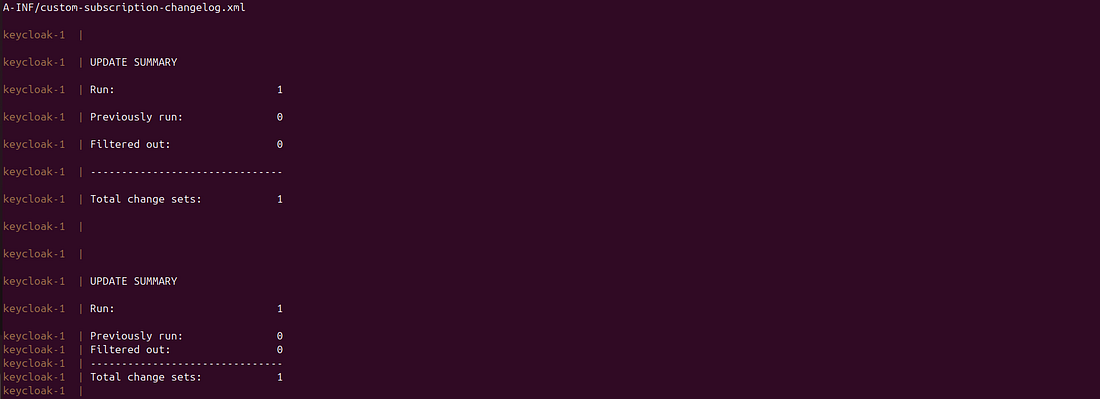
If there are any missing dependencies, misconfigured service files, or database connection issues, they will appear here in bright red. Read the logs carefully.
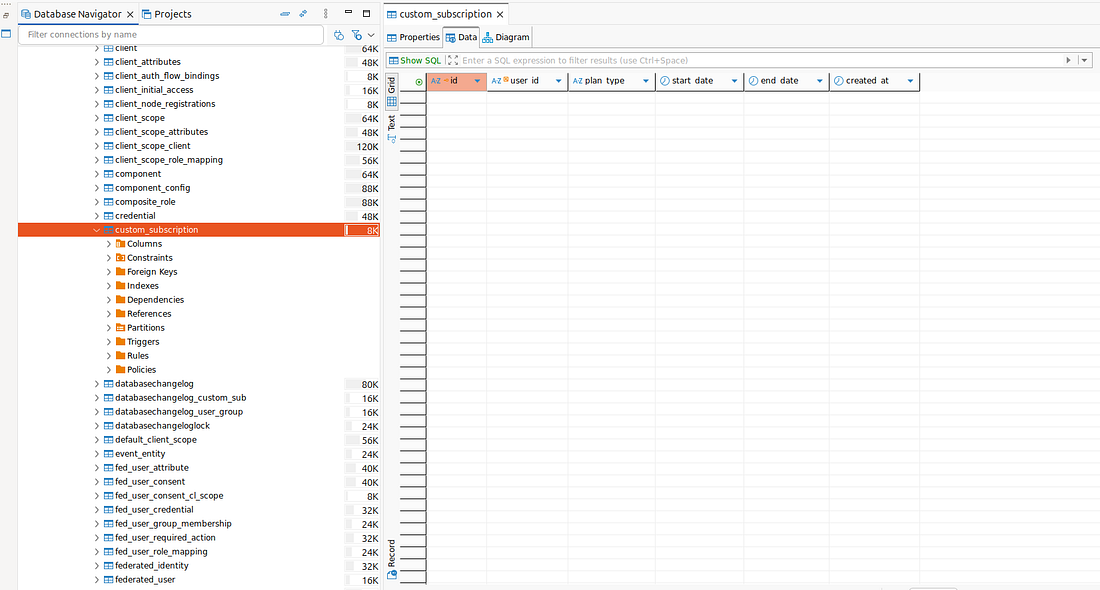
Keycloak knows about the new subscription table, and it’s ready to store data.
Conclusion
The second part of this post, which explains how to integrate CRUD operations or expose them externally, is available here.
This post is Part 1 of a 2-part series on Keycloak Custom SPI and Database Extensions. → Continue with Part 2: Keycloak Custom SPI and Database Extensions — Adding Your Own Tables (2/2)
Support me through GitHub Sponsors.
Thank you for reading!! See you in the next post.

