
The purpose of this post is to explain how to secure a Spring Boot API using the Apache Shiro security framework.
· Prerequisites
· Overview
∘ What is Apache Shiro?
∘ Why use Apache Shiro?
· Getting Started
∘ Set up Spring Boot Project
∘ Core Implementation
∘ Practical Examples
· Test the REST API
· Conclusion
· References
Prerequisites
This is the list of all the prerequisites:
- Spring Boot 3+
- Maven 3.6.3 or later
- Java 21 or higher
- PostgreSQL
- IntelliJ IDEA, Visual Studio Code, or another IDE
- Postman / insomnia or any other API testing tool.
Overview
What is Apache Shiro?
Apache Shiro is a powerful and flexible open-source security framework that cleanly handles authentication, authorization, enterprise session management and cryptography.
Apache Shiro’s first and foremost goal is to be easy to use and understand. Security can be very complex at times, even painful, but it doesn’t have to be. A framework should mask complexities where possible and expose a clean and intuitive API that simplifies the developer’s effort to make their application(s) secure. — https://shiro.apache.org/introduction.html
Why use Apache Shiro?
It is open source and free to use. Apache Shiro is a comprehensive application security framework that offers numerous features.
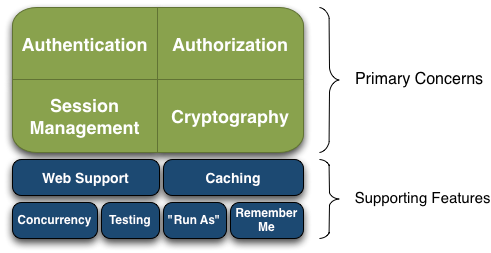
Shiro targets what the Shiro development team calls “the four cornerstones of application security” — Authentication, Authorization, Session Management, and Cryptography:
- Authentication: Sometimes referred to as ‘login’, this is the act of proving a user is who they say they are.
- Authorization: The process of access control, i.e., determining ‘who’ has access to ‘what’.
- Session Management: Managing user-specific sessions, even in non-web or EJB applications.
- Cryptography: Keeping data secure using cryptographic algorithms while still being easy to use.
Getting Started
Set up Spring Boot Project
We’ll start by creating a simple Spring Boot project from start.spring.io, with the following dependencies: Web, PostgreSQL Driver, Spring Data JPA, and Lombok.
Let’s start with the essential dependencies for Spring Boot 3.x to add in the pom.xml:
        <!-- Shiro -->
        <dependency>
            <groupId>org.apache.shiro</groupId>
            <artifactId>shiro-core</artifactId>
            <version>2.0.6</version>
        </dependency>

        <!-- Shiro Spring -->
        <dependency>
            <groupId>org.apache.shiro</groupId>
            <artifactId>shiro-spring</artifactId>
            <version>2.0.6</version>
        </dependency>


        <!-- JWT Dependencies (JJWT 0.13.0) -->
        <dependency>
            <groupId>io.jsonwebtoken</groupId>
            <artifactId>jjwt-api</artifactId>
            <version>0.13.0</version>
        </dependency>

        <dependency>
            <groupId>io.jsonwebtoken</groupId>
            <artifactId>jjwt-impl</artifactId>
            <version>0.13.0</version>
            <scope>runtime</scope>
        </dependency>
        <dependency>
            <groupId>io.jsonwebtoken</groupId>
            <artifactId>jjwt-jackson</artifactId>
            <version>0.13.0</version>
            <scope>runtime</scope>
        </dependency>
⚠️ Important: We do not use Spring Security.
Core Implementation
Creating a Custom Realm
A Realm is a component that can access application-specific security data such as users, roles, and permissions. The Realm translates this application-specific data into a format that Shiro understands, so Shiro can, in turn, provide a single easy-to-understand Subject programming AP, regardless of how many data sources exist or how application-specific your data might be.
Let’s create a custom realm that handles authentication and authorization:
/**
 * Apache Shiro {@link AuthorizingRealm} implementation that supports both
 * username/password authentication and JWT-based stateless authentication.
 *
 * <p>
 * This realm:
 * <ul>
 *     <li>Authenticates users using {@link UsernamePasswordToken}</li>
 *     <li>Validates and authenticates JWTs using {@link JwtToken}</li>
 *     <li>Loads user roles and permissions from {@link UserService}</li>
 *     <li>Disables authorization caching to support stateless JWT usage</li>
 * </ul>
 * </p>
 */
@Component
public class JwtRealm extends AuthorizingRealm {

    private final UserService userService;


    public JwtRealm(UserService userService, PasswordService passwordService) {
        this.userService = userService;

        PasswordMatcher matcher = new PasswordMatcher();
        matcher.setPasswordService(passwordService);
        this.setCredentialsMatcher(matcher);

        // Disable authorization cache for stateless JWT authentication
        this.setAuthorizationCachingEnabled(false);
    }

    /**
     * Determines whether this realm supports the given authentication token.
     *
     * @param token the authentication token
     * @return {@code true} if the token is a {@link JwtToken} or {@link UsernamePasswordToken}
     */
    @Override
    public boolean supports(AuthenticationToken token) {
        return token instanceof JwtToken || token instanceof UsernamePasswordToken;
    }

    /**
     * Performs authentication based on the provided authentication token.
     *
     * <p>
     * Supports:
     * <ul>
     *     <li>{@link UsernamePasswordToken} for standard login</li>
     *     <li>{@link JwtToken} for JWT-based authentication</li>
     * </ul>
     * </p>
     *
     * @param authToken the authentication token
     * @return authentication info containing the authenticated principal
     * @throws AuthenticationException if authentication fails
     */
    @Override
    protected AuthenticationInfo doGetAuthenticationInfo(AuthenticationToken authToken)
            throws AuthenticationException {

        if (authToken instanceof UsernamePasswordToken upToken) {
            String username = upToken.getUsername();

            User user = userService.getUserByUsername(username)
                    .orElseThrow(() -> new AuthenticationException("User not found"));

            if (!user.isEnabled()) {
                throw new DisabledAccountException();
            }

            return new SimpleAuthenticationInfo(
                    user.getUsername(),
                    user.getPassword(),
                    getName()
            );
        }

        if (authToken instanceof JwtToken jwtToken) {
            String jwt = (String) jwtToken.getCredentials();

            if (!JwtUtil.validate(jwt)) {
                throw new AuthenticationException("Invalid JWT");
            }

            String username = JwtUtil.getUsername(jwt);

            User user = userService.getUserByUsername(username)
                    .orElseThrow(() -> new AuthenticationException("Invalid token"));

            // Password is not required for JWT-based authentication
            return new SimpleAuthenticationInfo(user.getUsername(), null, getName());
        }

        throw new AuthenticationException("Unsupported token type");
    }

    /**
     * Asserts credentials match for the given authentication token.
     *
     * <p>
     * Credential matching is skipped for {@link JwtToken} since JWTs
     * are already validated cryptographically.
     * </p>
     *
     * @param token the authentication token
     * @param info  the authentication info
     * @throws AuthenticationException if credentials do not match
     */
    @Override
    protected void assertCredentialsMatch(AuthenticationToken token, AuthenticationInfo info)
            throws AuthenticationException {

        if (token instanceof JwtToken) {
            // Skip credentials check for JWT
            return;
        }
        super.assertCredentialsMatch(token, info);
    }

    /**
     * Retrieves authorization info for the given principals.
     *
     * <p>
     * Authorization caching is bypassed to ensure up-to-date role and
     * permission resolution for stateless JWT usage.
     * </p>
     *
     * @param principals the authenticated principals
     * @return authorization info containing roles and permissions
     */
    @Override
    protected AuthorizationInfo getAuthorizationInfo(PrincipalCollection principals) {
        return doGetAuthorizationInfo(principals);
    }

    /**
     * Loads roles and permissions for the authenticated user.
     *
     * @param principals the authenticated principals
     * @return populated {@link AuthorizationInfo}
     */
    @Override
    protected AuthorizationInfo doGetAuthorizationInfo(PrincipalCollection principals) {
        String username = (String) principals.getPrimaryPrincipal();

        User user = userService.getUserByUsername(username)
                .orElseThrow();

        SimpleAuthorizationInfo info = new SimpleAuthorizationInfo();

        user.getRoles().forEach(role -> {
            info.addRole(role.getCode());
            Arrays.stream(role.getPermissions().split(","))
                    .forEach(info::addStringPermission);
        });

        return info;
    }
}
Shiro Configuration
One of the main parts of Apache Shiro is the configuration of beans for security management. We’ll define all the beans in the ShiroConfig configuration class.
Next, create a configuration class to set up Shiro’s components:
/**
 * Spring configuration class for Apache Shiro.
 *
 * <p>
 * This configuration sets up:
 * <ul>
 *     <li>Stateless security using JWT</li>
 *     <li>A custom {@link JwtRealm}</li>
 *     <li>Password hashing via {@link PasswordService}</li>
 *     <li>Method-level authorization annotations</li>
 * </ul>
 * </p>
 */
@Configuration
public class ShiroConfig {

    /**
     * Provides the {@link PasswordService} used by Shiro to hash and
     * verify user passwords.
     *
     * @return a default password service implementation
     */
    @Bean
    public PasswordService passwordService() {
        return new DefaultPasswordService();
    }

    /**
     * Enables Shiro security annotations such as {@code @RequiresRoles}
     * and {@code @RequiresPermissions}.
     *
     * @param securityManager the Shiro security manager
     * @return the authorization attribute source advisor
     */
    @Bean
    public AuthorizationAttributeSourceAdvisor authorizationAttributeSourceAdvisor(
            SecurityManager securityManager) {

        AuthorizationAttributeSourceAdvisor advisor =
                new AuthorizationAttributeSourceAdvisor();
        advisor.setSecurityManager(securityManager);
        return advisor;
    }

    /**
     * Configures the Shiro {@link SecurityManager}.
     *
     * <p>
     * This setup:
     * <ul>
     *     <li>Uses {@link JwtRealm} for authentication and authorization</li>
     *     <li>Disables session creation to support stateless JWT authentication</li>
     *     <li>Disables session cookies and validation</li>
     * </ul>
     * </p>
     *
     * @param realm the custom JWT-enabled realm
     * @return the configured security manager
     */
    @Bean
    public SecurityManager securityManager(JwtRealm realm) {
        DefaultSecurityManager sm = new DefaultSecurityManager();
        sm.setRealm(realm);

        // Disable session creation for stateless JWT authentication
        sm.setSubjectFactory(new DefaultWebSubjectFactory() {
            @Override
            public Subject createSubject(SubjectContext ctx) {
                ctx.setSessionCreationEnabled(false);
                return super.createSubject(ctx);
            }
        });

        // Disable web session management
        DefaultWebSessionManager sessionManager = new DefaultWebSessionManager();
        sessionManager.setSessionIdCookieEnabled(false);
        sessionManager.setSessionValidationSchedulerEnabled(false);
        sm.setSessionManager(sessionManager);

        // Make SecurityManager globally accessible
        SecurityUtils.setSecurityManager(sm);
        return sm;
    }
}
Custom interceptor
The next step is to customize Shiro interceptors to control access to specified requests and connect to Shiro for authentication.
/**
 * Servlet filter responsible for authenticating requests using JWT.
 *
 * <p>
 * This filter:
 * <ul>
 *     <li>Intercepts every incoming HTTP request</li>
 *     <li>Skips authentication for public authentication endpoints</li>
 *     <li>Extracts and validates JWTs from the {@code Authorization} header</li>
 *     <li>Delegates authentication to Apache Shiro using {@link JwtToken}</li>
 * </ul>
 * </p>
 */
@Component
public class JwtAuthFilter extends OncePerRequestFilter {

    /**
     * Performs JWT-based authentication for each HTTP request.
     *
     * <p>
     * Expected header format:
     * <pre>{@code
     * Authorization: Bearer <jwt-token>
     * }</pre>
     * </p>
     *
     * <p>
     * Requests to paths starting with {@code /auth/} are treated as public
     * and bypass authentication.
     * </p>
     *
     * @param req   the HTTP servlet request
     * @param res   the HTTP servlet response
     * @param chain the filter chain
     * @throws ServletException if a servlet-related error occurs
     * @throws IOException      if an I/O error occurs
     */
    @Override
    protected void doFilterInternal(HttpServletRequest req,
                                    HttpServletResponse res,
                                    FilterChain chain)
            throws ServletException, IOException {

        String path = req.getRequestURI();
        if (path.startsWith("/auth/")) {
            chain.doFilter(req, res);
            return;
        }

        String header = req.getHeader("Authorization");
        if (header == null || !header.startsWith("Bearer ")) {
            res.setStatus(HttpServletResponse.SC_UNAUTHORIZED);
            return;
        }

        try {
            String token = header.substring(7);
            Subject subject = SecurityUtils.getSubject();
            subject.login(new JwtToken(token));
            chain.doFilter(req, res);
        } catch (AuthenticationException e) {
            res.setStatus(HttpServletResponse.SC_UNAUTHORIZED);
        }
    }
}
JWT Integration: Stateless Authentication
/**
 * Utility class for creating, parsing, and validating JSON Web Tokens (JWT).
 *
 * <p>
 * This class uses an HMAC-SHA signing key and provides helper methods for:
 * <ul>
 *     <li>Generating JWTs for authenticated users</li>
 *     <li>Validating token integrity and expiration</li>
 *     <li>Extracting claims such as username and user ID</li>
 * </ul>
 * </p>
 *
 * <p>
 * This class is stateless and thread-safe.
 * </p>
 */
public final class JwtUtil {

    private JwtUtil() {}

    /**
     * Secret key used for signing JWTs.
     *
     * <p>
     * In production, this value should be externalized and securely stored
     * (e.g., environment variable, secrets manager).
     * </p>
     */
    private static final String SECRET =
            "a3f9c8d4e1b76f2a9d0c5e4b8f6a1c2d7e9f0a4b3c5d6e8f1a2b4c7d9e0";

    /**
     * Token expiration time in milliseconds (1 hour).
     */
    private static final long EXPIRATION_MS = 3600_000;

    /**
     * Signing key derived from the configured secret.
     */
    private static final SecretKey KEY =
            Keys.hmacShaKeyFor(SECRET.getBytes(StandardCharsets.UTF_8));

    /**
     * Generates a signed JWT for the given username.
     *
     * @param username the authenticated user's username
     * @return a signed JWT string
     */
    public static String generateToken(String username) {
        return Jwts.builder()
                .subject(username)
                .claim("username", username)
                .issuedAt(new Date())
                .expiration(new Date(System.currentTimeMillis() + EXPIRATION_MS))
                .signWith(KEY)
                .compact();
    }

    /**
     * Parses the given JWT and returns its claims.
     *
     * @param token the JWT string
     * @return the JWT claims payload
     * @throws JwtException if the token is invalid or expired
     */
    public static Claims parse(String token) {
        return Jwts.parser()
                .verifyWith(KEY)
                .build()
                .parseSignedClaims(token)
                .getPayload();
    }

    /**
     * Validates the given JWT.
     *
     * <p>
     * This method verifies the token signature and expiration.
     * </p>
     *
     * @param token the JWT string
     * @return {@code true} if the token is valid; {@code false} otherwise
     */
    public static boolean validate(String token) {
        try {
            Jwts.parser()
                    .verifyWith(KEY)
                    .build()
                    .parseSignedClaims(token);
            return true;
        } catch (JwtException e) {
            return false;
        }
    }

    /**
     * Extracts the user ID from the JWT subject.
     *
     * @param token the JWT string
     * @return the user ID as a {@link UUID}
     * @throws IllegalArgumentException if the subject is not a valid UUID
     */
    public static UUID getUserId(String token) {
        return UUID.fromString(parse(token).getSubject());
    }

    /**
     * Extracts the username claim from the JWT.
     *
     * @param token the JWT string
     * @return the username stored in the token
     */
    public static String getUsername(String token) {
        return parse(token).get("username", String.class);
    }
}
Practical Examples
Database design
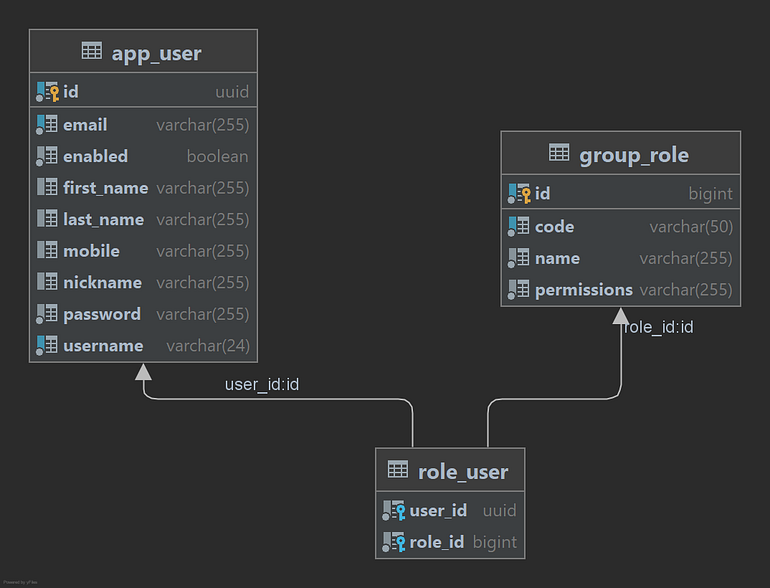
Domain Model
User Entity
@Builder
@Entity(name = "app_user")
@Getter
@Setter
@NoArgsConstructor
@AllArgsConstructor
@JsonIgnoreProperties(ignoreUnknown = true)
@ToString
@Table(uniqueConstraints = { @UniqueConstraint(columnNames = { "username" }),
        @UniqueConstraint(columnNames = { "email" }) })
public class User {

    @Id
    @GeneratedValue
    @Column(name = "id", columnDefinition = "uuid", updatable = false, nullable = false)
    private UUID id;

    @NotNull
    @Size(min = 4, max = 24)
    private String username;

    private String firstName;

    private String lastName;

    @Getter(onMethod = @__(@JsonIgnore))
    @NotNull
    private String password;

    private String nickname;
    private String mobile;
    @Email
    @NotNull
    private String email;

    private boolean enabled;

    /*
     * Get all roles associated with the User that are not deleted
     */
    @ManyToMany(fetch = FetchType.EAGER, cascade = CascadeType.MERGE)
    @JoinTable(name = "role_user", joinColumns = {
            @JoinColumn(name = "user_id", referencedColumnName = "id") }, inverseJoinColumns = {
            @JoinColumn(name = "role_id", referencedColumnName = "id") })
    private List<GroupRole> roles;
}
Group Role Entity
@Getter
@Setter
@NoArgsConstructor
@AllArgsConstructor
@ToString
@Entity
public class GroupRole implements Serializable {

 @Id
 @GeneratedValue(strategy = GenerationType.IDENTITY)
 private long id;

 @NotNull
 @Size(min = 1, max = 255)
 private String name;

 @NotNull
 @Column(unique = true)
 @Size(min = 1, max = 50)
 private String code;

 @NotNull
 private String permissions;
}
Creating the Authentication Controller
Now, let’s create a REST controller to handle login.
@RestController
@RequestMapping("/auth")
@RequiredArgsConstructor
public class AuthController {

    @PostMapping("/login")
    public String login(@RequestBody LoginRequest req) {
        Subject subject = SecurityUtils.getSubject();
        UsernamePasswordToken token = new UsernamePasswordToken(req.username(), req.password());

        try {
            // Authenticate user with Shiro
            subject.login(token);
            String username = (String) subject.getPrincipal();
            // Generate JWT
            return JwtUtil.generateToken(username);

        } catch (AuthenticationException e) {
            throw new AuthenticationException("Invalid credentials");
        }
    }
}
Creating Protected Endpoints
Let’s create some protected endpoints to demonstrate authorization.
@RestController
@RequestMapping("/api")
public class UserController {

    private final UserService userService;

    public UserController(UserService userService) {
        this.userService = userService;
    }

    @RequiresAuthentication
    @GetMapping("/me")
    public String me() { return "Authenticated"; }

    @RequiresRoles("ADMIN")
    @GetMapping("/admin")
    public String admin() { return "Admin only"; }

    @RequiresPermissions("user:read")
    @GetMapping("/user")
    public ResponseEntity<List<UserDTO>> readUsers() {
        List<UserDTO> list = userService.getUsers().stream().map(this::copyUserEntityToDto).toList();
        return new ResponseEntity<>(list, HttpStatus.OK);
    }

    private UserDTO copyUserEntityToDto(User userEntity) {
        UserDTO userDTO = new UserDTO();
        BeanUtils.copyProperties(userEntity, userDTO);
        return userDTO;
    }

}
Test the REST API
Run the Spring Boot Application.
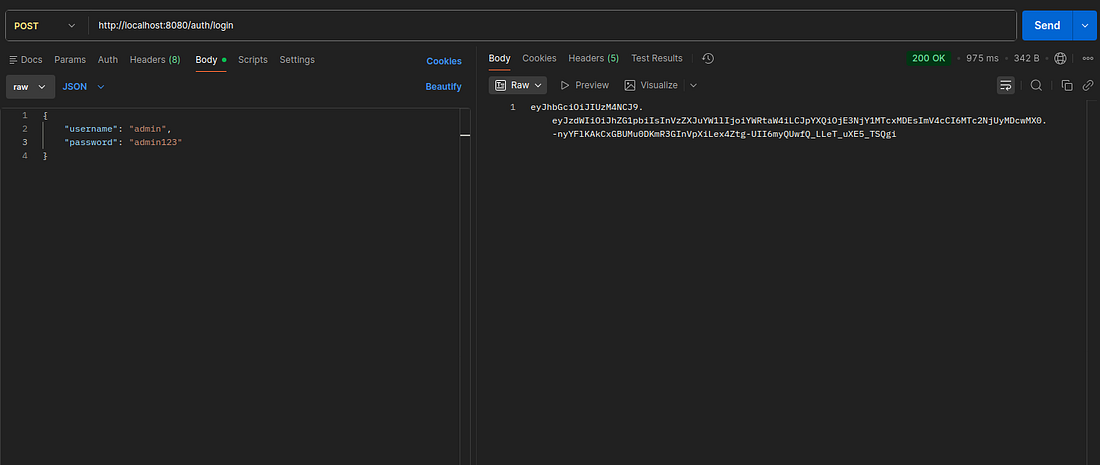
- login Resource
When the login is successful, the user gets the JWT token
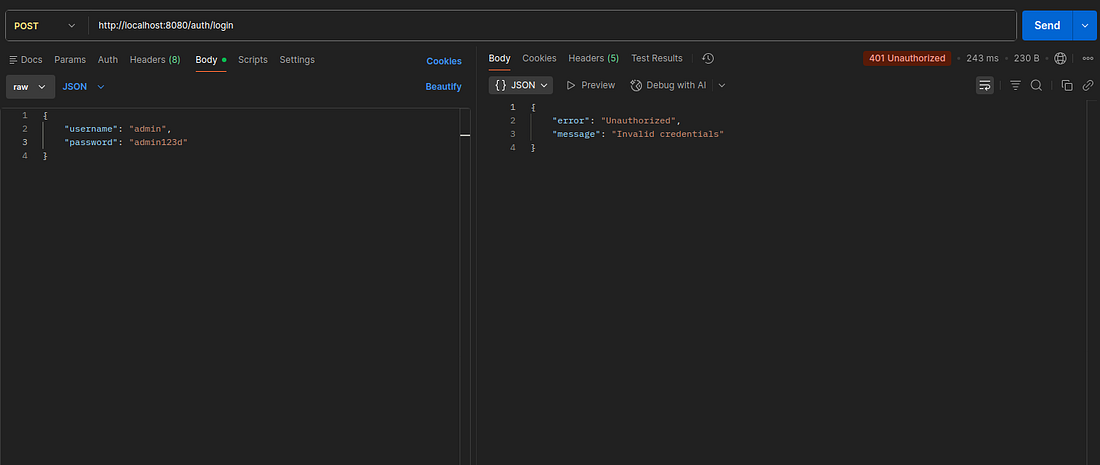
When the user’s password is incorrect
- Access Protected Resource
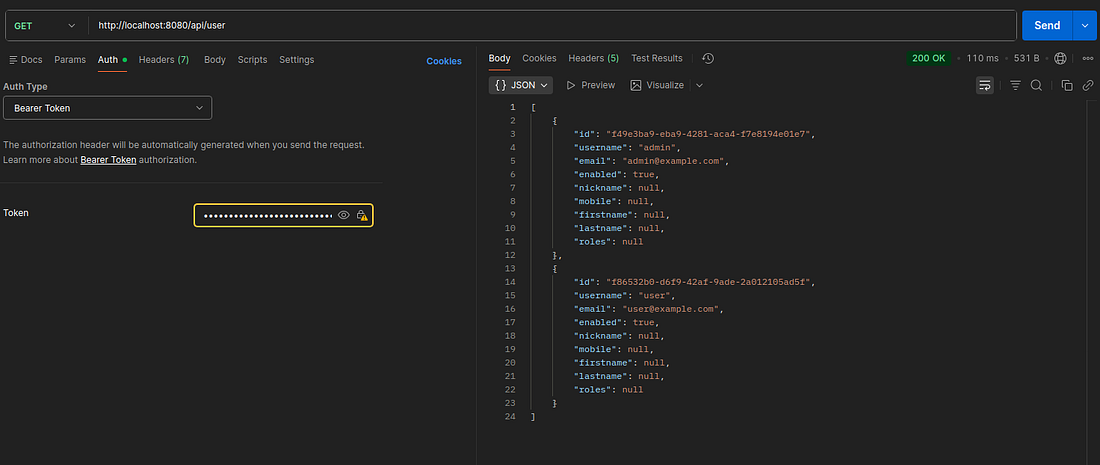
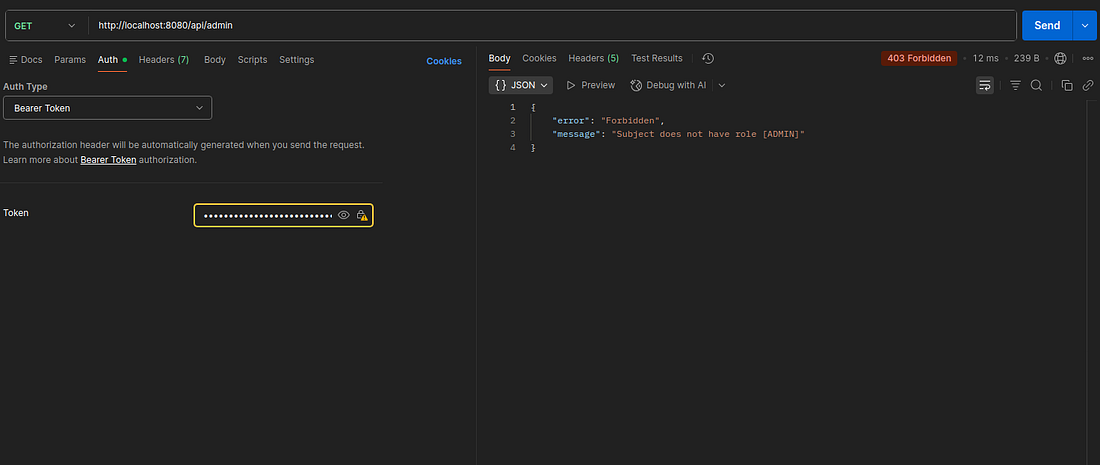
Conclusion
🏁 Well done !!.
Apache Shiro provides a straightforward approach to securing Spring Boot APIs with its intuitive API and flexible architecture. While Spring Security offers more out-of-the-box integrations with the Spring ecosystem, Shiro shines when you need a lightweight security framework with fine-grained access control.
The complete source code is available on GitHub.
If you loved reading the story, don’t forget to clap 👏. You can reach out to me and follow me on Medium, Twitter, GitHub, Linkedln
Support me through GitHub Sponsors.
Thank you for reading!! See you in the next story.
Last updated: December 23, 2025
References
https://auth0.com/blog/a-look-at-the-latest-draft-for-jwt-bcp
https://shiro.apache.org/index.html

