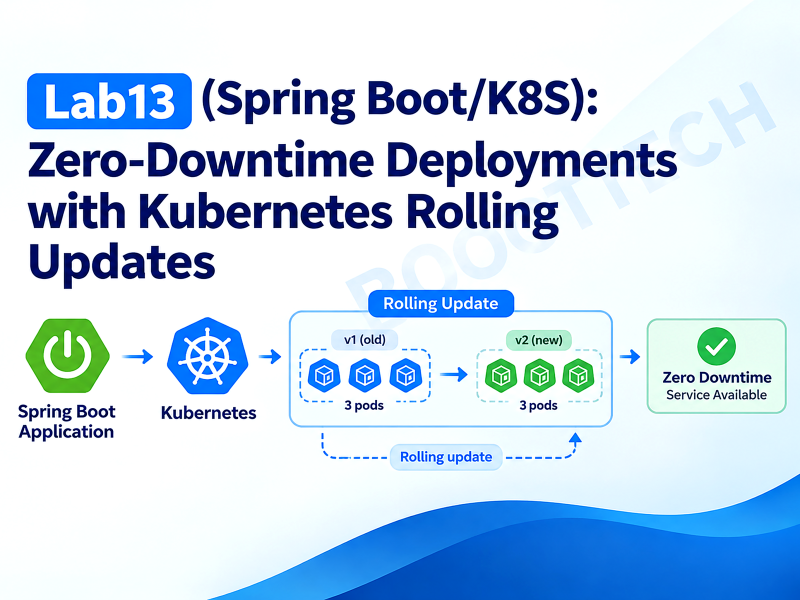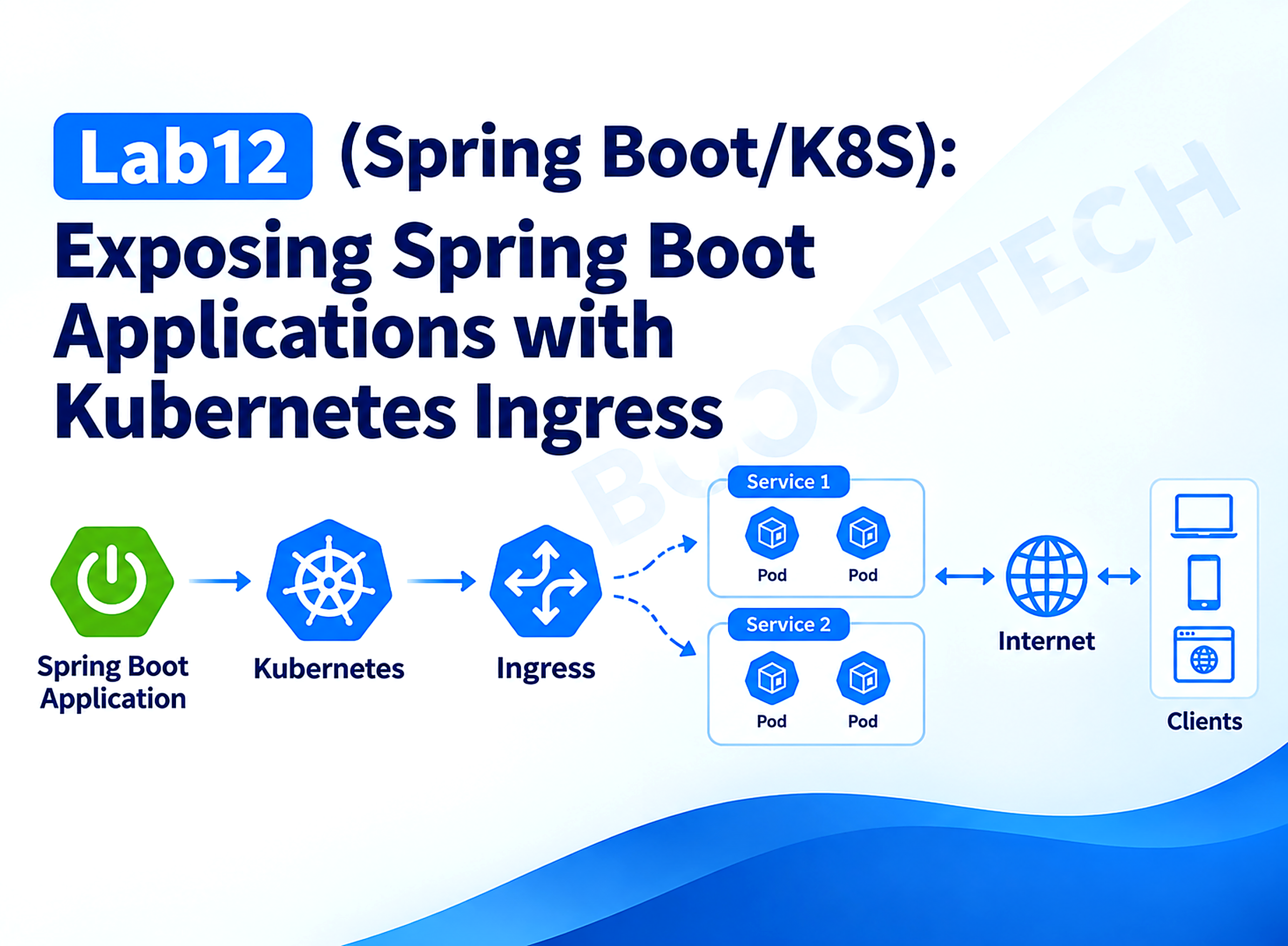
In Lab12 of my Spring Boot/K8S series, I replace Lab10’s NodePort-exposed Angular frontend with a real Ingress setup: one host, three backends (frontend, a Spring Boot API, and a stub auth service), path-based and host-based routing side by side, TLS termination, and a custom default backend that returns structured JSON instead of a bare 404.
This series of stories shows how to use Kubernetes in the Spring ecosystem. We work with a Spring Boot API and Minikube to have a lightweight and fast development environment similar to production.
- Lab1 (Spring Boot/K8S): Deploy Spring Boot application on Kubernetes
- Lab2 (Spring Boot/K8S): Kubernetes health probes with Spring Boot
- Lab3 (Spring Boot/K8S): Mastering ConfigMaps in Kubernetes
- Lab4 (Spring Boot/K8S): Using Kubernetes Secrets in Spring Boot
- Lab5 (Spring Boot/K8S): Understanding Kubernetes Resources Management
- Lab6 (Spring Boot/K8S): Persistent Volumes in Kubernetes
- Lab7 (Spring Boot/K8S): Spring Batch on Kubernetes — Jobs and CronJobs
- Lab8 (Spring Boot/K8S): Deploy a Spring Boot application on Kubernetes using Helm Chart
- Lab9 (Spring Boot/K8S): Understanding Kubernetes DaemonSet
- Lab10 (Spring Boot/K8S): Frontend deployment with Angular 19 on Kubernetes
- Lab11 (Spring Boot/K8S): Auto-Scaling Spring Boot Applications with Kubernetes HPA
- 👉 Lab12 (Spring Boot/K8S): Exposing Spring Boot Applications with Kubernetes Ingress
Lab10 exposed the Angular frontend through a NodePort Service (webappservice, reachable on some auto-assigned port in the 30000–32767 range). That works for one service and one demo. It stops working the moment you have three: a frontend, a Spring Boot API, and an auth service, each needing its own NodePort, none of them on port 443, none of them behind a real hostname, and none of them sharing a TLS certificate. Bookmark-worthy URLs and https:// are both off the table.
Kubernetes Ingress solves the “one entry point, many backends” problem: a single object that routes by hostname and URL path to different Services, terminates TLS in one place, and — critically — is not itself a load balancer. It’s a set of routing rules that an Ingress Controller (a running piece of software, most commonly NGINX) reads and turns into an actual reverse-proxy configuration. This lab replaces Lab10’s NodePort with ingress-nginx on Minikube, fronting three backends — /frontend, /api, /auth — behind one host, with a second manifest showing the host-based alternative, a self-signed TLS certificate, and a custom default backend for anything that doesn’t match.
Lab10:  Angular → NodePort → Kubernetes           (one service, one exposed port)
Lab12:  Internet → Ingress → { /frontend, /api, /auth }   (one entry point, N services)
This is a learning lab, not a production recommendation. The Kubernetes documentation now states: “The Kubernetes project recommends using Gateway instead of Ingress. The Ingress API has been frozen.” The Ingress API is still GA and is not being removed, but it will get no further changes. The
ingress-nginxcontroller used here was retired in March 2026. It no longer gets releases, bug fixes, or security patches. This lab uses Ingress because the concepts (host/path routing, TLS termination, default backends) carry over directly to Gateway API, andminikube addons enable ingressis the fastest way to see them working. For new production clusters, use Gateway API.
Concept Overview
Ingress is a routing spec, not a load balancer
An Ingress object contains no proxy logic. It’s declarative data: “requests for host X, path Y, go to Service Z.” Nothing happens with that data unless an Ingress Controller is running in the cluster, watching the API server for Ingress objects, and translating them into its own configuration. On Minikube, that controller is ingress-nginx — an actual NGINX process running as a pod, whose config file is regenerated every time a relevant Ingress, Service, or Secret changes. Apply an Ingress manifest with no controller installed, and kubectl get ingress will happily show it — routing nothing, because nothing is reading it.
This is also why ingressClassName: nginx matters on every manifest in this lab: a cluster can run more than one controller (ingress-nginx, Traefik, cloud-provider-specific ones), and IngressClass is how an Ingress object says which one should implement it.
Why one Service per backend, all ClusterIP now
Lab10’s webappservice was type: NodePort because it had to be reachable directly from outside the cluster. Once an Ingress Controller sits in front of everything, that’s no longer true for any backend Service — only the controller itself needs external exposure (Minikube handles that via minikube tunnel or the ingress addon’s own machinery). Every Service behind it — frontend-service, spring-boot-api-service, auth-api-service — goes back to being a plain internal ClusterIP, the type you’d use if there were no external traffic at all. The Ingress Controller is the only thing that talks to the outside world; everything else talks to the Ingress Controller.
Annotations apply to the whole Ingress object, not to one path inside it
This is the detail that trips up almost everyone building a multi-path Ingress for the first time. nginx.ingress.kubernetes.io/rewrite-target is an object-level annotation — if one Ingress resource has three paths and you annotate it with a rewrite rule, all three paths get rewritten the same way, even the ones that didn’t need it. If different paths need different rewrite behavior (or none at all), the fix isn’t a per-path annotation — there isn’t one — it’s splitting the paths across multiple Ingress objects that share the same host. ingress-nginx merges rules from every Ingress object targeting a given host into one generated NGINX config, so two (or more) Ingress resources for bootlabs.local is not a conflict; it’s the standard pattern for mixed rewrite requirements. This lab uses exactly that split — one Ingress for the path that needs rewriting (/frontend), one for the paths that don’t (/api, /auth).
What We’re Building
Internet
                                 │
                          (TLS termination)
                                 ▼
                     ┌────────────────────────┐
                     │   ingress-nginx (NGINX) │
                     │   host: bootlabs.local  │
                     └───────────┬─────────────┘
              ┌──────────────────┼──────────────────┐
              │                  │                  │
     path: /frontend        path: /api          path: /auth
     (rewrite: /$2)         (no rewrite)         (no rewrite)
              │                  │                   │
              ▼                  ▼                   ▼
   ┌──────────────────┐ ┌──────────────────┐ ┌──────────────────┐
   │ frontend-service  ││spring-boot-api-svc││ auth-api-service │
   │ (nginx, ClusterIP)││ ctx-path: /api    ││ ctx-path: /auth  │
   └──────────────────┘ └──────────────────┘ └──────────────────┘

Anything matching no rule above → default-backend-service (branded 404)
Two backends are real Spring Boot 3.3 applications (spring-boot-api, auth-api); the frontend is a small static NGINX site standing in for Lab10’s built Angular app — the Ingress configuration is identical either way, only the container image changes.
Implementation
Step 1 — Backend: spring-boot-api, mounted at its own context path
Rather than stripping the /api prefix at the Ingress layer, spring-boot-api owns it directly via server.servlet.context-path. This means the Ingress rule for /api needs no rewrite annotation at all — whatever path arrives (/api/products) is exactly the path the app expects:
server:
  port: 8080
  servlet:
    context-path: /api

spring:
  application:
    name: spring-boot-api

management:
  endpoints:
    web:
      exposure:
        include: health,info
  endpoint:
    health:
      probes:
        enabled: true
  health:
    livenessstate:
      enabled: true
    readinessstate:
      enabled: true
With context-path: /api set, Actuator’s endpoints move too — health checks live at /api/actuator/health/*, not /actuator/health/*. That’s a detail the Deployment manifest has to get right (Step 6) or the readiness probe silently 404s against the wrong path.
The controller itself is mounted at /products — the /api prefix is already handled by the context path, so the controller code never mentions it:
package com.bootlabs.springbootapi.controller;

import com.bootlabs.springbootapi.dto.CreateProductRequest;
import com.bootlabs.springbootapi.dto.ProductResponse;
import com.bootlabs.springbootapi.service.ProductService;
import jakarta.validation.Valid;
import org.springframework.http.HttpStatus;
import org.springframework.http.ResponseEntity;
import org.springframework.web.bind.annotation.*;

import java.util.List;

@RestController
@RequestMapping("/products")
public class ProductController {

    private final ProductService productService;

    public ProductController(ProductService productService) {
        this.productService = productService;
    }

    @GetMapping
    public List<ProductResponse> findAll() {
        return productService.findAll();
    }

    @GetMapping("/{id}")
    public ProductResponse findById(@PathVariable Long id) {
        return productService.findById(id);
    }

    @PostMapping
    public ResponseEntity<ProductResponse> create(@Valid @RequestBody CreateProductRequest request) {
        ProductResponse created = productService.create(request);
        return ResponseEntity.status(HttpStatus.CREATED).body(created);
    }
}
ProductService keeps an in-memory, thread-safe product catalog (ConcurrentHashMap, seeded with three entries) — this lab is about routing, not persistence, so a database would only add unrelated setup. ProductResponse includes a pod field (read from a POD_NAME Downward API env var, the same pattern used in Lab11’s autoscaling demo) so you can see which of the two replicas answered each request once it’s running behind the Ingress. GlobalExceptionHandler maps a missing product to 404 and a failed @Valid check to 400 with a structured error body — the full source, including both, is in the demo repository.
Step 2 — Backend: auth-api, the “other API” in the diagram
auth-api follows the identical shape — its own pom.xml, its own context path (/auth), its own Deployment — deliberately, because that’s the point of the routing exercise: independently deployable services unified behind one entry point. It exposes two endpoints:
package com.bootlabs.authapi.controller;

import com.bootlabs.authapi.dto.LoginRequest;
import com.bootlabs.authapi.dto.LoginResponse;
import com.bootlabs.authapi.dto.WhoAmIResponse;
import jakarta.validation.Valid;
import org.springframework.web.bind.annotation.*;

import java.util.UUID;

// Stub identity endpoint for the Ingress routing demo only — it issues an
// unsigned, unverifiable token and must never be treated as a real auth service.
@RestController
public class AuthController {

    private final String podName = System.getenv().getOrDefault("POD_NAME", "local");

    @PostMapping("/login")
    public LoginResponse login(@Valid @RequestBody LoginRequest request) {
        String token = UUID.randomUUID().toString();
        return new LoginResponse(request.username(), token, podName);
    }

    @GetMapping("/whoami")
    public WhoAmIResponse whoAmI() {
        return new WhoAmIResponse("anonymous", podName);
    }
}
The code comment is not decoration — /login returns a random UUID, not a signed JWT, and there’s no credential check at all. It’s there so the Ingress routing demo has three genuinely distinct backends to route to, not to demonstrate authentication. A real auth service belongs in its own lab, built on something like Spring Authorization Server or Keycloak.
Step 3 — Frontend: a stand-in for Lab10’s Angular build
frontend/
├── Dockerfile
├── nginx.conf
└── public/index.html
server {
listen 80;
server_name _;
root /usr/share/nginx/html;
index index.html;
location / {
try_files $uri $uri/ /index.html;
}
}This is a static page, not the real Angular app from Lab10 — rebuilding the full Angular project here would duplicate a repository that already exists. What matters for this lab is the <base href="/frontend/"> tag in index.html. When a single-page app is served under a URL prefix instead of the domain root, its base href has to match that prefix, or every relative asset request (main.js, styles.css) resolves against / instead of /frontend/ and 404s — a real Angular deployment gotcha covered further in Common Pitfalls. Building the real Lab10 image with ng build --base-href /frontend/ and swapping the image tag in k8s/frontend.yaml is the only change needed to go from this stand-in to the actual frontend.
Step 4 — Deployments and Services (all ClusterIP)
All three backends follow the same shape; spring-boot-api‘s is representative:
apiVersion: apps/v1
kind: Deployment
metadata:
  name: spring-boot-api
  labels:
    app: spring-boot-api
spec:
  replicas: 2
  selector:
    matchLabels:
      app: spring-boot-api
  template:
    metadata:
      labels:
        app: spring-boot-api
    spec:
      containers:
        - name: spring-boot-api
          image: spring-boot-api:1.0.0
          imagePullPolicy: Never
          ports:
            - containerPort: 8080
          env:
            - name: POD_NAME
              valueFrom:
                fieldRef:
                  fieldPath: metadata.name
          resources:
            requests:
              cpu: "150m"
              memory: "256Mi"
            limits:
              cpu: "500m"
              memory: "512Mi"
          readinessProbe:
            httpGet:
              path: /api/actuator/health/readiness
              port: 8080
            initialDelaySeconds: 10
            periodSeconds: 5
          livenessProbe:
            httpGet:
              path: /api/actuator/health/liveness
              port: 8080
            initialDelaySeconds: 20
            periodSeconds: 10
---
apiVersion: v1
kind: Service
metadata:
  name: spring-boot-api-service
spec:
  type: ClusterIP
  selector:
    app: spring-boot-api
  ports:
    - port: 80
      targetPort: 8080
Note the readiness probe path: /api/actuator/health/readiness, not /actuator/health/readiness — it has to include the context-path prefix, because Actuator’s endpoints move with it. auth-api.yaml and frontend.yaml follow the same pattern with their own context paths (/auth, and no prefix at all for the static NGINX site) — full manifests are in the repo.
Step 5 — A branded default backend
ingress-nginx ships its own built-in default backend that returns a bare 404. This lab deploys a custom one instead — a minimal NGINX pod configured via ConfigMap, returning a structured JSON 404 — and wires it in through the Ingress‘s defaultBackend field, so any request that matches no host or path anywhere in the cluster’s Ingress rules gets a response your API clients can actually parse:
apiVersion: v1
kind: ConfigMap
metadata:
  name: default-backend-conf
data:
  default.conf: |
    server {
        listen 80;
        server_name _;

        location /healthz {
            default_type text/plain;
            return 200 'ok';
        }

        location / {
            default_type application/json;
            return 404 '{"error":"NOT_FOUND","message":"No route matches this host or path"}';
        }
    }
The /healthz location matters more than it looks: the readiness probe on this Deployment has to hit an endpoint that returns 2xx. Pointing it at / — which this pod always answers with 404 by design — leaves the pod permanently NotReady, because Kubernetes only treats 2xx–3xx as probe success. A 404 is a perfectly correct application response and a permanently failing readiness probe at the same time; the fix is a dedicated health path that never carries the pod’s actual (intentionally 404-only) business logic.
Step 6 — Path-based Ingress, split by rewrite behavior
Two Ingress objects, both targeting bootlabs.local, exactly because of the annotation scoping rule from Concept Overview:
apiVersion: networking.k8s.io/v1
kind: Ingress
metadata:
  name: bootlabs-frontend-ingress
  annotations:
    nginx.ingress.kubernetes.io/rewrite-target: /$2
spec:
  ingressClassName: nginx
  tls:
    - hosts:
        - bootlabs.local
      secretName: bootlabs-tls
  rules:
    - host: bootlabs.local
      http:
        paths:
          - path: /frontend(/|$)(.*)
            pathType: ImplementationSpecific
            backend:
              service:
                name: frontend-service
                port:
                  number: 80
apiVersion: networking.k8s.io/v1
kind: Ingress
metadata:
name: bootlabs-api-ingress
spec:
ingressClassName: nginx
tls:
- hosts:
- bootlabs.local
secretName: bootlabs-tls
rules:
- host: bootlabs.local
http:
paths:
- path: /api
pathType: Prefix
backend:
service:
name: spring-boot-api-service
port:
number: 80
- path: /auth
pathType: Prefix
backend:
service:
name: auth-api-service
port:
number: 80
defaultBackend:
service:
name: default-backend-service
port:
number: 80The frontend path is a regex with two capture groups — /frontend(/|$)(.*) — matched against pathType: ImplementationSpecific (required for ingress-nginx‘s regex captures to work; Prefix and Exact don’t support them). nginx.ingress.kubernetes.io/rewrite-target: /$2 rewrites the matched request to whatever the second capture group held, so bootlabs.local/frontend/index.html becomes index.html at the backend — the frontend NGINX site never sees the /frontend prefix it didn’t ask for. /api and /auth use plain pathType: Prefix with no rewrite: the full incoming path reaches spring-boot-api-service and auth-api-service unmodified, which is exactly what their context-path configuration expects.
Step 7 — Deploy and enable the controller
minikube start --cpus=4 --memory=8192
eval $(minikube docker-env)

docker build -t spring-boot-api:1.0.0 ./spring-boot-api
docker build -t auth-api:1.0.0 ./auth-api
docker build -t frontend:1.0.0 ./frontend

minikube addons enable ingress
kubectl -n ingress-nginx get pods -w
Minikube’s ingress addon installs ingress-nginx, creates the nginx IngressClass, and marks it as the cluster default — wait for the ingress-nginx-controller pod to reach Running before applying any Ingress object; until then, every rule you apply is valid but unread.
kubectl apply -f k8s/spring-boot-api.yaml
kubectl apply -f k8s/auth-api.yaml
kubectl apply -f k8s/frontend.yaml
kubectl apply -f k8s/default-backend.yaml
Step 8 — TLS with a self-signed certificate
openssl req -x509 -nodes -days 365 \
  -newkey rsa:2048 \
  -keyout tls.key -out tls.crt \
  -subj "/CN=bootlabs.local/O=bootlabs" \
  -addext "subjectAltName=DNS:bootlabs.local"

kubectl create secret tls bootlabs-tls --cert=tls.crt --key=tls.key
Both Ingress objects above already reference secretName: bootlabs-tls in their tls: block, for the same host — that’s intentional and not a conflict; ingress-nginx reads the certificate once per host and applies it to every path routed to that host, regardless of how many Ingress objects declare rules for it. Apply the Ingress manifests after the secret exists:
kubectl apply -f k8s/ingress-frontend.yaml
kubectl apply -f k8s/ingress-api.yaml
ingress-nginx redirects plain HTTP to HTTPS by default (nginx.ingress.kubernetes.io/ssl-redirect defaults to "true" whenever a tls: block is present) — you don’t need to set that annotation explicitly unless you want to turn it off for a specific host.
For production, replace this manual openssl/kubectl create secret step with cert-manager and a ClusterIssuer backed by Let’s Encrypt: cert-manager watches Ingress objects annotated with cert-manager.io/cluster-issuer, requests and renews the certificate automatically, and writes it to the same kind of Secret this lab creates by hand. The Ingress manifest itself barely changes — you add one annotation and stop running openssl yourself.
Step 9 — Host-based routing (the alternative pattern)
Applied instead of Step 6’s manifests, not alongside them:
apiVersion: networking.k8s.io/v1
kind: Ingress
metadata:
  name: bootlabs-hostbased-ingress
spec:
  ingressClassName: nginx
  rules:
    - host: frontend.bootlabs.local
      http:
        paths:
          - path: /
            pathType: Prefix
            backend:
              service:
                name: frontend-service
                port:
                  number: 80
    - host: api.bootlabs.local
      http:
        paths:
          - path: /
            pathType: Prefix
            backend:
              service:
                name: spring-boot-api-service
                port:
                  number: 80
    - host: auth.bootlabs.local
      http:
        paths:
          - path: /
            pathType: Prefix
            backend:
              service:
                name: auth-api-service
                port:
                  number: 80
Each host maps its whole root path to one Service, no regex or rewrite needed — because these images were built with a shared /api / /auth context path, callers still request https://api.bootlabs.local/api/products, not https://api.bootlabs.local/products; only the host changed, not the app’s own routing. Host-based routing earns its complexity when different teams own different services and want independent TLS certificates, independent rate-limit or auth annotations, or DNS-level control per subdomain — things that get awkward once several unrelated services are jammed into one host’s path space. Path-based routing earns its keep when you want one clean domain for an entire product surface, which is the more common case for a small-to-mid-size system and the reason it’s this lab’s primary example.
Testing
echo "$(minikube ip) bootlabs.local" | sudo tee -a /etc/hostscurl -k https://bootlabs.local/frontend/
# 200 — the stand-in index.html, served with assets resolving against /frontend/
curl -k https://bootlabs.local/api/products
# 200 — [{"id":1,"name":"Kubernetes in Action", ...,"pod":"spring-boot-api-7d...-x1"}, ...]
curl -k -X POST https://bootlabs.local/api/products \
-H "Content-Type: application/json" \
-d '{"name":"Refactoring","price":42.5}'
# 201 — created product, echoing the handling pod's name
curl -k https://bootlabs.local/auth/whoami
# 200 — {"user":"anonymous","pod":"auth-api-...-k2"}
curl -k https://bootlabs.local/does-not-exist
# 404 — {"error":"NOT_FOUND","message":"No route matches this host or path"} from default-backend
curl http://bootlabs.local/api/products -v
# 308 redirect to https:// — ssl-redirect in actionRun the /api/products and /auth/whoami requests several times in a row and watch the pod field in the response change between the two replicas — confirmation that the Ingress → Service → Endpoint chain is actually load-balancing, not just routing to one lucky pod.
Verify the certificate itself independently of curl -k (which ignores validation errors entirely):
openssl s_client -connect $(minikube ip):443 -servername bootlabs.local </dev/null 2>/dev/null | openssl x509 -noout -subject -datesUnit and slice tests
Each Spring Boot module gets a @WebMvcTest slice exercising routing and validation without a servlet container:
package com.bootlabs.springbootapi.controller;

import com.bootlabs.springbootapi.dto.ProductResponse;
import com.bootlabs.springbootapi.exception.ProductNotFoundException;
import com.bootlabs.springbootapi.service.ProductService;
import org.junit.jupiter.api.Test;
import org.springframework.beans.factory.annotation.Autowired;
import org.springframework.boot.test.autoconfigure.web.servlet.WebMvcTest;
import org.springframework.boot.test.mock.mockito.MockBean;
import org.springframework.test.web.servlet.MockMvc;

import java.util.List;

import static org.mockito.ArgumentMatchers.eq;
import static org.mockito.BDDMockito.given;
import static org.springframework.test.web.servlet.request.MockMvcRequestBuilders.get;
import static org.springframework.test.web.servlet.result.MockMvcResultMatchers.jsonPath;
import static org.springframework.test.web.servlet.result.MockMvcResultMatchers.status;

@WebMvcTest(ProductController.class)
class ProductControllerTest {

    @Autowired
    private MockMvc mockMvc;

    @MockBean
    private ProductService productService;

    @Test
    void returns404WhenProductMissing() throws Exception {
        given(productService.findById(eq(99L))).willThrow(new ProductNotFoundException(99L));

        mockMvc.perform(get("/products/99"))
                .andExpect(status().isNotFound())
                .andExpect(jsonPath("$.error").value("PRODUCT_NOT_FOUND"));
    }
}
Note these tests run against the controller’s own mapping (/products), not /api/products — @WebMvcTest doesn’t apply server.servlet.context-path, so the test exercises exactly what the controller declares, and the Ingress/context-path prefix is verified separately, at the manifest and curl level, not in this test.
Edge cases worth adding beyond what’s shown here: a request to /frontend (no trailing slash, no capture-group match), a POST to /api/products with a negative price, and the default backend responding correctly when the host itself is wrong (curl -k https://wrong-host.local/ resolved via the same Minikube IP) versus when the host is right but the path isn’t.
Performance Considerations
The Ingress Controller is now a single chokepoint for every backend behind it. All external traffic — frontend, API, auth — funnels through the same ingress-nginx-controller Deployment. Under real load, that Deployment needs its own resources.requests/limits, its own replica count, and arguably its own HPA — the same CPU-based autoscaling from Lab11, applied to the controller instead of an application pod. Minikube’s default ingress addon install runs a single controller replica, which is fine for this lab and wrong for anything resembling production traffic.
TLS termination costs real CPU, concentrated in one place. Every HTTPS handshake happens on the Ingress Controller, not on the backend pods — that’s the point of centralizing TLS, but it also means the controller’s CPU request has to account for encryption overhead on top of routing, not just routing alone. Under sustained HTTPS load, undersized controller pods show up as elevated TLS handshake latency before anything else degrades.
Regex path matching (ImplementationSpecific + capture groups) is negligible per-request overhead, but every Ingress change triggers a config reload. ingress-nginx regenerates and reloads its NGINX configuration on essentially every relevant object change in the cluster — a burst of Ingress/Service/Secret edits during a rollout can cause a short series of reloads, each with a brief window where in-flight connections may see a reset. This is rarely visible at demo scale; it’s a real concern once Ingress objects change frequently (e.g., a CI pipeline applying manifests on every deploy) at high request volume.
Keep-alive and connection reuse matter more here than at the Service level. A Service routes at L4 with no protocol awareness; the Ingress Controller proxies at L7 and, by default, opens a fresh upstream connection per request unless keep-alives to the backend are tuned (nginx.ingress.kubernetes.io/upstream-keepalive-connections and related annotations). For a chatty frontend making many small API calls, this is a meaningful, easy-to-miss latency and backend-connection-count difference between “traffic hits the Service directly” and “traffic hits the Service via the Ingress Controller.”
Common Pitfalls
- Assuming
rewrite-targetapplies per-path instead of per-object. Annotating oneIngressresource that has both/apiand/frontendpaths with a singlerewrite-targetrewrites both the same way — breaking whichever path didn’t need it. Split into separateIngressobjects sharing the same host, as this lab does, whenever paths need different rewrite behavior. - A readiness probe pointed at an endpoint that never returns
2xxby design. The default-backend pod’s whole job is to answer404on/. Probing/directly leaves it permanentlyNotReady— a subtle trap because the pod is doing exactly what it’s supposed to; the fix is a dedicated/healthzpath that always returns200, kept separate from the intentionally-404 business logic. - Forgetting the Actuator health path moves with
server.servlet.context-path. A Deployment manifest copy-pasted before thecontext-path: /apichange (probing/actuator/health/readinessinstead of/api/actuator/health/readiness) fails every readiness check, and the pod never leavesNotReady— despite the application itself being perfectly healthy. - Omitting
ingressClassName. Without it,Ingressresolution falls back to whateverIngressClassis marked default in the cluster — which is usually fine on a single-controller Minikube setup, but silently wrong (or entirely unrouted) the moment a second controller exists, making manifests that “worked in the demo” fail unpredictably elsewhere. - Serving a path-prefixed single-page app with the wrong
base href. Lab10’s Angular app, if deployed under/frontendwithout rebuilding it asng build --base-href /frontend/, requests its JS/CSS bundles from/main.jsinstead of/frontend/main.js— every asset 404s, and the page loads as a blank white screen with no obvious server-side error to point at. - Treating a self-signed certificate as anything more than a local-testing convenience.
curl -kand manual/etc/hostsentries are fine for Minikube; shipping the same pattern to a real cluster means every client either has to disable certificate validation (a real security regression) or trust a certificate authority that exists only on one engineer’s laptop. Use cert-manager and a real issuer past the local-dev stage. - Multiple
Ingressobjects declaring conflicting rules for the exact same host and path.ingress-nginxmerging rules from several objects is a feature when the paths differ; if two objects both claimbootlabs.local/api, which one wins is implementation-defined behavior you don’t want to depend on — keep path ownership unambiguous across objects even when splitting by annotation.
Key Takeaways
ingress-nginxannotations (likerewrite-target) apply to an entireIngressobject, not to individual paths inside it — split paths across multipleIngressobjects sharing a host when they need different rewrite behavior.- Once an Ingress Controller fronts your services, every backend Service goes back to
ClusterIP— only the controller itself needs external exposure. - A readiness probe must hit an endpoint that returns
2xxby design; probing a path whose whole job is to return an error status leaves the pod permanentlyNotReady, even though the application is behaving exactly as intended.
The complete source code is available on GitHub.
Support me through GitHub Sponsors.
Thank you for Reading !! See you in the next post.
References
- Kubernetes Documentation — Ingress
- Kubernetes Documentation — Ingress Controllers
- ingress-nginx — Rewrite Annotation Examples
- ingress-nginx — Annotations Reference
- cert-manager Documentation
- Gateway API
- Ingress NGINX Retirement: What You Need to Know
- Spring Boot Documentation — Kubernetes Probes
- Lab10 (Spring Boot/K8S) — Frontend Deployment with Angular 19 on Kubernetes / source
- Lab2 (Spring Boot/K8S) — Kubernetes Health Probes with Spring Boot