Welcome. We’re going to implement a sample REST API quickly using PostgREST.
· Prerequisites
· Overview
∘ What is PostgREST?
∘ Why Use PostgREST?
∘ Set up PostgREST with Docker
· JSON Web Token (JWT) Authentication
· Conclusion
· References
Prerequisites
This is the list of all the prerequisites:
- Docker / Docker-compose installed (optional if you’ve already downloaded and installed PostgreSQL)
- PostgREST installed (available for Linux, macOS, and Windows via binaries or Docker).
- Basic knowledge of SQL and REST APIs.
- Postman / insomnia or any other API testing tool.
Overview
What is PostgREST?
PostgREST is a standalone web server that turns your PostgreSQL database directly into a RESTful API. The structural constraints and permissions in the database determine the API endpoints and operations. CRUD endpoints (create, read, update and delete) no longer need to be manually created, which reduces the complexity of backend systems.

Why Use PostgREST?
PostgREST shines when your application is data-driven. Here are some of its biggest advantages.
- Fast development — instant APIs from your database schema
- No ORM or boilerplate — use SQL, views, and functions directly
- Built-in features — CRUD, filtering, pagination, and JSON out of the box
- Strong security — leverages PostgreSQL roles and Row-Level Security
- High performance — no middleware overhead, optimized SQL execution
- Clear API contract — database schema defines API behavior
Set up PostgREST with Docker
There are several ways to install PostgREST (Binary OS source, Docker, and docker-compose). We’ll use Docker containers. We will create a Docker Compose YAML file containing all the instructions to run the PostgreSQL database, PostgREST, and Swagger OpenAPI services.
# docker-compose.yml
version: '3'
services:

# postgrest-db
  db:
    image: postgres
    ports:
      - "5433:5432"
    environment:
      POSTGRES_DB: bookdb
      POSTGRES_USER: bookuser
      POSTGRES_PASSWORD: password
    volumes:
      - "./pgdata:/var/lib/postgresql/data"
      - "./scripts:/docker-entrypoint-initdb.d"

  server:
    image: postgrest/postgrest
    ports:
      - "3000:3000"
    environment:
      PGRST_DB_URI: postgres://bookuser:password@db:5432/bookdb
      PGRST_DB_SCHEMA: rest
      PGRST_DB_ANON_ROLE: anonymous
      PGRST_OPENAPI_SERVER_PROXY_URI: http://127.0.0.1:3000
    depends_on:
      - db

  swagger:
   image: swaggerapi/swagger-ui
   ports:
    - "8080:8080"
   expose:
    - "8080"
   environment:
    API_URL: http://localhost:3000/
The local ./scripts folder contains the database initialization scripts that will be executed once the Postgres instance is started.
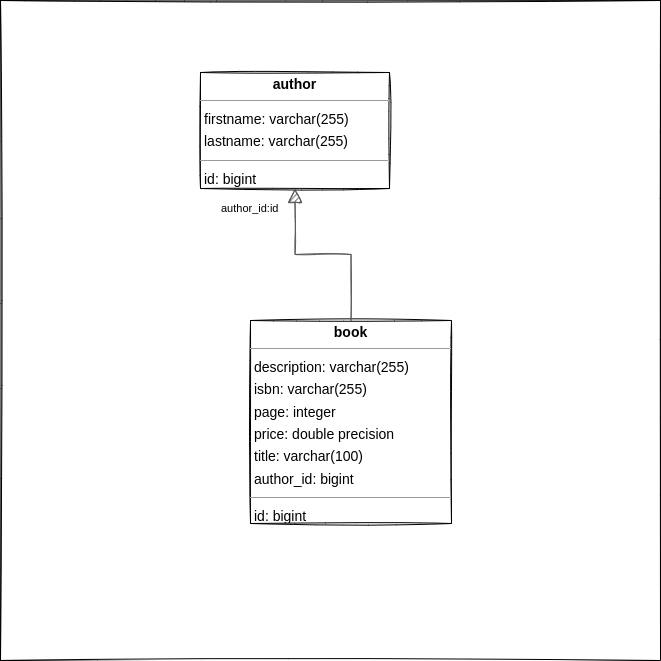
Let’s take a look at the SQL script scripts/init-db.sql:
CREATE SCHEMA rest;

SET search_path TO api;

drop table if exists rest.author;
drop table if exists rest.book;

create table rest.author (
    id serial primary key,
    firstname character varying(255) COLLATE pg_catalog."default",
    lastname character varying(255) COLLATE pg_catalog."default"
);

create table rest.book (
    id serial primary key,
    description text,
    isbn character varying(255) COLLATE pg_catalog."default",
    page integer NOT NULL,
    price double precision NOT NULL,
    title character varying(100) COLLATE pg_catalog."default",
    author_id integer not null references rest.author(id)
);

-- init data
INSERT INTO rest.author (id,firstname,lastname)
VALUES
  (1,'Bree','Nasim'),
  (2,'Kessie','Brenden'),
  (3,'Willow','Kirby'),
  (4,'Lareina','Lunea'),
  (5,'Flavia','Zane'),
  (6,'Noah','Maxwell'),
  (7,'Kelsey','Clinton'),
  (8,'Gage','Marsden'),
  (9,'Perry','Elijah'),
  (10,'Kennedy','Clementine');

  INSERT INTO rest.book (id,description,isbn,page,price,title,author_id)
VALUES
  (1,'netus et malesuada','X4J 5H8',62,529,'arcu. Vestibulum ut',9),
  (2,'mollis non,','M3Q 4G1',15,668,'Nullam ut',2),
  (3,'Maecenas mi felis, adipiscing fringilla, porttitor','B5W 1Y8',16,708,'et ipsum cursus',5),
  (4,'eros turpis non enim. Mauris quis turpis','Q1O 7Y6',46,642,'Nulla tincidunt,',4),
  (5,'tellus non magna. Nam ligula elit, pretium','Q0V 7Q9',86,656,'purus, in',1),
  (6,'a, facilisis non, bibendum sed, est.','V6Q 8T2',57,299,'sagittis',3),
  (7,'suscipit nonummy. Fusce fermentum fermentum arcu. Vestibulum ante ipsum','Q2T 8C5',68,891,'ligula. Donec',8),
  (8,'arcu. Vivamus sit amet risus. Donec egestas.','R5E 3I4',14,455,'vel',6),
  (9,'pede, nonummy ut, molestie in, tempus','I0W 6N9',33,874,'lorem semper',8),
  (10,'sed consequat auctor, nunc nulla vulputate dui, nec','U4E 5V8',7,185,'vel arcu.',4);

-- Create User-Group Roles
-- grant anonymous role access to certain tables etc
CREATE ROLE anonymous nologin;
CREATE ROLE webuser nologin;

-- creation of the authenticator role
CREATE ROLE authenticator WITH NOINHERIT LOGIN PASSWORD 'vfx44M4$l$Fu';

GRANT anonymous TO authenticator;
GRANT webuser TO authenticator;

GRANT USAGE on SCHEMA rest to anonymous;
GRANT SELECT on rest.author to anonymous;
GRANT SELECT on rest.book to anonymous;

GRANT ALL on SCHEMA rest to webuser;
GRANT ALL on rest.author to webuser;
GRANT ALL on rest.book to webuser;

GRANT ALL PRIVILEGES ON ALL SEQUENCES IN SCHEMA rest TO webuser;
First, we will create a schema called rest to hold the database objects that will be exposed through the PostgREST service. Within this schema, we define two tables—author and book—with a one-to-many relationship, where a single author can be associated with multiple books.
The next step is to create database roles. The anonymous role is granted permission to access objects in the rest schema and to read rows from the author and book tables. The webuser role is granted full read, write, update, and delete permissions on the schema and its tables.
Once the YAML file is created and the database script is configured, open your CLI and run the following command:
docker-compose up -d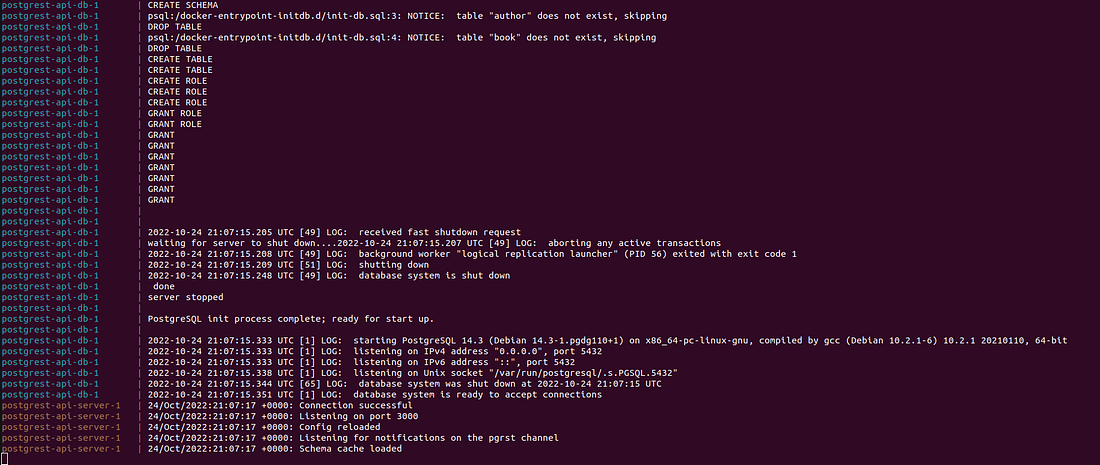
We begin by opening a visual preview of the API in your browser using Swagger UI at http://localhost:8080.

It’s now ready to serve requests. Let’s try to retrieve the list of authors and books from the database.
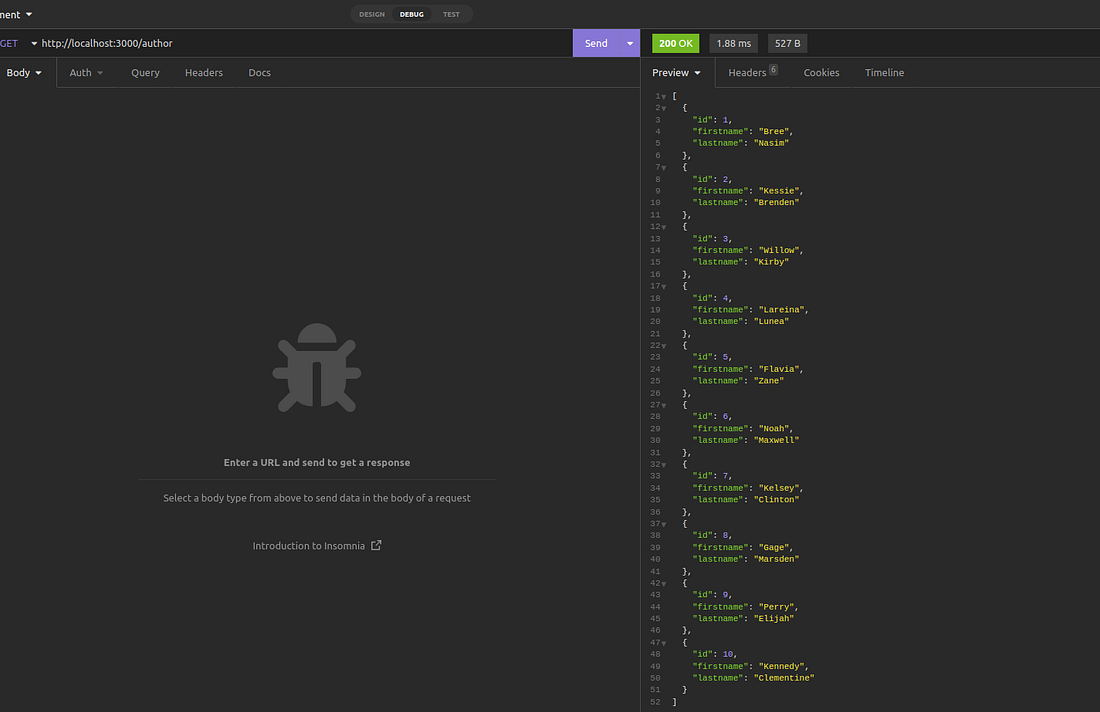
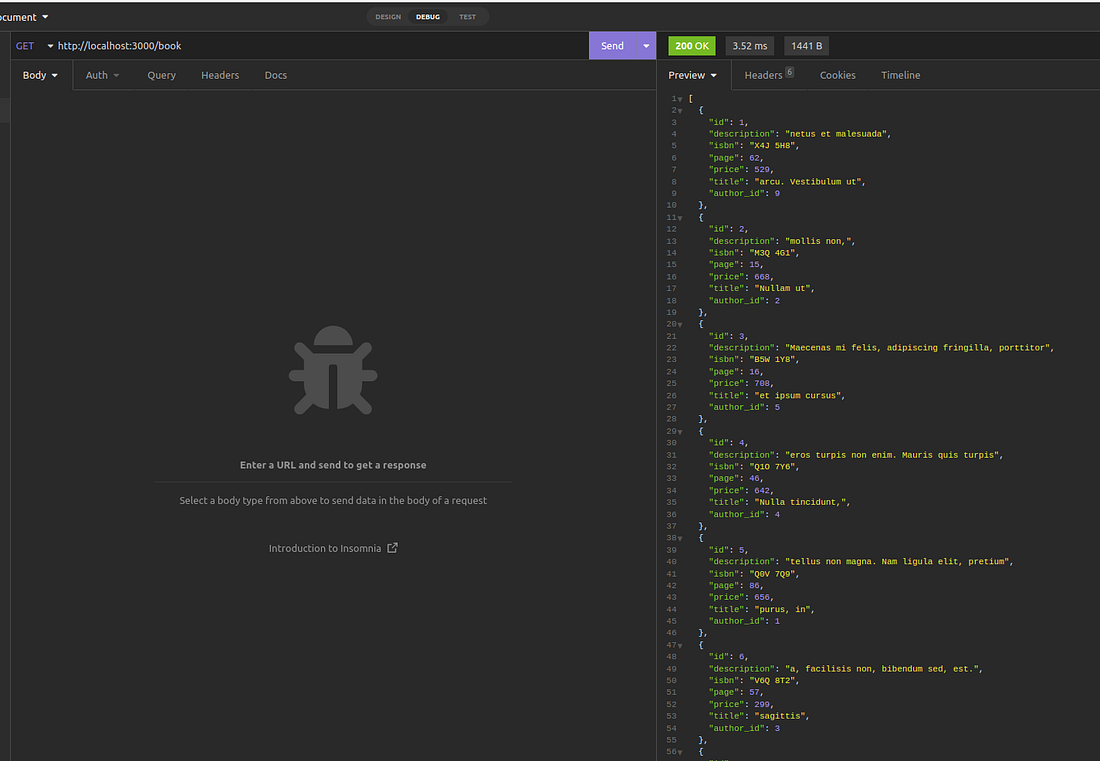
Done. It works fine 🙂
As mentioned earlier, the anonymous role does not have permission to write to the database, so it is not possible to add a new author.

JSON Web Token (JWT) Authentication
All PostgREST authorization happens through database roles and permissions. There are three types of roles used by PostgREST, the authenticator, anonymous, and user roles.
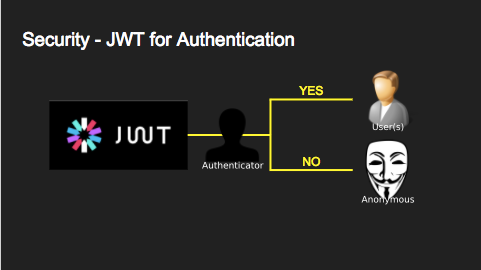
We use JSON Web Tokens (JWT) to authenticate API requests.
We’ll start by modifying our docker-compose.yml file and adding a new configuration to allow users to authenticate to our API.
# docker-compose.yml
version: '3'
services:

# postgrest-db
  db:
    image: postgres
    ports:
      - "5433:5432"
    environment:
      POSTGRES_DB: bookdb
      POSTGRES_USER: bookuser
      POSTGRES_PASSWORD: password
    volumes:
      - "./pgdata:/var/lib/postgresql/data"
      - "./extension/pgjwt.control:/usr/share/postgresql/18/extension/pgjwt.control"
      - "./extension/pgjwt--0.1.0--0.1.1.sql:/usr/share/postgresql/18/extension/pgjwt--0.1.0--0.1.1.sql"
      - "./extension/pgjwt--0.1.1.sql:/usr/share/postgresql/18/extension/pgjwt--0.1.1.sql"
      - "./extension/pgjwt--0.1.1--0.2.0.sql:/usr/share/postgresql/18/extension/pgjwt--0.1.1--0.2.0.sql"
      - "./scripts/init-db.sql:/docker-entrypoint-initdb.d/init01.sql"
      - "./scripts/auth.sql:/docker-entrypoint-initdb.d/init02.sql"

  server:
    image: postgrest/postgrest
    ports:
      - "3000:3000"
    environment:
      PGRST_DB_URI: postgres://bookuser:password@db:5432/bookdb
      PGRST_DB_SCHEMA: rest
      PGRST_DB_ANON_ROLE: anonymous
      PGRST_OPENAPI_SERVER_PROXY_URI: http://127.0.0.1:3000
      PGRST_JWT_SECRET: Q!6HLp@B5wD24Pbq*LNd!%S4&H%ly7bt
    depends_on:
      - db

  swagger:
   image: swaggerapi/swagger-ui
   ports:
    - "8080:8080"
   expose:
    - "8080"
   environment:
    API_URL: http://localhost:3000/
The first step is to add a new extension to our PostgreSQL instance that enables cryptographic signing of passwords on the server. Using the pgjwt extension, we can create JWT tokens directly in SQL.
The first thing is the addition of a new extension on our Postgres instance which will allow cryptographically signing passwords on our server. We’ll create JWT tokens in SQL using the pgjwt extension.
Next, we create a new schema in the database to handle all authentication-related objects. This schema includes a user table to manage user accounts, and we add the necessary functions to handle user access and authentication.
ALTER DATABASE bookdb SET "app.jwt_secret" TO 'Q!6HLp@B5wD24Pbq*LNd!%S4&H%ly7bt';

-- add custom extensions
CREATE EXTENSION IF NOT EXISTS pgcrypto;
CREATE EXTENSION IF NOT EXISTS pgjwt;


-- Authentication management schema
CREATE SCHEMA IF NOT EXISTS auth;

-- users table
CREATE TABLE IF NOT EXISTS auth.users (
  email     TEXT PRIMARY KEY CHECK ( email ~* '^.+@.+\..+$' ),
  password   TEXT NOT NULL CHECK (LENGTH(password) < 512),
  role     NAME NOT NULL CHECK (LENGTH(role) < 512)
);


CREATE OR REPLACE FUNCTION auth.check_role_exists() RETURNS TRIGGER AS $$
BEGIN
  IF NOT EXISTS (SELECT 1 FROM pg_roles AS r WHERE r.rolname = new.role) THEN
    raise foreign_key_violation USING message =
      'unknown database role: ' || new.role;
    RETURN NULL;
  END IF;
  RETURN new;
END
$$ LANGUAGE plpgsql;

DROP TRIGGER IF EXISTS ensure_user_role_exists ON auth.users;
CREATE CONSTRAINT TRIGGER ensure_user_role_exists
  AFTER INSERT OR UPDATE ON auth.users
  FOR EACH ROW
  EXECUTE PROCEDURE auth.check_role_exists();

CREATE OR REPLACE FUNCTION
auth.encrypt_password() RETURNS trigger AS $$
BEGIN
  IF tg_op = 'INSERT' OR new.password <> old.password THEN
    new.password = crypt(new.password, gen_salt('bf'));
  END IF;
  RETURN new;
END
$$ LANGUAGE plpgsql;

DROP TRIGGER IF EXISTS encrypt_password ON auth.users;
CREATE TRIGGER encrypt_password
  BEFORE INSERT OR UPDATE ON auth.users
  FOR EACH ROW
  EXECUTE PROCEDURE auth.encrypt_password();

-- add new type
DROP TYPE IF EXISTS auth.jwt_token cascade;
CREATE TYPE auth.jwt_token AS (
  token TEXT
);

-- login should be on our exposed schema
CREATE OR REPLACE FUNCTION
rest.login(email text, password text) RETURNS auth.jwt_token AS $$
DECLARE
  _user auth.users;
  result auth.jwt_token;
BEGIN
  -- check email and password
  SELECT users.* FROM auth.users
   WHERE users.email = login.email
     AND users.password = crypt(login.password, users.password)
  INTO _user;
  IF NOT FOUND THEN
    raise invalid_password USING message = 'invalid user or password';
  END IF;

  SELECT sign(
      row_to_json(r), current_setting('app.jwt_secret')
    ) AS token
    FROM (
      SELECT _user.role AS role, login.email AS email,
         extract(epoch FROM now())::INTEGER + 60*60 AS exp
    ) r
    INTO result;
  RETURN result;
END;
$$ LANGUAGE plpgsql SECURITY DEFINER;

CREATE OR REPLACE FUNCTION
rest.signup(email text, password text) RETURNS void
AS $$
BEGIN
  INSERT INTO auth.users (email, password, role) VALUES
    (signup.email, signup.password, 'webuser');
END;
$$ LANGUAGE plpgsql SECURITY DEFINER;

GRANT USAGE ON SCHEMA auth TO anonymous, webuser;
GRANT EXECUTE ON FUNCTION rest.login(text,text) TO anonymous;
GRANT EXECUTE ON FUNCTION rest.signup(text,text) TO anonymous;
Now, restart the Docker services and proceed to test the setup.
We need to create a user account.

Next, we need to log in to obtain a token. Note that all function endpoints must be accessed with the /rpc prefix.

We will need to include a Bearer Authorization header with the JWT token for our requests. Let’s try creating a new author using this token.
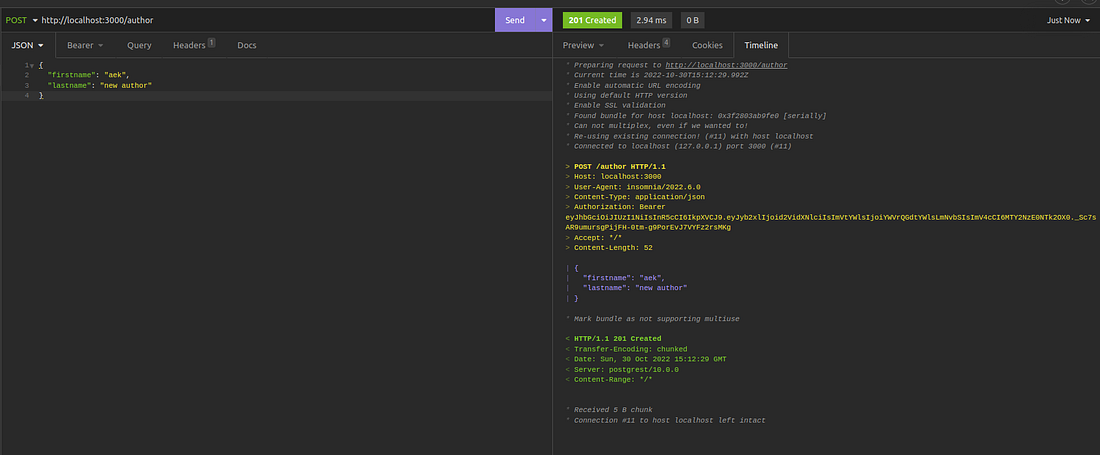
Congratulations! It’s done.
Conclusion
In this story, we created a REST API using PostgREST without writing any backend code or using a web framework. It’s a convenient way to build simple REST APIs while using fewer resources quickly
The complete source code is available on GitHub.
Support me through GitHub Sponsors.
Thank you for reading!! See you in the next story.
Last updated: January 4, 2025