
In this post, we’ll implement a sample REST API that uses Spring Boot with jOOQ and PostgreSQL.
Prerequisites
This is the list of all the prerequisites for following this story:
- Spring Boot 3.x
- Maven 3.6.3 or later
- Java 21 or later
- PostgreSQL
- jOOQ 3.20+
- Postman / insomnia or any other API testing tool.
- IntelliJ IDEA, Visual Studio Code, or another IDE
Overview
When building modern backend services with relational databases, developers often rely on ORM frameworks like Hibernate. While ORMs simplify CRUD operations, they can make complex queries difficult to manage and sometimes generate inefficient SQL.
jOOQ provides a different approach: type-safe SQL built directly in Java, allowing developers to retain full control over queries while still benefiting from compile-time safety.
What is jOOQ?
jOOQ (Java Object Oriented Querying) is a popular Java database library that builds type-safe SQL queries through its fluent API. jOOQ includes generators that generate Java code from the database. It also has code generators for Data Access Objects (DAO) and POJOs to effectively complete CRUD operations.
Why Use jOOQ Instead of JPA?
Many developers start with Hibernate or Spring Data JPA, but large production systems often encounter limitations when dealing with:
- complex joins
- window functions
- performance-critical queries
- database-specific features
Advantages of jOOQ:
- Code Generation: jOOQ generates Java classes, JPA-annotated entity classes, interfaces, or even XML from the database metadata.
- Type Safety SQL: jOOQ treats SQL like what it is in the first place: A language. Through its unique and modern fluent API design techniques, jOOQ embeds SQL as an internal domain-specific language directly in Java, making it easy for developers to write and read code that almost feels like actual SQL.
- Database First: With jOOQ, database and data comes first.
- Domain-Specific Language: jOOQ provides a DSL that replicates the particular SQL dialect used by the database vendors.
Getting Started
We’ll start with a “database first” approach which consists in creating and initializing the objects of our database which will be used by jOOQ.
We have two tables author and book with a one-to-many mapping between the tables.
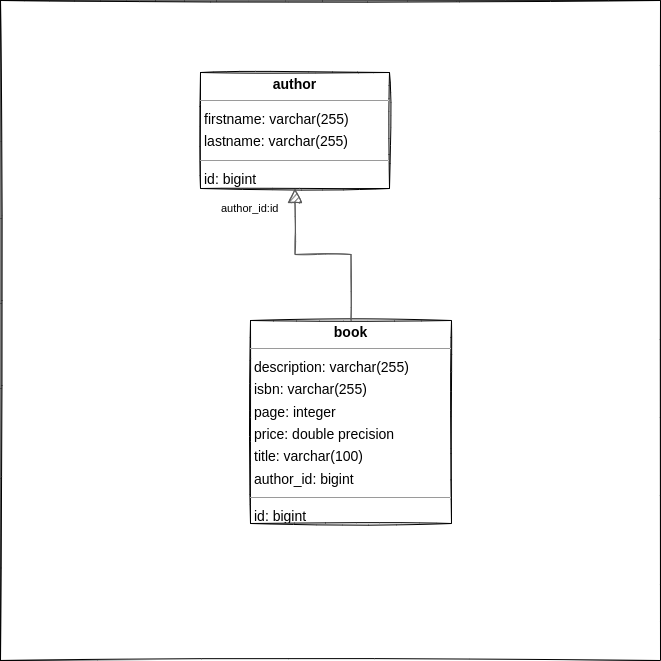
src/main/resources/schema.sql
drop table if exists public.author;
drop table if exists public.book;

create table public.author
(
    id        serial primary key,
    firstname character varying(255) COLLATE pg_catalog."default",
    lastname  character varying(255) COLLATE pg_catalog."default"
);

create table public.book
(
    id          serial primary key,
    description text,
    isbn        character varying(255) COLLATE pg_catalog."default",
    page        integer          NOT NULL,
    price       double precision NOT NULL,
    title       character varying(100) COLLATE pg_catalog."default",
    author_id   integer          not null references public.author (id)
);
Configure jOOQ’s code generator
Let’s start by creating a simple Spring Boot project from start.spring.io, with the following dependencies: Spring Web, JOOQ Access Layer, Lombok, PostgreSQL Driver, and Validation.
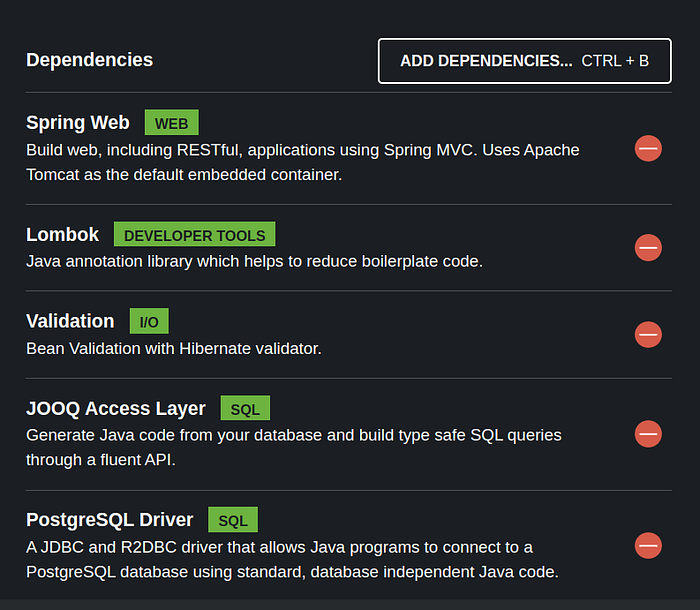
Spring Boot automatically configures DSLContext, which is the main entry point for building SQL queries.
Database Configuration
Open the properties filesrc/main/resources/application.propertiesand add the PostgreSQL database configuration.
#PostgreSQL Database Configuration
datasource.driver= org.postgresql.Driver
datasource.jdbcUrl= jdbc:postgresql://localhost:5432/book
datasource.username= dev
datasource.password= qwerty

# configure spring data source
spring.application.name=jooq-api
spring.datasource.driver-class-name=${datasource.driver}
spring.datasource.url = ${datasource.jdbcUrl}
spring.datasource.username = ${datasource.username}
spring.datasource.password = ${datasource.password}
spring.jooq.sql-dialect= postgres
Spring Boot will configure:
- connection pooling via HikariCP
- DSLContext
- transaction management
jOOQ Code Generation
One of the most powerful features of jOOQ is code generation.
jOOQ reads the database schema and Java classes from the database schema that allow type-safe SQL queries through the DSL. These Java classes representing:
- tables
- fields
- records
We need to use jooq-codegen-mavenplugin to integrate source code generation in your Maven build process.
<plugin>
                <groupId>org.jooq</groupId>
                <artifactId>jooq-codegen-maven</artifactId>
                <version>${jooq.version}</version>
                <executions>
                    <execution>
                        <id>generate-postgres</id>
                        <phase>generate-sources</phase>
                        <goals>
                            <goal>generate</goal>
                        </goals>
                        <configuration>
                            <!-- JDBC connection parameters -->
                            <jdbc>
                                <driver>${datasource.driver}</driver>
                                <url>${datasource.jdbcUrl}</url>
                                <user>${datasource.username}</user>
                                <password>${datasource.password}</password>
                            </jdbc>
                            <!-- Generator parameters -->
                            <generator>
                                <database>
                                    <name>
                                        org.jooq.meta.postgres.PostgresDatabase
                                    </name>
                                    <includes>.*</includes>
                                    <excludes/>
                                    <inputSchema>public</inputSchema>
                                </database>
                                <generate>
                                    <pojos>true</pojos>
                                    <pojosEqualsAndHashCode>true</pojosEqualsAndHashCode>
                                    <javaTimeTypes>true</javaTimeTypes>
                                    <fluentSetters>true</fluentSetters>
                                    <!-- Generate the DAO classes -->
                                    <daos>true</daos>
                                    <!-- Annotate DAOs (and other types) with spring annotations, such as @Repository and @Autowired
                                         for auto-wiring the Configuration instance, e.g. from Spring Boot's jOOQ starter -->
                                    <springAnnotations>true</springAnnotations>
                                    <!-- Generate Spring-specific DAOs containing @Transactional annotations -->
                                    <springDao>true</springDao>
                                </generate>
                                <target>
                                    <packageName>com.example.springbootjooq.model</packageName>
                                    <directory>target/generated-sources/jooq</directory>
                                </target>
                            </generator>
                        </configuration>
                    </execution>
                </executions>
            </plugin>
Start the jOOQ generator with the command: mvn clean generate-sources
We should find new classes in target/generated-sources/jooq
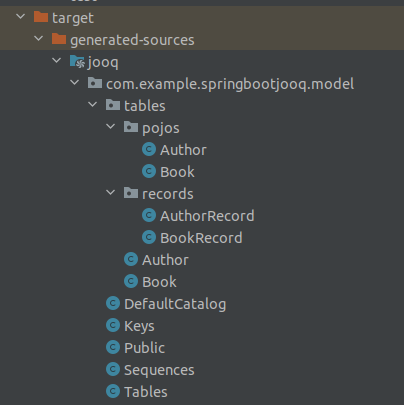
Using DSLContext
The fluent API offered by jOOQ is initiated via the org.jooq.DSLContext interface. Spring Boot will auto-configure DSLContext as a Spring Bean.
@RequiredArgsConstructor
@Transactional
@Repository
public class BookRepository implements JOOQRepository<Book> {

    private final DSLContext context;

    @Override
    public Book save(Book book){
        BookRecord bookRecord = context.insertInto(BOOK)
                .set(BOOK.DESCRIPTION, book.getDescription())
                .set(BOOK.ISBN, book.getIsbn())
                .set(BOOK.PAGE, book.getPage())
                .set(BOOK.PRICE, book.getPrice())
                .set(BOOK.TITLE, book.getTitle())
                .set(BOOK.AUTHOR_ID, book.getAuthorId())
                .returning(BOOK.ID).fetchOne();

        if (bookRecord != null) {
            book.setId(bookRecord.getId());
            return book;
        }
        return null;
    }

    @Override
    public Book update(Book book, int id) {
        BookRecord bookRecord = context.update(BOOK)
                .set(BOOK.DESCRIPTION, book.getDescription())
                .set(BOOK.ISBN, book.getIsbn())
                .set(BOOK.PAGE, book.getPage())
                .set(BOOK.PRICE, book.getPrice())
                .set(BOOK.TITLE, book.getTitle())
                .set(BOOK.AUTHOR_ID, book.getAuthorId())
                .where(BOOK.ID.eq(5))
                .returning(BOOK.ID).fetchOne();

        return (bookRecord != null) ? book : null;
    }

    @Override
    public List<Book> findAll(){
        return context
                .selectFrom(BOOK)
                .fetchInto(Book.class);
    }
    @Override
    public Optional<Book> findById(int id){
        Book book = context.selectFrom(BOOK).where(BOOK.ID.eq(id)).fetchOneInto(Book.class);
        return (ObjectUtils.isEmpty(book)) ? Optional.empty() : Optional.of(book);
    }

    @Override
    public boolean deleteById(int id) {
        return context.delete(BOOK)
                .where(BOOK.ID.eq(id))
                .execute() == 1;
    }

}
JOOQRepository is our custom interface which uses the CRUD methods.
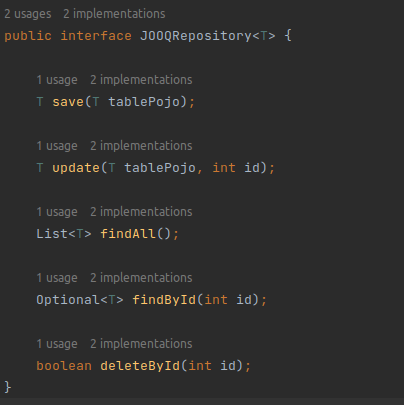
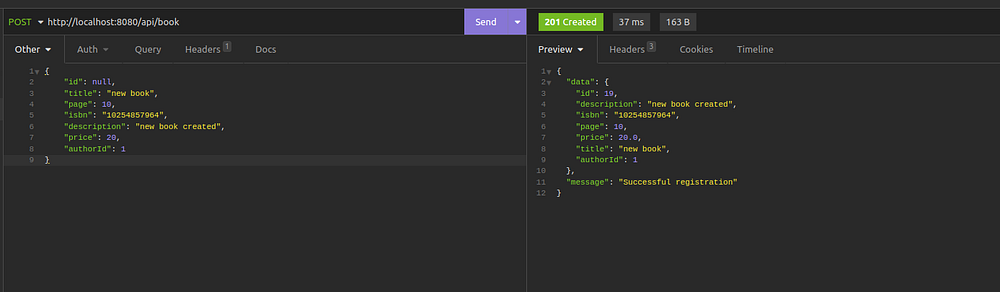
Let’s try some calls through our BookController.java.
@RequiredArgsConstructor
@RestController
@RequestMapping("/api/book")
public class BookController {

    private final BookService bookService;

     @PostMapping()
     public ResponseEntity<SuccessResponse> create(@RequestBody @Valid Book book) {
         if (!ObjectUtils.isEmpty(book.getId())) {
             throw new BadRequestException("A new data cannot already have an ID");
         }

         return new ResponseEntity<>(
                 new SuccessResponse(bookService.create(book), "Successful registration"),
                 HttpStatus.CREATED);
     }

    @GetMapping
    public ResponseEntity<SuccessResponse> getAll() {
        List<Book> books = bookService.getAll();

        return new ResponseEntity<>(new SuccessResponse(books, MessageFormat.format("{0} Results found", books.size())), HttpStatus.OK);
    }

    @GetMapping("/{id}")
    public ResponseEntity<SuccessResponse> getOne(@PathVariable("id") int id) {
        Book book = bookService.getOne(id);
        return new ResponseEntity<>(
                new SuccessResponse(book, "Result found"), HttpStatus.OK);
    }

    @DeleteMapping("/{id}")
    public ResponseEntity<SuccessResponse> delete(@PathVariable("id") int id) {
        bookService.deleteById(id);
        return new ResponseEntity<>(
                new SuccessResponse(null, "Deletion completed successfully"), HttpStatus.OK);
    }

}
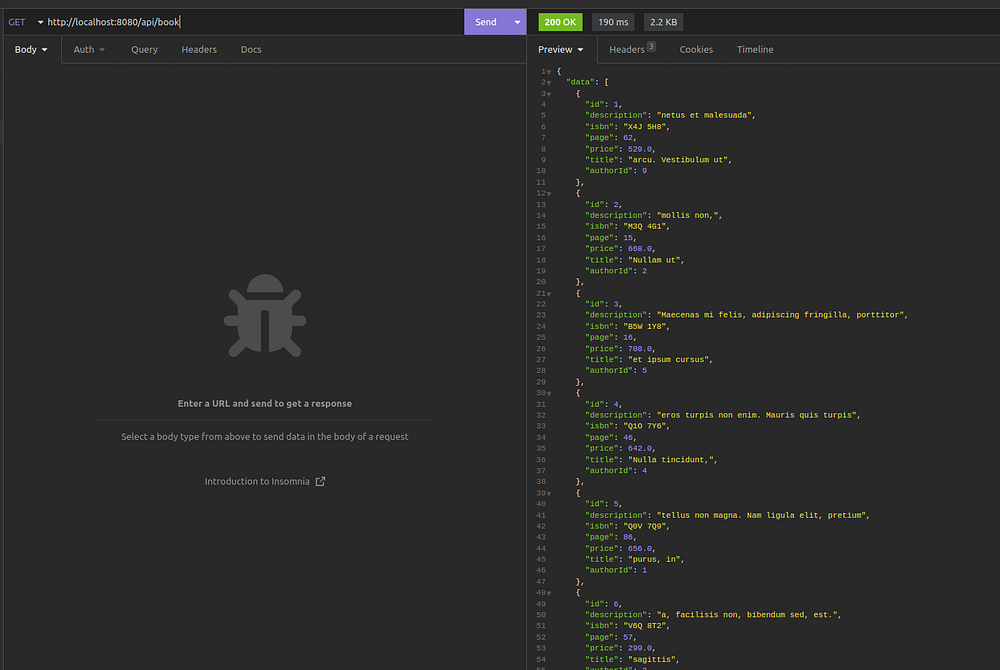
Done. It works fine. 🙂
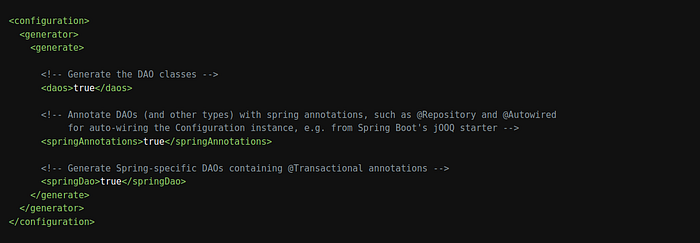
All the methods above use the DSLContext bean but we can also use DAOs implementation. jOOQ generates one DAO per UpdatableRecord, i.e. per table with a single-column primary key. Generated DAOs implement a common jOOQ type called org.jooq.DAO. With this, we don’t need our custom repository interface JOOQRepository.java because generated DAO classes implement various useful CRUD methods.
Let’s modify the existing jooq-codegen-maven plugin configuration to add daos generation.
After rebuilding, jOOQ added classes corresponding to the Dao.
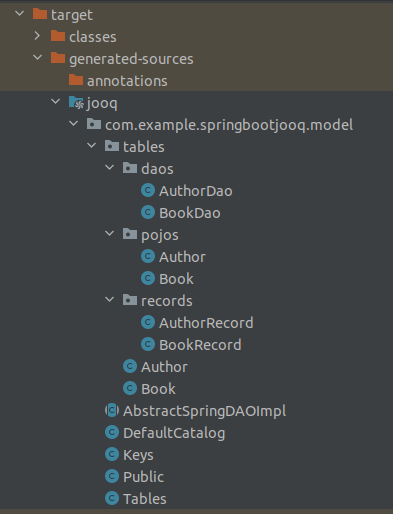
target/generated-sources/jooqTo use the DAO, we can inject it, as shown in the following example in the BookServiceImpl.java class:
@RequiredArgsConstructor
@Transactional
@Service(value = "BookServiceDAO")
public class BookServiceImpl implements BookService {

    private final BookDao repository;

    @Override
    public Book create(Book book) {
        repository.insert(book);
        return book;
    }

    @Override
    public Book update(Book book) {
        repository.update(book);
        return book;
    }

    @Override
    public List<Book> getAll(){
        return repository.findAll();
    }

    @Override
    public Book getOne(int id) {
        Book book = repository.findById(id);
        if (book == null) {
            throw new DataNotFoundException(
                    MessageFormat.format("Book with id {0} not found", id)
            );
        }
        return book;
    }

    @Override
    public void deleteById(int id) {
        repository.deleteById(id);
    }

}
Congratulations! It’s done.
Conclusion
🏁 Well done !!. jOOQ provides a powerful alternative to traditional ORMs by allowing developers to write type-safe SQL while maintaining full control over query performance and PostgreSQL features.
jOOQ enables developers to:
- write expressive SQL
- maintain compile-time safety
- leverage database-specific features
- optimize query performance
For teams building data-intensive or performance-critical services, jOOQ offers a compelling approach that combines the power of SQL with the safety of Java.
The complete source code is available on GitHub.
Support me through GitHub Sponsors.
Thank you for reading!! See you in the next story.
Last updated: March 08, 2026

