
In this post, we cover how to implement structured logging for Spring Boot using Grafana, Alloy, and Loki.
Prerequisites
This is the list of all the prerequisites:
- Spring Boot 3 or later
- Maven 3.6.3 or later
- Java 21 or later
- Docker / Docker-compose installed
- Postman / insomnia or any other API testing tool.
- IntelliJ IDEA, Visual Studio Code, or another IDE
Overview
Modern applications generate an overwhelming amount of logs. When you’re running multiple services — especially in a microservices architecture — tracking down issues without a centralized logging system quickly becomes a nightmare.
If you’ve been looking for a lightweight, cost-effective alternative to the ELK stack, you’ve likely heard about the Grafana LGTM Stack (Loki, Grafana, Tempo, Mimir). Today, we’ll focus on the “LG” part: Loki for log aggregation and Grafana for visualization. But there’s a new player in town for log collection: Grafana Alloy.
Before we dive into the code, let’s talk about why this combination is compelling for Spring Boot developers.
What is Grafana Loki?
Grafana Loki is a set of open source components that can be composed into a fully featured logging stack. A small index and highly compressed chunks simplifies the operation and significantly lowers the cost of Loki.
Unlike other logging systems, Loki is built around the idea of only indexing metadata about your logs’ labels (just like Prometheus labels). Log data itself is then compressed and stored in chunks in object stores such as Amazon Simple Storage Service (S3) or Google Cloud Storage (GCS), or even locally on the filesystem. https://grafana.com/docs/loki/latest/
What is Grafana Alloy?
Grafana Alloy combines the strengths of the leading collectors into one place. Whether observing applications, infrastructure, or both, Grafana Alloy can collect, process, and export telemetry signals to scale and future-proof your observability approach. https://grafana.com/docs/loki/latest/
What is Grafana ?
Grafana open source is open-source visualization and analytics software. It allows you to query, visualize, alert on, and explore your metrics, logs, and traces no matter where they are stored. It provides you with tools to turn your time-series database (TSDB) data into insightful graphs and visualizations. https://grafana.com/oss/grafana/
Why Centralized Logging Matters
Imagine debugging a production issue where requests pass through multiple services. Without centralized logging, you would:
- SSH into multiple servers
- Manually search log files
- Correlate timestamps across systems
This is slow, error-prone, and frustrating.
Centralized logging solves this by:
- Aggregating logs in one place
- Making logs searchable and filterable
- Enabling real-time monitoring and alerting
Architecture Overview
Our logging pipeline will look like this:
Spring Boot App
     │
     │  (Writes structured JSON logs to file)
     ▼
./logs/*.log
     │
     │  (Alloy tails log files)
     ▼
Grafana Alloy
     │
     │  (Parses, labels, and ships logs)
     ▼
Grafana Loki
     │
     │  (Indexes and stores logs)
     ▼
Grafana Dashboard
     │
     │  (Query, visualize, alert)
     ▼
  Developer
Each component has a focused responsibility:
- Spring Boot: Generates structured JSON logs with trace IDs via Logback + Logstash encoder
- Grafana Alloy: Collects, parses, and forwards logs to Loki
- Grafana Loki: Stores and indexes logs for fast querying
- Grafana: Visualizes and queries logs via LogQL
Coding
Project Setup
We’ll create a simple Spring Boot project from start.spring.io, with the following dependencies: Spring Web, Lombok, Spring Boot Actuator, H2, Spring Data, and Validation.
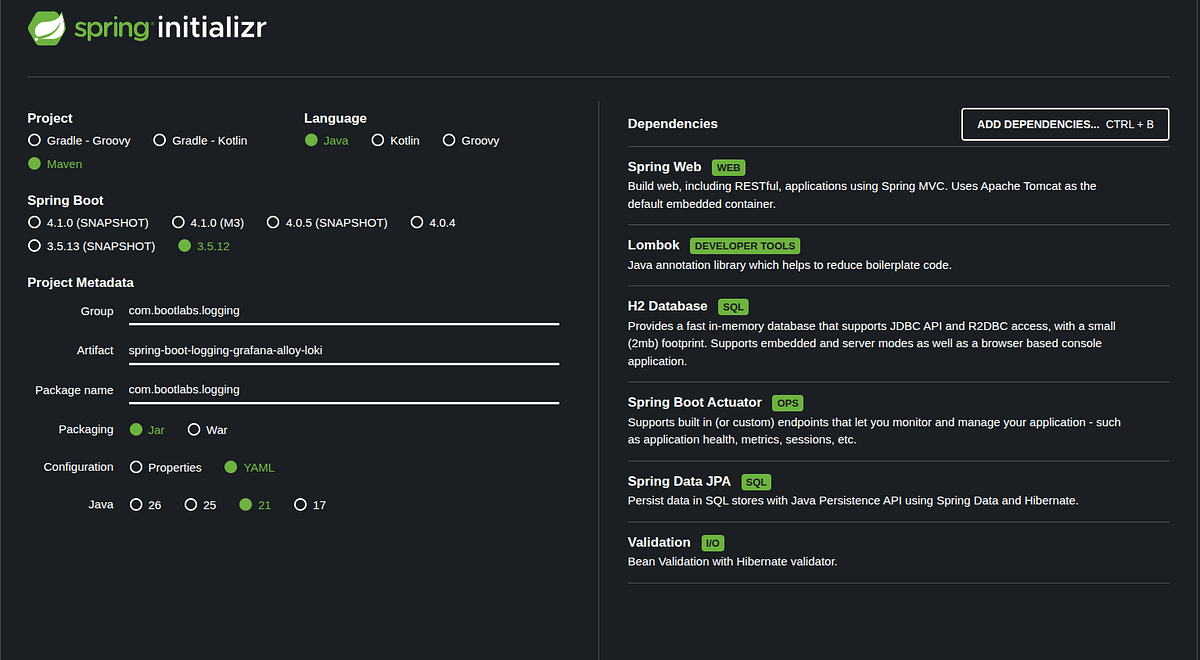
The base project is a REST API exposing /books and /authors endpoints, backed by an H2 database. The codebase is already in place. In this post, we will focus on configuring logging and setting up the Grafana LGTM stack.
Configuring Spring Boot for Structured Logging
To make logs machine-parseable and easy to filter in Loki, we need JSON output. The only dependency to add is logstash-logback-encoder, which plugs into Logback and serializes every log event as a single-line JSON object.
<!-- pom.xml -->
<properties>
    <logstash-logback-encoder.version>8.0</logstash-logback-encoder.version>
</properties>

<dependencies>
    <dependency>
        <groupId>net.logstash.logback</groupId>
        <artifactId>logstash-logback-encoder</artifactId>
        <version>${logstash-logback-encoder.version}</version>
    </dependency>
</dependencies>
Logging Configuration Properties
Rather than scattering magic values across the codebase, all tuning knobs live in one @ConfigurationProperties class bound to the logging.http.* namespace.
// config/LoggingProperties.java
@Getter
@Setter
@ConfigurationProperties(prefix = "logging.http")
public class LoggingProperties {

    /** Cap on request/response body size. Larger bodies are truncated. */
    private int maxBodySize = 10_000;

    /** URI prefixes that bypass the filter entirely. */
    private Set<String> excludedPaths = Set.of("/actuator", "/health");

    /**
     * When true, request and response bodies are included in the log event.
     * Only applies to loggable content-types (JSON, XML, text, form-encoded).
     * Keep false in production to avoid logging sensitive payloads.
     */
    private boolean logBody = false;
}
// config/LoggingConfig.java
@Configuration
@EnableConfigurationProperties(LoggingProperties.class)
public class LoggingConfig {
}Inbound HTTP Logging Filter
HttpLoggingFilter is the core of inbound observability. It extends Spring’s OncePerRequestFilter — guaranteed to run exactly once per request, regardless of servlet dispatch type.
// filter/HttpLoggingFilter.java
@Component
@Order(Ordered.HIGHEST_PRECEDENCE)
public class HttpLoggingFilter extends OncePerRequestFilter {

    private static final Logger log = LoggerFactory.getLogger(HttpLoggingFilter.class);

    private static final Set<String> LOGGABLE_CONTENT_TYPES = Set.of(
            "application/json",
            "application/xml",
            "application/x-www-form-urlencoded"
    );

    private static final String MDC_TRACE_ID       = "traceId";
    private static final String MDC_CORRELATION_ID = "correlationId";

    private final LoggingProperties props;

    public HttpLoggingFilter(LoggingProperties props) {
        this.props = props;
    }

    @Override
    protected boolean shouldNotFilter(HttpServletRequest request) {
        String path = request.getRequestURI();
        return props.getExcludedPaths().stream().anyMatch(path::startsWith);
    }

    @Override
    protected void doFilterInternal(HttpServletRequest request,
                                    HttpServletResponse response,
                                    FilterChain filterChain)
            throws ServletException, IOException {

        var wrappedRequest  = new ContentCachingRequestWrapper(request, props.getMaxBodySize());
        var wrappedResponse = new ContentCachingResponseWrapper(response);

        // Extract or generate distributed trace IDs
        String traceId = Optional.ofNullable(request.getHeader("X-Trace-Id"))
                .filter(s -> !s.isBlank())
                .orElseGet(() -> UUID.randomUUID().toString());

        String correlationId = Optional.ofNullable(request.getHeader("X-Correlation-Id"))
                .filter(s -> !s.isBlank())
                .orElseGet(() -> UUID.randomUUID().toString());

        // Store in MDC — every log line emitted during this request
        // (by any class, not just this filter) will carry these IDs
        MDC.put(MDC_TRACE_ID,       traceId);
        MDC.put(MDC_CORRELATION_ID, correlationId);

        // Propagate IDs back to the caller via response headers
        wrappedResponse.addHeader("X-Trace-Id",       traceId);
        wrappedResponse.addHeader("X-Correlation-Id", correlationId);

        long startTime = System.currentTimeMillis();
        try {
            filterChain.doFilter(wrappedRequest, wrappedResponse);
        } finally {
            long duration = System.currentTimeMillis() - startTime;

            // Log BEFORE copyBodyToResponse — the buffer is still intact here
            logExchange(wrappedRequest, wrappedResponse, duration);

            // Flush the cached response bytes back to the actual output stream
            wrappedResponse.copyBodyToResponse();

            MDC.remove(MDC_TRACE_ID);
            MDC.remove(MDC_CORRELATION_ID);
        }
    }

    private void logExchange(ContentCachingRequestWrapper  request,
                              ContentCachingResponseWrapper response,
                              long                          duration) {

        Map<String, Object> fields = new LinkedHashMap<>();
        fields.put("event.kind",       "inbound");
        fields.put("http.method",      request.getMethod());
        fields.put("http.url",         request.getRequestURI());
        fields.put("http.query",       request.getQueryString() != null ? request.getQueryString() : "");
        fields.put("http.status_code", response.getStatus());
        fields.put("event.duration",   duration);
        fields.put("client.ip",        resolveClientIp(request));

        extractRequestHeaders(request)
                .forEach((k, v) -> fields.put("http.request.headers."  + k, v));

        extractResponseHeaders(response)
                .forEach((k, v) -> fields.put("http.response.headers." + k, v));

        if (props.isLogBody()) {
            addBodies(request, response, fields);
        }

        log.info(appendEntries(fields),
                "HTTP {} {} -> {} ({}ms)",
                request.getMethod(), request.getRequestURI(),
                response.getStatus(), duration);
    }

}
ContentCachingRequestWrapper caches the request body lazily — it stores bytes as the downstream servlet reads the InputStream. If you log before the chain runs, getContentAsByteArray() returns an empty array because nobody has read the stream yet.
Logging after the chain ensures:
- The request body cache is fully populated
- The response status and headers are set
- The response body has been written to the wrapper’s buffer
Logback JSON Configuration
logback-spring.xml replaces Spring Boot’s default text-based logging with LogstashEncoder — the JSON serializer from logstash-logback-encoder. It outputs every log event as a single-line JSON object, writes it to a rolling file, and mirrors it to the console outside of production.
Create src/main/resources/logback-spring.xml:
<configuration>

    <!-- ══ Spring property bindings ════════════════════════════════════════ -->
    <springProperty name="APP_NAME"        source="spring.application.name"                           defaultValue="application"/>
    <springProperty name="APP_VERSION"     source="spring.application.version"                        defaultValue="unknown"/>
    <springProperty name="ENVIRONMENT"     source="spring.profiles.active"                            defaultValue="default"/>
    <springProperty name="LOG_DIR"         source="logging.http.log-dir"                              defaultValue=".log"/>
    <springProperty name="MAX_HISTORY"     source="logging.logback.rollingpolicy.max-history"         defaultValue="30"/>
    <springProperty name="MAX_FILE_SIZE"   source="logging.logback.rollingpolicy.max-file-size"       defaultValue="100MB"/>
    <springProperty name="TOTAL_SIZE_CAP"  source="logging.logback.rollingpolicy.total-size-cap"      defaultValue="3GB"/>


    <!-- ── FILE appender ──────────────────────────────────────────────────── -->
    <appender name="JSON_FILE" class="ch.qos.logback.core.rolling.RollingFileAppender">
        <file>${LOG_DIR}/${APP_NAME}.log</file>
        <append>true</append>

        <!-- Daily + size-based rotation with compressed archives -->
        <rollingPolicy class="ch.qos.logback.core.rolling.SizeAndTimeBasedRollingPolicy">
            <!-- e.g. .log/spring-boot-logging-grafana-alloy-loki.2026-03-21.0.log.gz -->
            <fileNamePattern>${LOG_DIR}/${APP_NAME}.%d{yyyy-MM-dd}.%i.log.gz</fileNamePattern>
            <maxFileSize>${MAX_FILE_SIZE}</maxFileSize>
            <maxHistory>${MAX_HISTORY}</maxHistory>
            <totalSizeCap>${TOTAL_SIZE_CAP}</totalSizeCap>
            <!-- Remove stale archives on startup (safe for containers) -->
            <cleanHistoryOnStart>true</cleanHistoryOnStart>
        </rollingPolicy>

        <encoder class="net.logstash.logback.encoder.LogstashEncoder">
            <!--
              ISO-8601 with nanosecond precision and timezone offset.
              Example: 2026-03-21T21:27:19.571043105+01:00
              Uses DateTimeFormatter patterns: S = fractional-second digit.
            -->
            <timestampPattern>yyyy-MM-dd'T'HH:mm:ss.SSSSSSSSSXXX</timestampPattern>

            <!-- Rename standard logstash field names to match the spec -->
            <fieldNames>
                <timestamp>@timestamp</timestamp>
                <version>@version</version>
                <message>message</message>
                <logger>logger</logger>
                <thread>thread</thread>
                <level>level</level>
                <!-- levelValue is redundant alongside level — exclude it -->
                <levelValue>[ignore]</levelValue>
                <stackTrace>error.stack_trace</stackTrace>
            </fieldNames>

            <customFields>{"application.name":"${APP_NAME}","application.version":"${APP_VERSION}","environment":"${ENVIRONMENT}"}</customFields>
        </encoder>
    </appender>

    <!-- ── CONSOLE appender (dev / non-prod profiles only) ────────────────── -->
    <springProfile name="!prod">
        <appender name="JSON_CONSOLE" class="ch.qos.logback.core.ConsoleAppender">
            <encoder class="net.logstash.logback.encoder.LogstashEncoder">
                <timestampPattern>yyyy-MM-dd'T'HH:mm:ss.SSSSSSSSSXXX</timestampPattern>
                <fieldNames>
                    <timestamp>@timestamp</timestamp>
                    <version>@version</version>
                    <message>message</message>
                    <logger>logger</logger>
                    <thread>thread</thread>
                    <level>level</level>
                    <levelValue>[ignore]</levelValue>
                    <stackTrace>error.stack_trace</stackTrace>
                </fieldNames>
                <customFields>{"application.name":"${APP_NAME}","application.version":"${APP_VERSION}","environment":"${ENVIRONMENT}"}</customFields>
            </encoder>
        </appender>
    </springProfile>

    <!-- ══ Root loggers per profile ════════════════════════════════════════ -->

    <!-- Production: file only -->
    <springProfile name="prod">
        <root level="INFO">
            <appender-ref ref="JSON_FILE"/>
        </root>
    </springProfile>

    <!-- Every other profile: file + console -->
    <springProfile name="!prod">
        <root level="INFO">
            <appender-ref ref="JSON_FILE"/>
            <appender-ref ref="JSON_CONSOLE"/>
        </root>
    </springProfile>

</configuration>
The SizeAndTimeBasedRollingPolicy rotates:
- Daily at midnight (
.%d{yyyy-MM-dd}) - On size when a single file reaches
MAX_FILE_SIZE(.%isuffix for same-day segments)
Archives are gzip-compressed and kept for MAX_HISTORY days, subject to TOTAL_SIZE_CAP:
logs/
├── spring-boot-logging-grafana-alloy-loki.log           ← active
├── spring-boot-logging-grafana-alloy-loki.2026-03-21.0.log.gz
├── spring-boot-logging-grafana-alloy-loki.2026-03-20.0.log.gz
└── ...
Setting Up Loki and Grafana
Docker Compose Stack
This post uses a Docker Compose file that brings up Loki, Alloy, and Grafana. The Spring Boot service joins via a shared loki network and a volume that maps ./logs (where the app writes) to /var/log/spring (where Alloy reads).
# docker-compose.yml
version: "3.8"

services:

  # Uncomment and adjust once the image is built
  # api:
  #   build: .
  #   ports:
  #     - "8080:8080"
  #   volumes:
  #     - ./logs:/app/logs   # app writes here; Alloy reads /var/log/spring
  #   networks:
  #     - loki

  loki:
    image: grafana/loki:latest
    command: -config.file=/etc/loki/local-config.yaml
    ports:
      - "3100:3100"
    volumes:
      - ./docker/loki/local-config.yaml:/etc/loki/local-config.yaml
      - loki-storage:/loki
    networks:
      - loki

  alloy:
    image: grafana/alloy:latest
    ports:
      - "12345:12345"
    command:
      - run
      - --server.http.listen-addr=0.0.0.0:12345
      - --storage.path=/var/lib/alloy/data
      - /etc/alloy/config.alloy
    volumes:
      - ./logs:/var/log/spring            # ← Spring app log directory
      - ./docker/alloy/config.alloy:/etc/alloy/config.alloy
    networks:
      - loki

  grafana:
    image: grafana/grafana:latest
    environment:
      - GF_SECURITY_ADMIN_USER=admin
      - GF_SECURITY_ADMIN_PASSWORD=admin
    ports:
      - "3000:3000"
    volumes:
      - ./docker/grafana/grafana-datasource.yml:/etc/grafana/provisioning/datasources/grafana-datasource.yml
      - grafana-storage:/var/lib/grafana
    depends_on:
      - loki
    networks:
      - loki

volumes:
  loki-storage:
  grafana-storage:

networks:
  loki:
    driver: bridge
Grafana Alloy Pipeline
config.alloy is the heart of the collection pipeline. It tells Alloy where to find log files, how to parse each JSON line, which fields become Loki stream labels, which become structured metadata, and how to set the log timestamp.
// docker/alloy/config.alloy

logging {
  level  = "info"
  format = "logfmt"
}

// ── File discovery ────────────────────────────────────────────────────────────

local.file_match "spring_logs" {
  path_targets = [{ __path__ = "/var/log/spring/*.log" }]
  sync_period  = "5s"
}

loki.source.file "spring_source" {
  targets       = local.file_match.spring_logs.targets
  forward_to    = [loki.process.springboot_pipeline.receiver]
  tail_from_end = true
}

// ── Processing pipeline ───────────────────────────────────────────────────────

loki.process "springboot_pipeline" {
  forward_to = [loki.write.grafana_loki.receiver]

  // Stage 1 — Parse the JSON log line
  // Keys containing "@" or "." use backtick (raw-string) JMESPath expressions.
  stage.json {
    expressions = {
      timestamp           = `"@timestamp"`,
      level               = "level",
      logger              = "logger",
      thread              = "thread",
      message             = "message",
      error_stack_trace   = `"error.stack_trace"`,

      application_name    = `"application.name"`,
      application_version = `"application.version"`,
      environment         = "environment",

      traceId             = "traceId",
      correlationId       = "correlationId",

      event_kind          = `"event.kind"`,        // "inbound" | "outbound"
      http_method         = `"http.method"`,
      http_url            = `"http.url"`,
      http_query          = `"http.query"`,
      http_status         = `"http.status_code"`,
      http_target         = `"http.target"`,       // full URL — outbound only
      event_duration      = `"event.duration"`,
      client_ip           = `"client.ip"`,
    }
  }

  // Stage 2 — Low-cardinality fields → Loki stream labels
  // Each unique label combination = a new stream. Keep this small.
  stage.labels {
    values = {
      level            = "level",            // TRACE/DEBUG/INFO/WARN/ERROR
      application_name = "application_name", // one value per service
      environment      = "environment",      // dev/staging/prod
      event_kind       = "event_kind",       // inbound/outbound
    }
  }

  // Stage 3 — High-cardinality fields → structured metadata
  // Indexed per log line, not per stream. Queryable without stream explosion.
  // Requires Loki ≥ 2.9 + allow_structured_metadata: true
  stage.structured_metadata {
    values = {
      traceId           = "traceId",
      correlationId     = "correlationId",
      logger            = "logger",
      thread            = "thread",
      http_method       = "http_method",
      http_url          = "http_url",
      http_query        = "http_query",
      http_status       = "http_status",
      http_target       = "http_target",
      event_duration    = "event_duration",
      client_ip         = "client_ip",
      error_stack_trace = "error_stack_trace",
    }
  }

  // Stage 4 — Set log timestamp from JSON, not ingestion wall-clock time
  stage.timestamp {
    source = "timestamp"
    format = "RFC3339Nano"  // matches yyyy-MM-dd'T'HH:mm:ss.SSSSSSSSSXXX
  }

  // Stage 5 — Human-readable log line shown in Grafana Explore
  stage.output {
    source = "message"  // "HTTP GET /api/books -> 200 (42ms)"
  }
}

// ── Loki writer ───────────────────────────────────────────────────────────────

loki.write "grafana_loki" {
  endpoint {
    url        = "http://loki:3100/loki/api/v1/push"
    tenant_id  = "default"
    batch_wait = "1s"
    batch_size = "1MB"
  }
}
Running the Stack
- Start your Spring Boot app (run via
./mvnw spring-boot:runor Docker). - Start the logging stack:
docker compose up -d - Generate some traffic to your Spring Boot app.
For example:
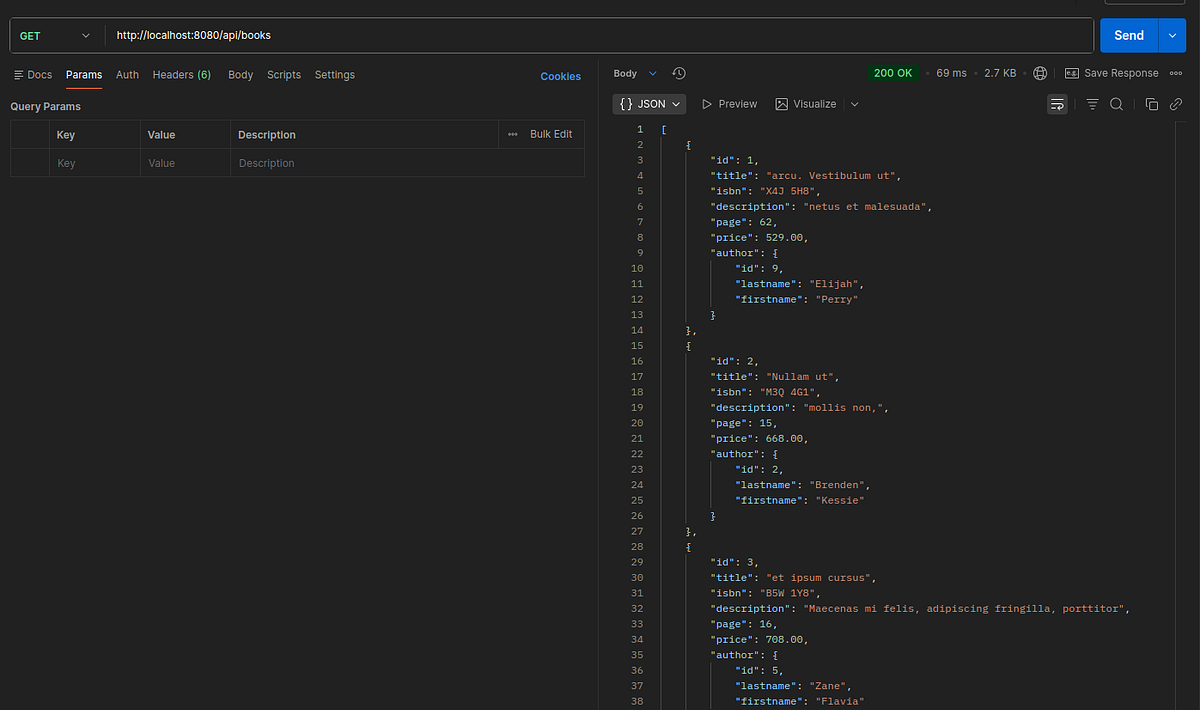
Inspect your configuration in the Alloy UI
Open http://localhost:12345/graph. The graph should look similar to the following:
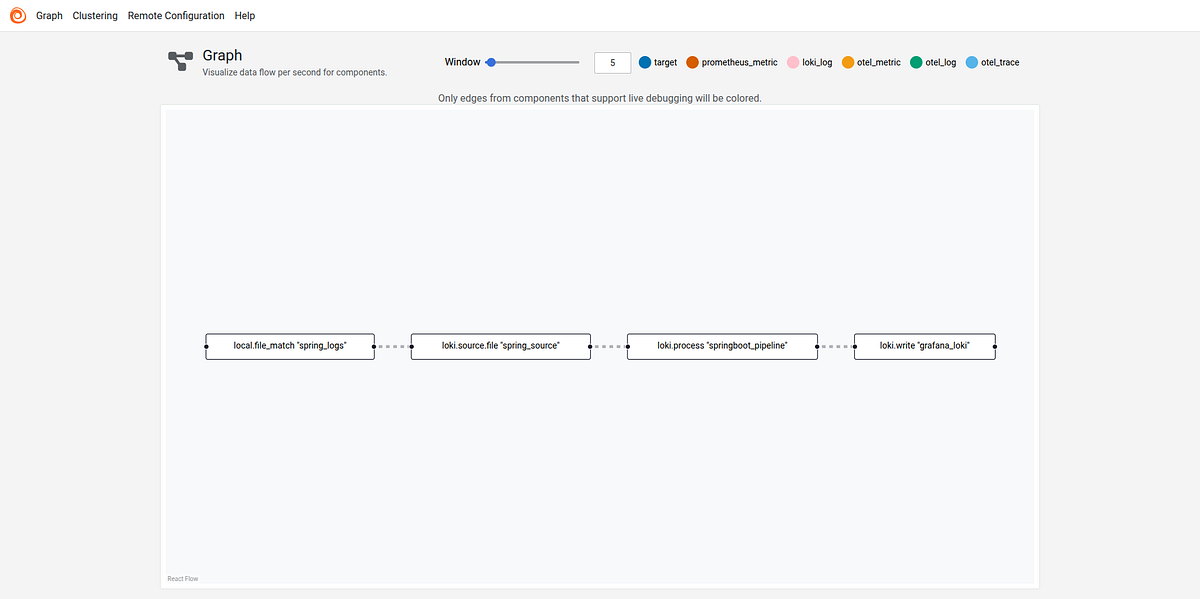
The Alloy UI shows you a visual representation of the pipeline you built with your Alloy component configuration.
You can see that the components are healthy, and you are ready to explore the logs in Grafana.
Log in to Grafana and explore Loki logs
Grafana is accessible via http://localhost:3000
Default username and password is admin as specified in the docker-compose file. We can reset the default password for the first login.
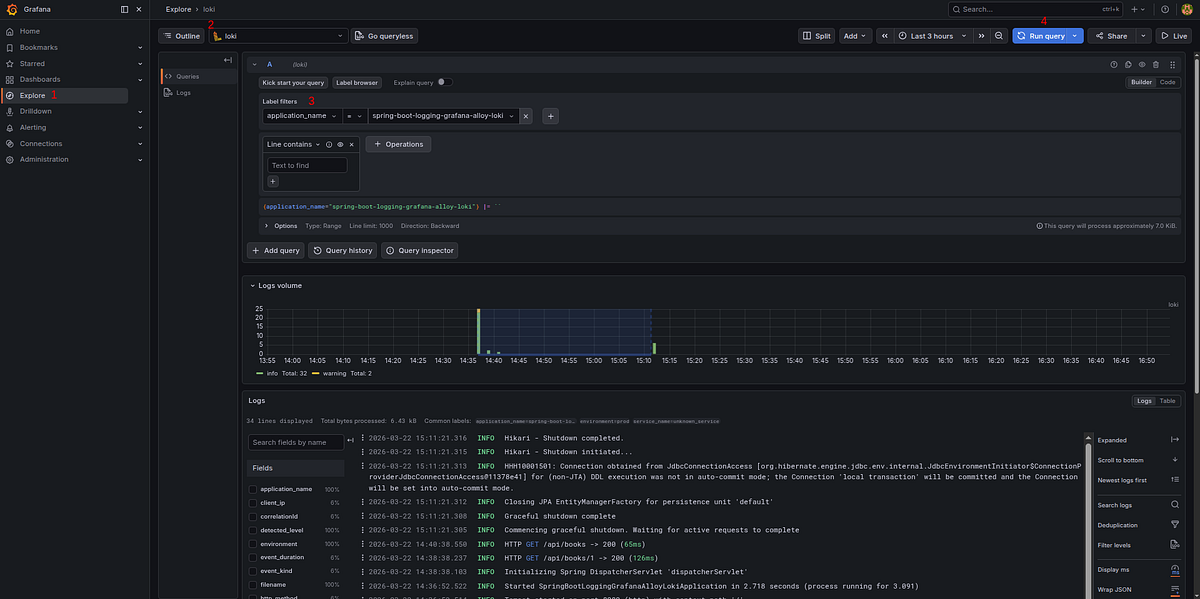
Open the Explore menu to access the Explore feature in Grafana.
Select Loki as the data source, then click the Label Browser button to choose a log stream that Alloy has sent to Loki.
Conclusion
🏁 Well done !!. Centralized logging doesn’t have to be complex or expensive. With Grafana Loki handling storage efficiently and Grafana Alloy providing a flexible, programmable pipeline for log processing, you can achieve enterprise-grade observability with minimal overhead.
The complete source code is available on GitHub.
Support me through GitHub Sponsors.
Thank you for reading!! See you in the next post.

