In this post, we’ll explore how to implement an efficient soft delete strategy using Spring Boot and JPA, along with practical best practices to avoid common pitfalls.
Prerequisites
This is the list of all the prerequisites:
- Spring Boot 4 or later
- Maven 3.9+
- Java 21 or later
- IntelliJ IDEA, Visual Studio Code, or another IDE
- Postman / insomnia or any other API testing tool.
- H2 / PostgreSQL (depending on your choice of database)
Overview
What Is Soft Delete?
Soft delete is a technique where a record is not actually removed from the database. Instead, a flag (e.g., deleted = true) or a timestamp (deleted_at) is used to indicate that the record should be treated as deleted.
- SQL Operation
Hard Delete:DELETE FROM users WHERE id = 1
Soft Delete:UPDATE users SET deleted_at = NOW() WHERE id = 1 - Data Recoverability
Hard Delete: No (data is permanently removed)
Soft Delete: Yes (data can be restored) - Audit Trail
Hard Delete: Lost
Soft Delete: Preserved - Referential Integrity Risk
Hard Delete: High
Soft Delete: Low - Query Complexity
Hard Delete: Low
Soft Delete: Medium
Why Use Soft Delete in Spring Boot JPA
Soft delete is a strong fit when:
- Regulatory compliance requires data retention (GDPR right-to-erasure being a notable exception — more on that later).
- Audit trails are required to know when and by whom a record was removed.
- Data recovery is a business requirement (e.g., restoring an accidentally deleted account).
- Referential integrity must be maintained across related entities.
It is not ideal for high-volume, high-churn tables where storage cost and query performance are critical, and where historical data has no value.
Let’s code
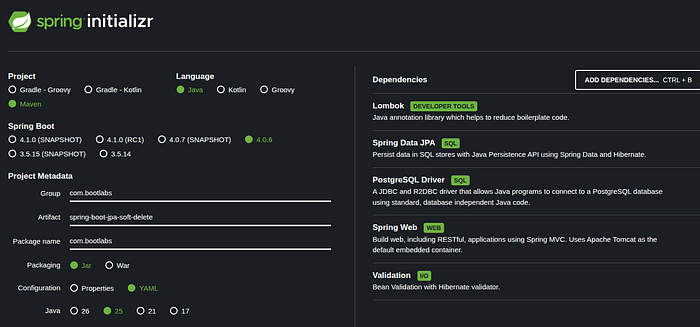
We’ll start by creating a simple Spring Boot project from start.spring.io, with the following dependencies: Spring Web, Lombok, PostgreSQL Database, Spring Data JPA, and Validation.
Choosing the Right Soft Delete Strategy
Before writing any Java code, it’s important to start with the right soft delete strategy.
A key design decision is how to represent the deletion state in your database. In practice, there are two common approaches:
- A boolean flag (
deleted = true/false) - A timestamp (
deleted_at = NULL / NOT NULL)
1. Boolean Flag (deleted)
This approach uses a simple flag to indicate whether a record is deleted:
ALTER TABLE book ADD COLUMN deleted BOOLEAN NOT NULL DEFAULT FALSE;
Active records are then retrieved with:
SELECT * FROM book WHERE deleted = false;
While this method is straightforward and easy to implement, it comes with several limitations:
- It does not capture when the deletion occurred
- It makes data retention and cleanup strategies harder to implement
- It offers limited value for auditing and debugging
2. Timestamp (deleted_at)
An alternative approach is to store the exact time a record is deleted:
ALTER TABLE book ADD COLUMN deleted_at TIMESTAMP NULL;
With this strategy, active records are simply those where:
deleted_at IS NULL
It offers:
- Greater flexibility in handling data lifecycle
- Improved observability, thanks to precise deletion timestamps
- Better alignment with real-world requirements like auditing and compliance
In contrast, while a boolean flag may be sufficient for very simple use cases, it often becomes restrictive as the application grows, leading to future refactoring.
In this post, we adopt the deleted_at strategy as it provides a more robust and maintainable foundation for production systems.
Implementing Soft Delete in JPA
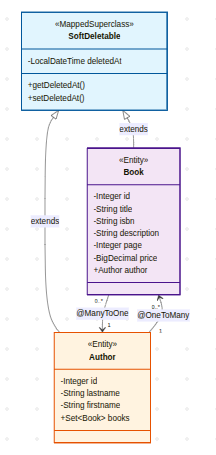
Assume we have the following Author and Book entities that inherit from the SoftDeletable base class, as shown in the diagram below:
Create a Base Soft Delete Entity
Avoid duplicating logic across entities.
@Getter
@Setter
@MappedSuperclass
public abstract class SoftDeletable implements Serializable {

    @Serial
    private static final long serialVersionUID = 1L;

    @Column(name = "deleted_at")
    private LocalDateTime deletedAt;
}
Basic Implementation with @SQLDelete and @SQLRestriction
In Spring Boot (with Hibernate 6 / Spring Boot 3+), two annotations are available to transparently support soft deletion: @SQLDelete and @SQLRestriction. These annotations allow you to override the default delete operation and automatically filter out logically deleted entities from query results.
Author Entity
@Data
@EqualsAndHashCode(callSuper = true)
@AllArgsConstructor
@NoArgsConstructor
@Entity
@Table(name = "author")
@SQLDelete(sql = "UPDATE author SET deleted_at = now() WHERE id = ?")
@SQLRestriction("deleted_at IS NULL")
public class Author extends SoftDeletable {

    @Serial
    private static final long serialVersionUID = 1L;

    @Id
    @GeneratedValue(strategy = GenerationType.IDENTITY)
    @Column(name = "id", nullable = false)
    private Integer id;

    @Column(name = "lastname", nullable = false, length = 100)
    private String lastname;

    @Column(name = "firstname", length = 255)
    private String firstname;

    @OneToMany(mappedBy = "author")
    private Set<Book> books = new HashSet<>();
}
Book Entity
@Data
@EqualsAndHashCode(callSuper = true)
@AllArgsConstructor
@NoArgsConstructor
@Entity
@Table(name = "book")
@SQLDelete(sql = "UPDATE book SET deleted_at = now() WHERE id = ?")
@SQLRestriction("deleted_at IS NULL")
public class Book extends SoftDeletable {

    @Serial
    private static final long serialVersionUID = 1L;

    @Id
    @GeneratedValue(strategy = GenerationType.IDENTITY)
    @Column(name = "id", nullable = false)
    private Integer id;

    @Column(name = "title", nullable = false, length = 100)
    private String title;

    @Column(name = "isbn")
    private String isbn;

    @Column(name = "description")
    private String description;

    @Column(name = "page")
    private Integer page;

    @Column(name = "price")
    private BigDecimal price;

    @ManyToOne
    @JsonIgnoreProperties("books")
    private Author author;
}
What these annotations do:
@SQLDeleteoverrides the SQL Hibernate generates when you callrepository.delete(entity)orrepository.deleteById(id). Instead of issuing aDELETE, it runs your customUPDATE.@SQLRestrictionappends the given clause to everySELECTHibernate generates for this entity, effectively hiding soft-deleted rows from all standard queries.
Hibernate 5 / Spring Boot 2.x: Replace
@SQLRestriction("deleted_at IS NULL")with@Where(clause = "deleted_at IS NULL"). The clause string stays the same.
Repository Layer
@Repository
public interface AuthorRepository extends JpaRepository<Author, Long> {

}

@Repository
public interface BookRepository extends JpaRepository<Book, Long> {

}
Because of @Where, all default queries automatically exclude deleted records.
Handling Relationships
Soft delete does NOT cascade automatically. If you soft delete an Author, their Book records remain active in the database, creating inconsistent state.
// DANGEROUS: Books remain active while Author is "deleted"
authorRepository.delete(authorId);
// Author.deleted_at = now()
// Book.deleted_at still = NULL → Books appear active!
The solution is to implement a manual cascade within the service layer
@Service
@Transactional
public class AuthorServiceImpl implements AuthorService {

    private final AuthorRepository repository;
    private final BookRepository bookRepository;
    private final AuthorMapper mapper;

    public AuthorServiceImpl(AuthorRepository repository, BookRepository bookRepository, AuthorMapper mapper) {
        this.repository = repository;
        this.bookRepository = bookRepository;
        this.mapper = mapper;
    }

    @Override
    public void delete(Long id) {
        Author author = repository.findById(id)
                .orElseThrow(() -> new ResourceNotFoundException("Author", id));

        // 1. Cascade to relationships FIRST
        bookRepository.softDeleteByAuthor(author, LocalDateTime.now());

        // 2. Then delete parent
        repository.delete(author);
    }
}

@Repository
public interface BookRepository extends JpaRepository<Book, Long> {

    @Modifying
    @Query("UPDATE Book b SET b.deletedAt = :now WHERE b.author = :author AND b.deletedAt IS NULL")
    void softDeleteByAuthor(@Param("author") Author author, @Param("now") LocalDateTime now);
}
Another more advanced approach is to implement a database trigger to handle the cascade automatically.
Custom Queries: Fetching Deleted Records
By default, annotations like @Where(clause = "deleted_at IS NULL") ensure that all standard JPA queries automatically exclude soft-deleted records. While this behavior is ideal for most application scenarios, there are cases—such as admin dashboards, audit tools, or data recovery workflows—where accessing soft-deleted data is necessary.
Because @Where is applied at the entity level and cannot be toggled dynamically, the only way to include soft-deleted records in query results is by defining explicit custom queries that bypass this restriction.
@Repository
public interface BookRepository extends JpaRepository<Book, Long> {

    // Standard query - automatically filtered by @SQLRestriction
    List<Book> findByAuthorId(Long authorId);  // Active only

    // Include deleted records via native query
    @Query(value = "SELECT * FROM book WHERE author_id = :authorId",
           nativeQuery = true)
    List<Book> findAllByAuthorIdIncludingDeleted(@Param("authorId") Long authorId);

    // Using JPQL without restrictions
    @Query("SELECT b FROM Book b WHERE b.author.id = :authorId")
    List<Book> findAllByAuthorIdIncludingDeletedJPQL(@Param("authorId") Long authorId);

    // Fetch only deleted records
    @Query("SELECT b FROM Book b WHERE b.deletedAt IS NOT NULL")
    List<Book> findAllDeleted();

    // Admin dashboard queries
    @Query("SELECT COUNT(b) FROM Book b WHERE b.deletedAt IS NOT NULL")
    long countDeletedBooks();
}
Common Pitfalls
Pitfall 1: deleteAllInBatch() Bypasses @SQLDelete
deleteAllInBatch()executes a single bulkDELETE FROM bookstatement, which bypasses the entity lifecycle and does not invoke@SQLDelete.
Pitfall 2: GDPR and the Right to Erasure
Soft delete merely hides personal data — it doesn’t remove it. Under GDPR’s right to erasure, data must be fully deleted or irreversibly anonymized. To comply, implement a dedicated erasure process that anonymizes personally identifiable information (PII) before applying soft deletion.
Pitfall 3: Lazy Collections and Soft-Deleted Children
Author.booksusesFetchType.LAZYby default. Because@SQLRestrictionis onBook, deleted books are excluded when Hibernate loads the collection via JPQL. However, if you access books through a native SQL join, deleted books may appear. Always verify your fetch strategy when mixing native queries with soft-deleted relationships.
Pitfall 4: Missing Index on deleted_at
Without proper indexing, queries that filter on
WHERE deleted_at IS NULLwill increasingly trigger full table scans as the dataset grows, leading to noticeable performance degradation over time.
Pitfall 5: Mixing deleted and deleted_at
Some implementations use both a
deletedboolean flag and adeleted_attimestamp, which introduces redundancy and the risk of inconsistency—for example,deleted = falsewhiledeleted_at IS NOT NULL. To avoid these issues, it’s better to adopt a single strategy, preferably relying ondeleted_atalone.
Pitfall 6: Table Growth Over Time
Soft delete prevents physical removal of data, so over time tables grow significantly, indexes become heavier, and query performance degrades. To mitigate this, implement a cleanup strategy — such as scheduled jobs that permanently delete outdated records and archiving older data into separate tables.
Pitfall 7: Forgetting to Handle Restore Logic
Soft delete is only half the story — being able to restore data is often just as important. Without a clear restore mechanism, records can become “logically lost,” making admin workflows cumbersome. To address this, provide explicit restore operations, such as a query that resets the deletion marker (e.g., setting
deletedAtback toNULLfor a given record).
Testing
Start the application and hit the endpoints to verify everything is working as expected.
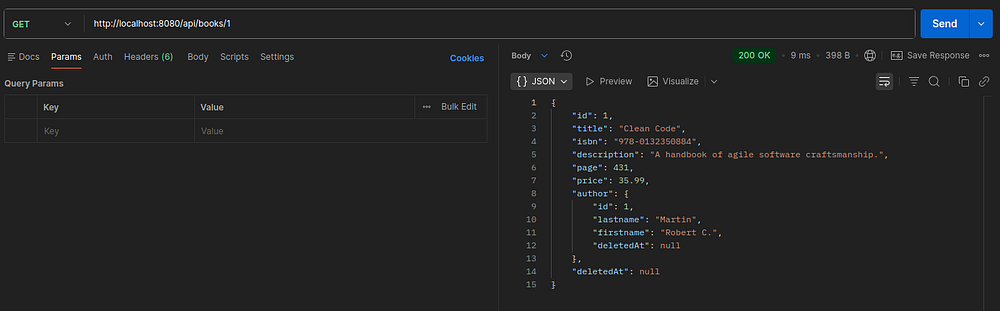
Here’s the generated SQL for this request. As you can see, the condition deleted_at IS NULL is automatically appended to the query:
Hibernate:
    select
        b1_0.id,
        a1_0.id,
        a1_0.deleted_at,
        a1_0.firstname,
        a1_0.lastname,
        b1_0.deleted_at,
        b1_0.description,
        b1_0.isbn,
        b1_0.page,
        b1_0.price,
        b1_0.title
    from
        book b1_0
    left join
        author a1_0
            on a1_0.id = b1_0.author_id
            and (a1_0.deleted_at IS NULL)
    where
        b1_0.id = ?
        and (b1_0.deleted_at IS NULL)
Now, we’re going to try deleting this book record.
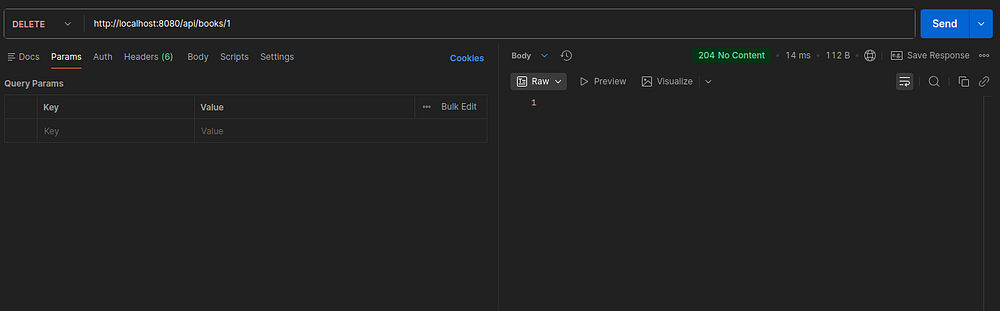
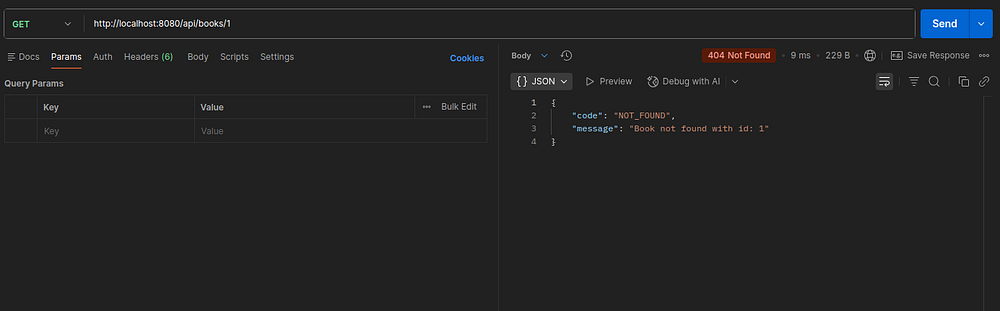
The deleted_at column is now populated in the database, and when you try calling the getById endpoint again, it returns a “not found” response.

This happens because the entity is using a soft delete mechanism, where records are not physically removed but are instead excluded from queries via the deleted_at IS NULL condition. Once the record is marked as deleted, it no longer matches the default query filters, so JPA behaves as if it doesn’t exist.
Conclusion
🏁 Well done !!. In this post, we implemented soft delete using Spring Boot JPA.
Implementing soft delete involves more than just introducing a deleted_at column. A production-ready approach requires careful design decisions and several additional considerations to ensure correctness, performance, and maintainability.
The complete source code is available on GitHub.
Support me through GitHub Sponsors.
Thank you for reading!! See you in the next post.