
In this post, we’ll build a lightweight messaging system using Redis Publish/Subscribe messaging and integrate it into a Spring Boot application step by step.
Prerequisites
This is the list of all the prerequisites:
- Spring Boot 3 or later
- Maven 3.9+
- Java 21 or later
- Docker and Docker Compose
- IntelliJ IDEA, Visual Studio Code, or another IDE
- Postman / insomnia or any other API testing tool.
- Redis 7.4+
Overview
What is Redis Pub/Sub?
Redis Pub/Sub (Publish/Subscribe) is a messaging pattern where:
- Publishers send messages to a channel
- Subscribers listen to channels and receive messages instantly
The publisher and subscriber are completely decoupled, making the architecture scalable and event-driven.
Basic Flow
Publisher → Redis Channel → SubscriberFor example:
Order Service → "orders" channel → Notification ServiceWhy Use Redis Pub/Sub?
Redis Pub/Sub is popular because it is:
- Fast and lightweight
- Easy to implement
- Perfect for real-time messaging
- Great for microservices communication
- Low latency
- Minimal infrastructure setup
However, it’s important to know that Redis Pub/Sub is not persistent. If a subscriber is offline, messages are lost.
For guaranteed delivery, tools like Kafka or RabbitMQ are better options.
Project Overview
What We’re Building
A simple order management service where:
- A REST API accepts order events (order created, status updated)
- Events are published to named Redis channels (
orders.events.created,orders.events.status) - Two subscribers process those events:
OrderEventSubscriberhandles business logic on specific channels,AuditEventSubscribercaptures all order activity via a wildcard pattern - Communication is fire-and-forget — no persistence, no consumer groups, no offsets
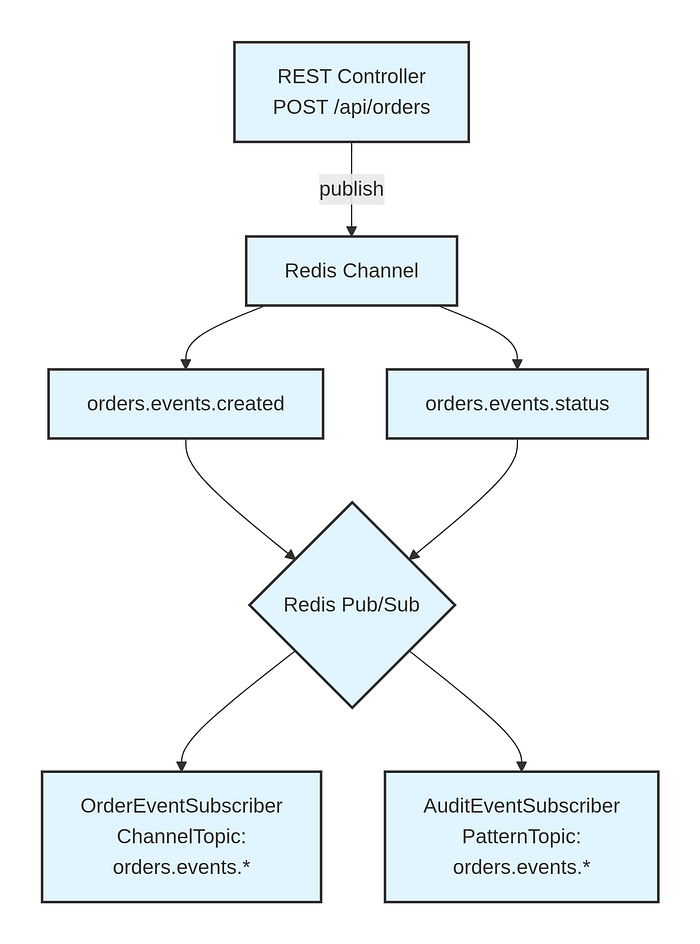
The audit subscriber uses Redis PSUBSCRIBE, so it captures every message published to any channel matching orders.events.* without needing to register for each individual channel explicitly.
Redis Pub/Sub Internals
Before writing any code, it helps to understand what Redis is actually doing under the hood.
Redis Pub/Sub is a messaging primitive built into the Redis server. When a client publishes a message to a channel, Redis immediately forwards it to every connected subscriber — then discards it. There is no persistence, no queue, no acknowledgement.
Three commands drive the entire protocol:
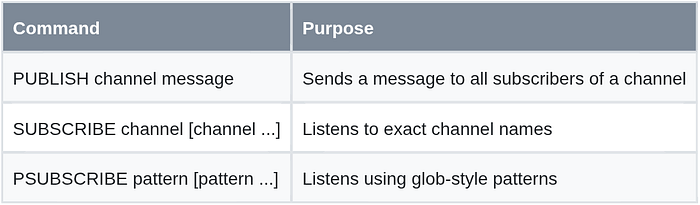
Message Flow
Publisher                 Redis Server               Subscriber(s)
    │                          │                          │
    │─ PUBLISH orders.created ─▶                          │
    │                          │─── message ─────────────▶│ subscriber A
    │                          │─── message ─────────────▶│ subscriber B
    │                     (discarded)
Properties to Understand Before You Build
- No persistence: Messages published before a client subscribes are silently lost.
- No acknowledgement: Redis does not know or care whether a subscriber processed a message.
- No backpressure: A slow subscriber does not slow down the publisher.
- Fan-out by default: Every subscriber on a channel receives every message independently.
These properties make Pub/Sub extremely fast but inherently unreliable. It works well for real-time notifications, live dashboards, cache invalidation signals, and audit streaming. It is the wrong tool for financial transactions, order processing, or anything requiring at-least-once delivery guarantees.
Spring Data Redis Abstractions
Spring Data Redis wraps the Redis Pub/Sub protocol behind three components:
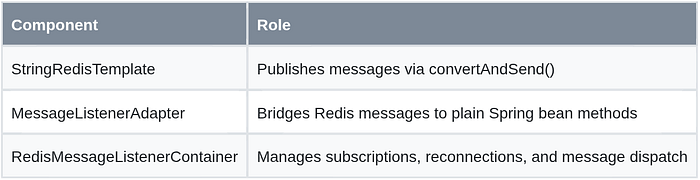
The container runs message delivery in a separate thread pool, so subscriber logic never blocks main application threads.
Redis with Docker Compose
Create docker-compose.yml at the project root:
services:
  redis:
    image: redis:7.4-alpine
    container_name: redis-pubsub
    ports:
      - "6379:6379"
    volumes:
      - redis_data:/data
    command: redis-server --appendonly yes --loglevel notice
    healthcheck:
      test: [ "CMD", "redis-cli", "ping" ]
      interval: 10s
      timeout: 5s
      retries: 5
    restart: unless-stopped

volumes:
  redis_data:
Start Redis and verify it’s ready:
docker compose up -d
docker compose logs redis
# Expected: Ready to accept connections tcp 0.0.0.0:6379
Project Setup
We’ll start by creating a simple Spring Boot project from start.spring.io.
Maven Dependencies (pom.xml)
<?xml version="1.0" encoding="UTF-8"?>
<project xmlns="http://maven.apache.org/POM/4.0.0"
         xmlns:xsi="http://www.w3.org/2001/XMLSchema-instance"
         xsi:schemaLocation="http://maven.apache.org/POM/4.0.0
             https://maven.apache.org/xsd/maven-4.0.0.xsd">
    <modelVersion>4.0.0</modelVersion>

    <parent>
        <groupId>org.springframework.boot</groupId>
        <artifactId>spring-boot-starter-parent</artifactId>
        <version>3.5.14</version>
        <relativePath/>
    </parent>

    <groupId>com.boottechnologies.ci</groupId>
    <artifactId>redis-pubsub-demo</artifactId>
    <version>0.0.1-SNAPSHOT</version>
    <name>redis-pubsub-demo</name>

    <properties>
        <java.version>21</java.version>
    </properties>

    <dependencies>
        <dependency>
            <groupId>org.springframework.boot</groupId>
            <artifactId>spring-boot-starter-data-redis</artifactId>
        </dependency>
        <dependency>
            <groupId>org.springframework.boot</groupId>
            <artifactId>spring-boot-starter-web</artifactId>
        </dependency>
        <dependency>
            <groupId>org.springframework.boot</groupId>
            <artifactId>spring-boot-starter-validation</artifactId>
        </dependency>
        <dependency>
            <groupId>org.apache.commons</groupId>
            <artifactId>commons-pool2</artifactId>
        </dependency>
        <dependency>
            <groupId>com.fasterxml.jackson.datatype</groupId>
            <artifactId>jackson-datatype-jsr310</artifactId>
        </dependency>
        <dependency>
            <groupId>org.projectlombok</groupId>
            <artifactId>lombok</artifactId>
            <optional>true</optional>
        </dependency>
        <dependency>
            <groupId>org.springframework.boot</groupId>
            <artifactId>spring-boot-starter-test</artifactId>
            <scope>test</scope>
        </dependency>
        <dependency>
            <groupId>org.testcontainers</groupId>
            <artifactId>junit-jupiter</artifactId>
            <scope>test</scope>
        </dependency>
    </dependencies>

    <build>
        <plugins>
            <plugin>
                <groupId>org.springframework.boot</groupId>
                <artifactId>spring-boot-maven-plugin</artifactId>
                <configuration>
                    <excludes>
                        <exclude>
                            <groupId>org.projectlombok</groupId>
                            <artifactId>lombok</artifactId>
                        </exclude>
                    </excludes>
                </configuration>
            </plugin>
        </plugins>
    </build>
</project>
spring-boot-starter-data-redis pulls in Lettuce (the default Redis client) and Spring Data Redis. commons-pool2 is required to activate Lettuce connection pooling — without it, the lettuce.pool configuration in application.yml is silently ignored.
Application Configuration
src/main/resources/application.yml:
spring:
  application:
    name: redis-pubsub-demo

  data:
    redis:
      host: ${REDIS_HOST:localhost}
      port: ${REDIS_PORT:6379}
      lettuce:
        pool:
          max-active: 10
          max-idle: 5
          min-idle: 2
          max-wait: 2000ms

logging:
  level:
    com.boottechnologies.ci.redispubsub: DEBUG
Project Structure
src/main/java/com/boottechnologies/ci/redispubsub/
├── RedisPubSubApplication.java
├── config/
│   ├── RedisChannels.java
│   └── RedisConfig.java
├── controller/
│   └── EventController.java
├── dto/
│   ├── OrderRequest.java
│   ├── PublishResponse.java
│   └── StatusUpdateRequest.java
├── exception/
│   └── GlobalExceptionHandler.java
├── model/
│   └── EventMessage.java
├── publisher/
│   └── EventPublisher.java
└── subscriber/
    ├── AuditEventSubscriber.java
    └── OrderEventSubscriber.java
Channel Definitions
public final class RedisChannels {

    public static final String ORDER_CREATED        = "orders.events.created";
    public static final String ORDER_STATUS_UPDATED = "orders.events.status";
    public static final String ORDER_PATTERN        = "orders.events.*";

    private RedisChannels() {}
}
Centralizing channel names as constants eliminates a whole class of silent bugs. A typo in a channel name produces zero compile errors, zero runtime exceptions, and zero message deliveries — the publisher and subscriber simply talk to different channels.
Event Message Model
public record EventMessage(
        String messageId,
        String eventType,
        String channel,
        Map<String, Object> payload,
        LocalDateTime timestamp
) {
    public static EventMessage of(String eventType, String channel, Map<String, Object> payload) {
        return new EventMessage(
                UUID.randomUUID().toString(),
                eventType,
                channel,
                payload,
                LocalDateTime.now()
        );
    }
}
The Map<String, Object> payload keeps the model generic without introducing per-event classes. In a production system with stable contracts, typed payload records (OrderCreatedPayload, StatusUpdatedPayload) are preferable — but for this post, the flexible map keeps the focus on the Pub/Sub mechanics.
Publisher
@Slf4j
@Service
@RequiredArgsConstructor
public class EventPublisher {

    private final StringRedisTemplate redisTemplate;
    private final ObjectMapper objectMapper;

    public void publish(String channel, EventMessage event) {
        try {
            String payload = objectMapper.writeValueAsString(event);
            Long subscriberCount = redisTemplate.convertAndSend(channel, payload);

            log.debug("Published event [{}] to channel [{}] — received by {} subscriber(s)",
                    event.messageId(), channel, subscriberCount);

            if (subscriberCount != null && subscriberCount == 0) {
                log.warn("No active subscribers on channel [{}], message dropped: {}",
                        channel, event.messageId());
            }
        } catch (JsonProcessingException e) {
            throw new RuntimeException("Failed to serialize event: " + event.messageId(), e);
        }
    }
}
StringRedisTemplate.convertAndSend() maps directly to the Redis PUBLISH command and returns the number of subscribers that received the message. A return value of 0 is not an exception — Spring won’t tell you the message was dropped. Logging that zero-subscriber case is essential for diagnosing missed events in staging and production.
Subscribers
OrderEventSubscriber — Direct MessageListener Implementation
@Slf4j
@Component
@RequiredArgsConstructor
public class OrderEventSubscriber implements MessageListener {

    private final ObjectMapper objectMapper;

    @Override
    public void onMessage(Message message, byte[] pattern) {
        String body    = new String(message.getBody(), StandardCharsets.UTF_8);
        String channel = new String(message.getChannel(), StandardCharsets.UTF_8);

        try {
            EventMessage event = objectMapper.readValue(body, EventMessage.class);
            log.info("[OrderEventSubscriber] channel={} | messageId={} | type={}",
                    channel, event.messageId(), event.eventType());
            processEvent(event);
        } catch (JsonProcessingException e) {
            log.error("[OrderEventSubscriber] Deserialization failed on channel [{}]: {}",
                    channel, body, e);
        }
    }

    private void processEvent(EventMessage event) {
        switch (event.eventType()) {
            case "ORDER_CREATED" ->
                log.info("Processing new order: orderId={}", event.payload().get("orderId"));
            case "ORDER_STATUS_UPDATED" ->
                log.info("Updating order status: orderId={}, status={}",
                        event.payload().get("orderId"), event.payload().get("status"));
            default ->
                log.warn("Unknown event type: {}", event.eventType());
        }
    }
}
Implementing MessageListener directly — rather than delegating through MessageListenerAdapter — gives you access to both the message body and the originating channel via the Message object. This is important when a single subscriber handles multiple distinct channels and needs to route behavior based on which one fired.
Redis Configuration
This is where the wiring happens. The RedisMessageListenerContainer is the core component that manages connections to Redis, resubscribes on reconnect, and dispatches incoming messages to the right listener
@Configuration
public class RedisConfig {

    @Bean
    public ObjectMapper objectMapper() {
        return JsonMapper.builder()
                .addModule(new JavaTimeModule())
                .disable(SerializationFeature.WRITE_DATES_AS_TIMESTAMPS)
                .build();
    }

    @Bean
    public MessageListenerAdapter auditListenerAdapter(AuditEventSubscriber auditEventSubscriber) {
        return new MessageListenerAdapter(auditEventSubscriber, "onAuditMessage");
    }

    @Bean
    public RedisMessageListenerContainer redisMessageListenerContainer(
            RedisConnectionFactory connectionFactory,
            OrderEventSubscriber orderEventSubscriber,
            MessageListenerAdapter auditListenerAdapter) {

        RedisMessageListenerContainer container = new RedisMessageListenerContainer();
        container.setConnectionFactory(connectionFactory);

        // Specific channel subscriptions (SUBSCRIBE command)
        container.addMessageListener(orderEventSubscriber,
                new ChannelTopic(RedisChannels.ORDER_CREATED));
        container.addMessageListener(orderEventSubscriber,
                new ChannelTopic(RedisChannels.ORDER_STATUS_UPDATED));

        // Wildcard pattern subscription (PSUBSCRIBE command)
        container.addMessageListener(auditListenerAdapter,
                new PatternTopic(RedisChannels.ORDER_PATTERN));

        // Java 21 virtual threads for non-blocking subscriber dispatch
        container.setTaskExecutor(Executors.newVirtualThreadPerTaskExecutor());

        return container;
    }
}
Three decisions worth explaining:
ChannelTopic vs PatternTopic: ChannelTopic maps to Redis SUBSCRIBE (exact name match). PatternTopic maps to PSUBSCRIBE (glob match). They show up separately in PUBSUB NUMSUB (per-channel counts) vs PUBSUB NUMPAT (active patterns), which matters when you monitor your Redis instance.
ObjectMapper bean: Defined here to ensure consistent serialization across publisher and subscriber. Without JavaTimeModule, LocalDateTime serializes as a numeric array [2026,5,27,10,15,22] rather than "2026-05-27T10:15:22". Mismatched serializers between publisher and subscriber cause deserialization failures that are hard to diagnose.
Virtual threads as TaskExecutor: By default, RedisMessageListenerContainer uses a single-threaded executor. One slow onMessage() call blocks all other pending messages. Using Executors.newVirtualThreadPerTaskExecutor() in Java 21 gives each message delivery its own lightweight virtual thread with near-zero overhead.
DTOs
// OrderRequest.java
public record OrderRequest(
        @NotBlank String orderId,
        @NotBlank String customerId,
        @NotNull @Positive BigDecimal amount,
        String notes
) {}
// StatusUpdateRequest.java
public record StatusUpdateRequest(
@NotBlank String orderId,
@NotBlank String status,
String reason
) {}// PublishResponse.java
public record PublishResponse(
String messageId,
String channel,
String status,
LocalDateTime publishedAt
) {}REST Controller
@Slf4j
@RestController
@RequestMapping("/api/orders")
@RequiredArgsConstructor
public class EventController {

    private final EventPublisher eventPublisher;

    @PostMapping("/created")
    public ResponseEntity<PublishResponse> orderCreated(
            @Valid @RequestBody OrderRequest request) {

        Map<String, Object> payload = Map.of(
                "orderId",    request.orderId(),
                "customerId", request.customerId(),
                "amount",     request.amount(),
                "notes",      request.notes() != null ? request.notes() : ""
        );

        EventMessage event = EventMessage.of(
                "ORDER_CREATED", RedisChannels.ORDER_CREATED, payload);
        eventPublisher.publish(RedisChannels.ORDER_CREATED, event);

        return ResponseEntity.ok(new PublishResponse(
                event.messageId(),
                RedisChannels.ORDER_CREATED,
                "PUBLISHED",
                event.timestamp()
        ));
    }

    @PostMapping("/status")
    public ResponseEntity<PublishResponse> updateStatus(
            @Valid @RequestBody StatusUpdateRequest request) {

        Map<String, Object> payload = Map.of(
                "orderId", request.orderId(),
                "status",  request.status(),
                "reason",  request.reason() != null ? request.reason() : ""
        );

        EventMessage event = EventMessage.of(
                "ORDER_STATUS_UPDATED", RedisChannels.ORDER_STATUS_UPDATED, payload);
        eventPublisher.publish(RedisChannels.ORDER_STATUS_UPDATED, event);

        return ResponseEntity.ok(new PublishResponse(
                event.messageId(),
                RedisChannels.ORDER_STATUS_UPDATED,
                "PUBLISHED",
                event.timestamp()
        ));
    }
}
Testing
Manual Verification with redis-cli
Open two terminal windows before starting the application.
Terminal 1 — Subscribe and watch for messages:
docker exec -it redis-pubsub redis-cli
SUBSCRIBE orders.events.created orders.events.status
Terminal 2 — Publish a test message directly:
docker exec -it redis-pubsub redis-cli
PUBLISH orders.events.created '{"test":"manual-message"}'
Terminal 1 should display the message within milliseconds.
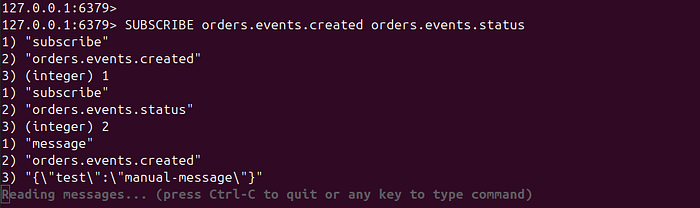
Inspect active subscriptions:
PUBSUB CHANNELS              # list all channels with at least one subscriber
PUBSUB NUMSUB orders.events.created   # subscriber count on a specific channel
PUBSUB NUMPAT                # count of active pattern subscriptions
Run the Application
Publish an order created event:

Expected application logs (subscriber side):

Notice the subscriber count is 2: OrderEventSubscriber (registered on ChannelTopic) and AuditEventSubscriber (registered on PatternTopic) both receive the message independently.
Update an order status:
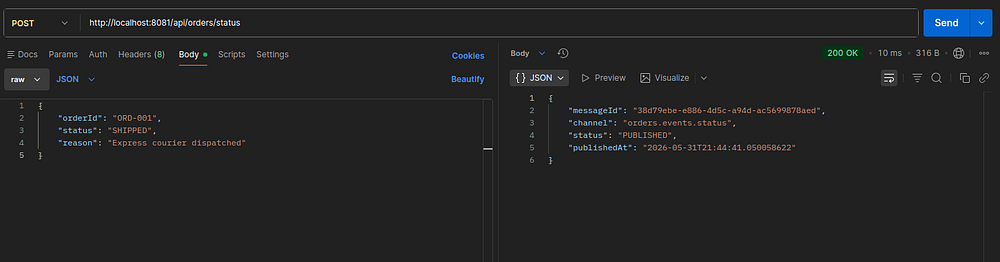
Expected application logs (subscriber side):

Performance Considerations
Throughput Ceiling
A single Redis instance handles hundreds of thousands of Pub/Sub messages per second in benchmarks. In practice, throughput limits come from:
- Network latency between publisher and Redis (RTT dominates for small messages)
- Subscriber processing time — a slow
onMessage()call holds a container thread - Connection pool exhaustion on the publisher side under high concurrency
Don’t Block in onMessage()
The RedisMessageListenerContainer dispatches messages on its task executor. If subscriber logic performs a database write, an HTTP call, or any I/O-heavy operation inline, you’ll back up message processing behind that latency. Offload heavy work:
@Override
public void onMessage(Message message, byte[] pattern) {
    String body = new String(message.getBody(), StandardCharsets.UTF_8);
    // Hand off immediately; don't block the executor thread
    CompletableFuture.runAsync(() -> processEvent(body));
}
With Java 21 virtual threads (Executors.newVirtualThreadPerTaskExecutor()), blocking I/O inside onMessage() is less harmful — the virtual thread parks rather than consuming a platform thread. However, it is still better practice to keep onMessage() thin.
Fan-out and Horizontal Scaling
If you horizontally scale the Spring Boot service (e.g., three instances behind a load balancer), each instance establishes its own independent subscriptions to Redis. Every instance receives every message published to its subscribed channels. This is the correct fan-out behavior for notifications. If you instead need competitive consumption — where only one instance processes each message — Redis Pub/Sub is the wrong primitive. Use Redis Streams with consumer groups, or a queue-based system.
Memory Profile
Redis holds zero message state for Pub/Sub. Memory footprint is negligible — only active subscriber connections consume resources. Unlike Redis lists or Streams, there is no queue accumulating in memory as consumers fall behind.
Conclusion
🏁 Well done !!. In this post, we learned how to build a real-time order event notification system using Redis Pub/Sub and Spring Boot.
Redis Pub/Sub provides an incredibly lightweight and efficient way to build real-time communication systems in Spring Boot applications.
With minimal configuration, you can implement asynchronous event-driven messaging that scales well for many real-time use cases.
If your application needs:
- instant communication,
- low latency,
- and simple architecture,
then Redis Pub/Sub is an excellent choice.
As your system grows and requires message durability or advanced streaming, you can later evolve toward solutions like Kafka or RabbitMQ.
The complete source code is available on GitHub.
Support me through GitHub Sponsors.
Thank you for reading!! See you in the next post.

