In this post, we’ll build a simple message-driven application using Redis Streams and Spring Boot.
Prerequisites
This is the list of all the prerequisites:
- Spring Boot 4 or later
- Maven 3.9+
- Java 25 or later
- Docker and Docker Compose
- IntelliJ IDEA, Visual Studio Code, or another IDE
- Postman / insomnia or any other API testing tool.
- Redis 7.4+
- Basic familiarity with Spring Boot and Redis
Overview
Most teams reach for Kafka or RabbitMQ when they need async messaging between services. Both are excellent choices, but they come with real operational overhead: clusters to provision, brokers to monitor, consumer group offsets to manage. If you already run Redis and your throughput requirements are in the tens of thousands of messages per second rather than millions, Redis Streams is a compelling alternative that eliminates an entire infrastructure dependency.
This post walks through building a production-grade order event processing system using Redis Streams and Spring Boot 4. We’ll set up a producer that publishes events to a stream, two independent consumer groups reading from the same stream concurrently, dead letter queue handling, and stale message recovery — the full pattern you’d deploy to production.
Redis Streams Core Concepts
Streams are append-only logs
A Redis Stream, introduced in Redis 5.0, is a persistent, ordered sequence of entries. Each entry has an auto-generated ID (millisecond timestamp + sequence, e.g., 1718358400000-0) and a set of key-value fields. Unlike Pub/Sub, messages persist after they’re delivered. A consumer that goes offline and comes back will not miss messages.
Consumer groups enable competitive consumption
A consumer group is a named cursor on a stream. Redis tracks how far each group has read independently. Multiple consumer instances sharing the same group name compete: each message goes to exactly one instance within the group.
Stream: orders:events
  entry 1718358400000-0 → inventory-group (consumer-1 processes it)
                        → notification-group (consumer-1 processes it, independently)
  entry 1718358401000-0 → inventory-group (consumer-2 processes it if scaled)
                        → notification-group (consumer-1 processes it)
Two groups reading the same stream = fan-out. Each group gets every message. Consumers within a group share the load.
XACK is mandatory
When a consumer reads a message via XREADGROUP, Redis moves it to a Pending Entry List (PEL) for that consumer. The message stays in the PEL until the consumer calls XACK. If the consumer crashes before acknowledging, the message remains pending and can be reclaimed by another consumer. This is what gives you at-least-once delivery.
Forgetting to call XACK is the most common mistake. Every code path — including error paths — must eventually acknowledge or the PEL grows unboundedly.
XPENDING tracks what hasn’t been acknowledged
XPENDING shows messages in the PEL. If a message has been sitting there longer than your SLA allows, another consumer should claim it with XAUTOCLAIM and retry. This is your crash recovery mechanism.
What We’re Building
An order placement API that publishes ORDER_CREATED events to a Redis Stream. Two independent consumer groups process each event concurrently: one reserves inventory, the other sends a confirmation notification.
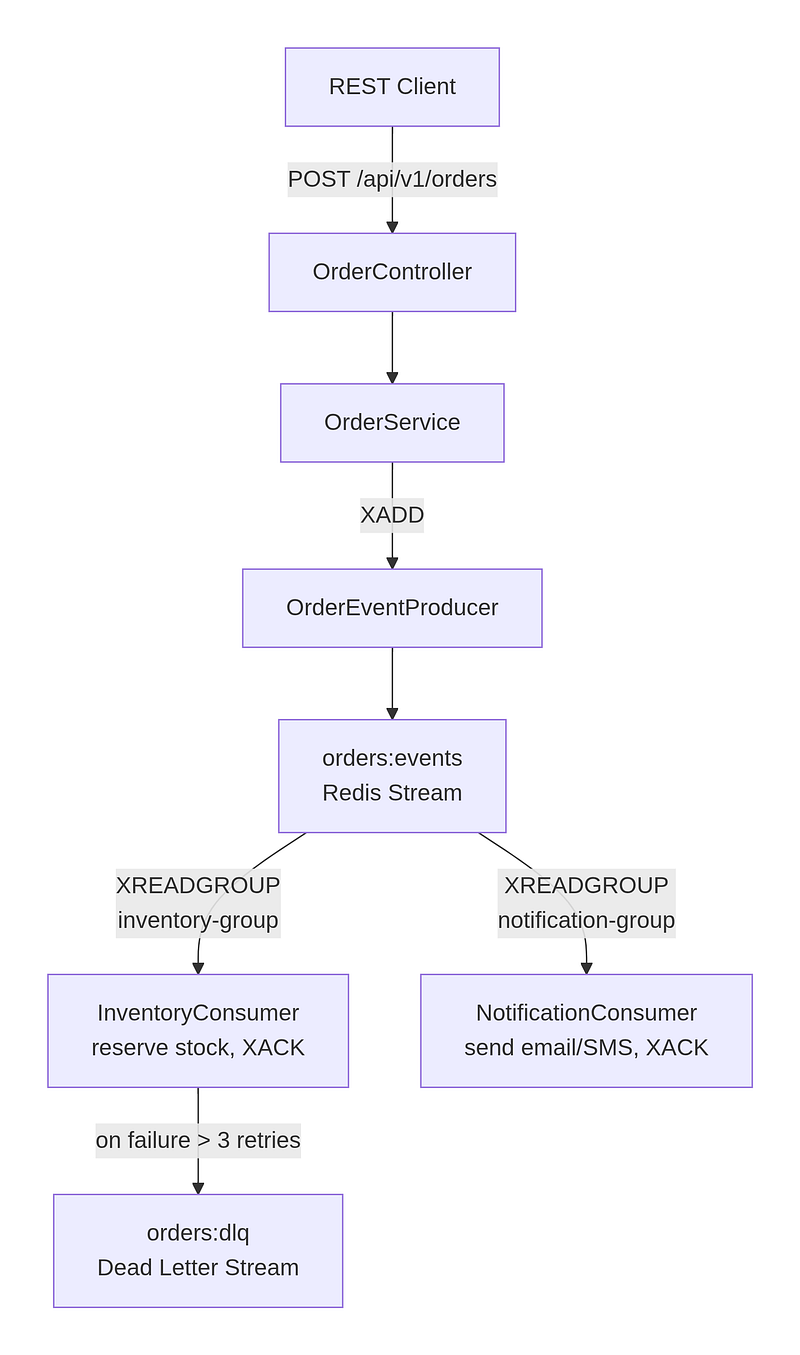
Key point: both consumer groups read every message independently. The inventory-group and notification-group each get their own copy of the event — they do not compete with each other. Within a group, multiple consumer instances compete, so each message is processed by exactly one instance.
Redis with Docker Compose
Stand up Redis with persistence enabled. The noeviction policy is critical for a message broker — you never want Redis evicting stream entries because memory is full.
services:
  redis:
    image: redis:7.4-alpine
    container_name: redis-streams
    ports:
      - "6379:6379"
    volumes:
      - redis_data:/data
    command: >
      redis-server
      --appendonly yes
      --maxmemory 256mb
      --maxmemory-policy noeviction
    healthcheck:
      test: ["CMD", "redis-cli", "ping"]
      interval: 10s
      timeout: 5s
      retries: 5

  redis-insight:
    image: redis/redisinsight:latest
    ports:
      - "5540:5540"
    depends_on:
      redis:
        condition: service_healthy

volumes:
  redis_data:
Use --maxmemory-policy noeviction rather than any of the LRU/LFU policies. With an LRU policy, Redis can silently drop stream entries when memory pressure hits, which means data loss with no error — exactly what you don’t want in a message broker.
docker compose up -dProject Setup
We’ll start by creating a simple Spring Boot project from start.spring.io.
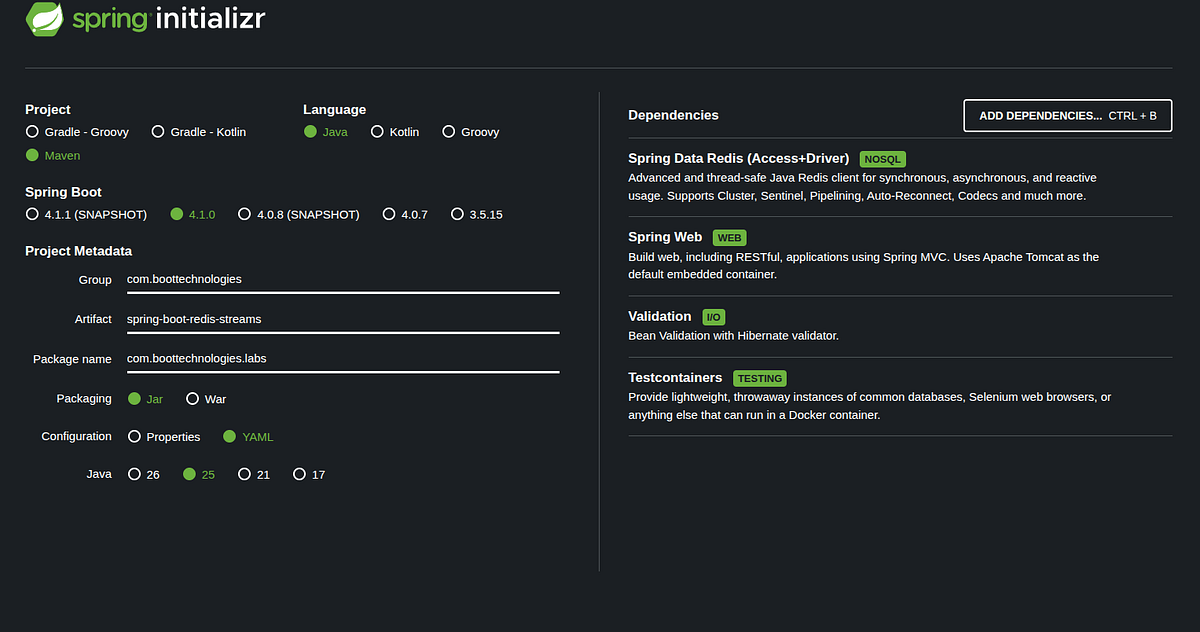
Spring Boot’s spring-boot-starter-data-redis pulls in Lettuce as the default Redis client. Lettuce is non-blocking and handles connection pooling well. No need to add it explicitly.
Configuration
Externalise all stream-specific values. Hard-coding stream names, group names, or consumer names into your beans makes deployments fragile — you can’t distinguish between production and staging streams without rebuilding.
# application.yml
spring:
  data:
    redis:
      host: ${REDIS_HOST:localhost}
      port: ${REDIS_PORT:6379}
      connect-timeout: 2s
      timeout: 1s
      lettuce:
        pool:
          max-active: 10
          max-idle: 5
          min-idle: 2
          max-wait: 1s

app:
  streams:
    orders:
      stream-key: orders:events
      dlq-key: orders:dlq
      max-len: 10000
      inventory-group: inventory-group
      notification-group: notification-group
      inventory-consumer: inventory-consumer-1
      notification-consumer: notification-consumer-1
      claim-min-idle-ms: 30000
Bind these with a typed @ConfigurationProperties record:
@ConfigurationProperties(prefix = "app.streams.orders")
public record StreamProperties(
        String streamKey,
        String dlqKey,
        long maxLen,
        String inventoryGroup,
        String notificationGroup,
        String inventoryConsumer,
        String notificationConsumer,
        long claimMinIdleMs
) {}
Redis Configuration
@Configuration
public class RedisConfig {

    @Bean
    public StringRedisTemplate stringRedisTemplate(RedisConnectionFactory connectionFactory) {
        StringRedisTemplate template = new StringRedisTemplate(connectionFactory);
        template.setKeySerializer(new StringRedisSerializer());
        template.setHashKeySerializer(new StringRedisSerializer());
        template.setHashValueSerializer(new StringRedisSerializer());
        return template;
    }

    @Bean
    public ObjectMapper objectMapper() {
        return new ObjectMapper()
                .registerModule(new JavaTimeModule())
                .disable(SerializationFeature.WRITE_DATES_AS_TIMESTAMPS);
    }
}
Use StringRedisTemplate for stream operations. Stream field keys and values in this implementation are all strings — the event payload is serialised JSON stored in a payload field. This avoids the complexity of custom serialisers for hash records and makes stream entries readable in Redis Insight without decoding.
The Event Record
public record OrderEvent(
        String eventId,
        String orderId,
        String customerId,
        List<String> itemIds,
        BigDecimal totalAmount,
        OrderStatus status,
        Instant occurredAt,
        int retryCount
) {
    public static OrderEvent of(String orderId, String customerId,
                                List<String> itemIds, BigDecimal totalAmount) {
        return new OrderEvent(
                UUID.randomUUID().toString(), orderId, customerId,
                itemIds, totalAmount, OrderStatus.PENDING, Instant.now(), 0
        );
    }

    public OrderEvent withRetryCount(int count) {
        return new OrderEvent(eventId, orderId, customerId, itemIds,
                totalAmount, status, occurredAt, count);
    }
}
The retryCount field is stored as a top-level stream field alongside the payload so consumers can check it without deserialising the full JSON body — important for high-throughput scenarios where you want fast discard of poison messages.
The Producer
The producer uses XADD to append entries to the stream. It stores the full JSON payload in a payload field and exposes key routing metadata (eventType, orderId) as individual fields so consumers can filter without full deserialisation.
@Component
public class OrderEventProducer {

    private final StringRedisTemplate redisTemplate;
    private final ObjectMapper objectMapper;
    private final StreamProperties props;

    public RecordId publish(OrderEvent event) {
        try {
            String payload = objectMapper.writeValueAsString(event);

            MapRecord<String, String, String> record = StreamRecords.string(Map.of(
                    "eventId",    event.eventId(),
                    "orderId",    event.orderId(),
                    "eventType",  "ORDER_CREATED",
                    "payload",    payload,
                    "retryCount", String.valueOf(event.retryCount())
            )).withStreamKey(props.streamKey());

            RecordId recordId = redisTemplate.opsForStream().add(record);
            trimStream();

            log.debug("Published ORDER_CREATED: orderId={} recordId={}", event.orderId(), recordId);
            return recordId;

        } catch (JsonProcessingException e) {
            throw new IllegalStateException("Failed to serialize OrderEvent: " + event.eventId(), e);
        }
    }

    private void trimStream() {
        redisTemplate.opsForStream().trim(props.streamKey(), props.maxLen(), true);
    }
}
The trim() call uses approximate trimming (true = MAXLEN ~) rather than exact trimming. Approximate trimming is significantly faster because Redis can trim at radix tree node boundaries rather than individual entries. The stream will stay close to maxLen without the CPU overhead of exact trimming on every write.
Consumer Group Bootstrap
Consumer groups must exist before consumers start reading. The BUSYGROUP error means the group already exists — catch it and continue. Do not use NOGROUP reads in production.
@Bean
public ApplicationRunner startStreamListeners(
        StreamMessageListenerContainer<String, MapRecord<String, String, String>> container,
        InventoryConsumer inventoryConsumer,
        NotificationConsumer notificationConsumer) {

    return args -> {
        ensureConsumerGroupExists(props.streamKey(), props.inventoryGroup());
        ensureConsumerGroupExists(props.streamKey(), props.notificationGroup());

        container.receive(
                Consumer.from(props.inventoryGroup(), props.inventoryConsumer()),
                StreamOffset.create(props.streamKey(), ReadOffset.lastConsumed()),
                inventoryConsumer
        );
        container.receive(
                Consumer.from(props.notificationGroup(), props.notificationConsumer()),
                StreamOffset.create(props.streamKey(), ReadOffset.lastConsumed()),
                notificationConsumer
        );

        container.start();
    };
}
ReadOffset.lastConsumed() tells the consumer to start from the last acknowledged message for its group. On first start (no prior consumed messages), the group’s cursor is at 0, so it reads from the beginning of the stream. This is typically what you want — the group was created with ReadOffset.from("0") in ensureConsumerGroupExists.
The StreamMessageListenerContainer is configured with a virtual thread executor — a Java 21 feature that makes thread-per-consumer much cheaper than platform threads:
@Bean
public StreamMessageListenerContainer<String, MapRecord<String, String, String>> listenerContainer(
        RedisConnectionFactory connectionFactory) {

    var options = StreamMessageListenerContainer
            .StreamMessageListenerContainerOptions
            .<String, MapRecord<String, String, String>>builder()
            .pollTimeout(Duration.ofMillis(100))
            .executor(Executors.newVirtualThreadPerTaskExecutor())
            .build();

    return StreamMessageListenerContainer.create(connectionFactory, options);
}
Consumers
Each consumer implements StreamListener and is responsible for acknowledging every message — including on error paths.
InventoryConsumer — with retry logic and DLQ routing:
@Component
public class InventoryConsumer implements StreamListener<String, MapRecord<String, String, String>> {

    private static final int MAX_RETRIES = 3;

    @Override
    public void onMessage(MapRecord<String, String, String> message) {
        String payload = message.getValue().get("payload");

        try {
            OrderEvent event = objectMapper.readValue(payload, OrderEvent.class);
            processInventoryReservation(event);
            acknowledge(message);

        } catch (Exception e) {
            log.error("[inventory-group] Processing failed: id={} error={}", message.getId(), e.getMessage());
            handleProcessingFailure(message, payload, e);
        }
    }

    private void handleProcessingFailure(MapRecord<String, String, String> message, String payload, Exception cause) {
        int retryCount = parseRetryCount(message.getValue().get("retryCount"));

        if (retryCount >= MAX_RETRIES) {
            OrderEvent event = deserialize(payload);
            producer.publishToDlq(event, cause.getMessage());
            acknowledge(message);  // Remove from PEL after routing to DLQ
        } else {
            // Do NOT acknowledge — message stays in PEL for reclaim
            log.warn("[inventory-group] Will retry: id={} attempt={}/{}", message.getId(), retryCount + 1, MAX_RETRIES);
        }
    }
The key insight in the retry logic: do not call XACK on failure if you want the message retried. The message stays in the PEL. Your @Scheduled reclaim job then picks it up and redelivers it. Once retryCount >= MAX_RETRIES, route to DLQ and then acknowledge — otherwise the DLQ message and the PEL entry both exist, and you get double processing.
NotificationConsumer uses a different error strategy — acknowledge even on failure because notifications are best-effort in this system. Each system should explicitly choose its failure semantics rather than inheriting them accidentally:
@Override
public void onMessage(MapRecord<String, String, String> message) {
    try {
        OrderEvent event = objectMapper.readValue(payload, OrderEvent.class);
        sendOrderConfirmationNotification(event);
    } catch (Exception e) {
        log.error("[notification-group] Notification failed: id={} error={}", message.getId(), e.getMessage());
        // Acknowledge anyway — notifications are best-effort here
    } finally {
        acknowledge(message);
    }
}
Stale Message Recovery
The @Scheduled job on InventoryConsumer monitors the PEL and logs stale messages. In a full production implementation, you’d call XAUTOCLAIM to reassign messages that have been idle longer than your SLA:
@Scheduled(fixedDelayString = "${app.streams.orders.claim-min-idle-ms:30000}")
public void reclaimAbandonedMessages() {
    var pendingMessages = redisTemplate.opsForStream()
            .pending(props.streamKey(), props.inventoryGroup(),
                     Range.unbounded(), 10L);

    if (pendingMessages == null || pendingMessages.isEmpty()) return;

    pendingMessages.stream()
            .filter(p -> p.getElapsedTimeSinceLastDelivery()
                          .compareTo(Duration.ofMillis(props.claimMinIdleMs())) > 0)
            .forEach(p -> log.warn("[inventory-group] Stale pending: id={} idleFor={}",
                    p.getId(), p.getElapsedTimeSinceLastDelivery()));
}
Running the Application
# Start Redis
docker compose up -d

# Run the app
mvn spring-boot:run
Place an order:
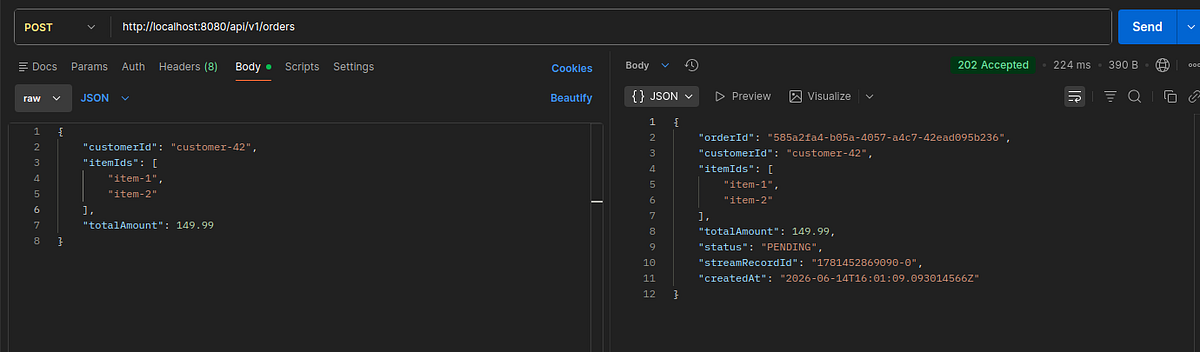
You should see both consumer groups log processing:
INFO 44470 --- [spring-boot-redis-streams] [nio-8080-exec-1] c.b.labs.service.OrderService            : Order created and published: orderId=585a2fa4-b05a-4057-a4c7-42ead095b236 recordId=1781452869090-0
INFO 44470 --- [spring-boot-redis-streams] [     virtual-65] c.b.labs.consumer.NotificationConsumer   : [notification-group] Sending order confirmation: orderId=585a2fa4-b05a-4057-a4c7-42ead095b236 customerId=customer-42 amount=149.99
INFO 44470 --- [spring-boot-redis-streams] [     virtual-63] c.b.labs.consumer.InventoryConsumer      : [inventory-group] Reserving inventory for orderId=585a2fa4-b05a-4057-a4c7-42ead095b236 items=[item-1, item-2] customerId=customer-42
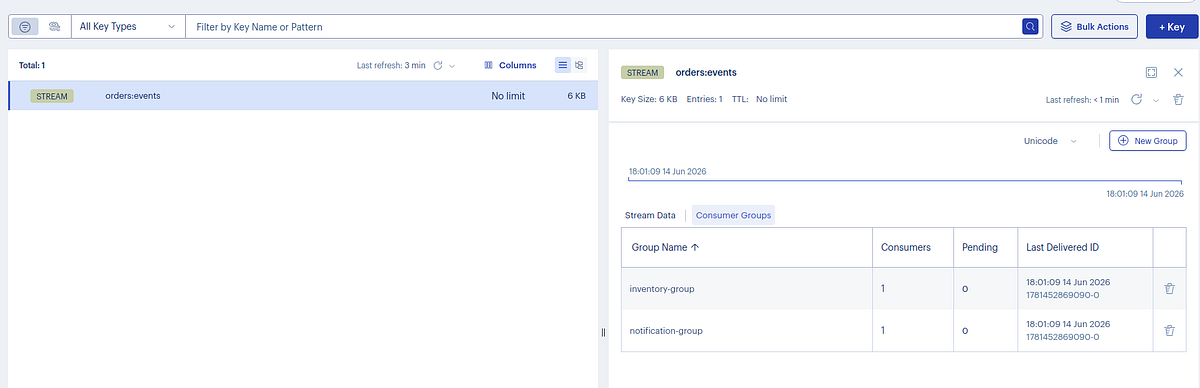
Inspect the stream state in Redis:
# Stream entry count
redis-cli XLEN orders:events

# Consumer group state (lag, last-delivered-id, pending count)
redis-cli XINFO GROUPS orders:events

# Entries in PEL for inventory-group
redis-cli XPENDING orders:events inventory-group - + 10
Open Redis Insight at http://localhost:5540 to browse stream entries visually.
Performance Considerations
Throughput ceiling: Redis Streams can handle ~100K–500K XADD operations per second on typical hardware. This is enough for most microservice use cases. If you need millions per second, evaluate Kafka.
PEL growth: Every unacknowledged message occupies memory in the PEL. In high-throughput systems, a consumer that fails repeatedly and leaves messages un-acknowledged can cause significant memory pressure. Monitor XPENDING count in your alerting pipeline.
Approximate trimming vs exact: Always use trim(key, maxLen, true) (approximate). Exact trimming requires Redis to count individual entries and is significantly more expensive per write. The approximate variant keeps your stream within ~10% of maxLen with no perceptible overhead.
Connection pool sizing: The lettuce.pool.max-active setting controls concurrent Redis connections. For consumer-heavy workloads, increase this. The StreamMessageListenerContainer polls each subscription with its own thread; with virtual threads the cost is low, but each thread still needs a Redis connection.
AOF vs RDB persistence: AOF (appendonly yes) gives you better durability guarantees — you lose at most one second of writes on a crash. RDB snapshots can lose minutes of data. For a message broker, use AOF.
Common Pitfalls
Not acknowledging on error paths. The most frequent bug. If any code path throws before XACK, the message sits in the PEL forever. Structure your onMessage implementations with explicit try-catch-acknowledge or a finally block depending on your delivery semantics.
Creating consumer groups against non-existent streams. XGROUP CREATE fails with ERR if the stream doesn’t exist and you haven’t passed MKSTREAM. Spring Data Redis createGroup passes MKSTREAM by default, but confirm this matches your Redis version.
Using ReadOffset.latest() instead of ReadOffset.from("0") when creating groups. latest() ($) means the group starts reading only messages published after group creation — any messages already in the stream are skipped. Use from("0") unless you explicitly want to skip existing messages.
No stream length cap. Without MAXLEN, the stream grows indefinitely. A stream with 50 million entries takes gigabytes of memory and causes slow recovery on restart. Always trim.
Sharing a consumer name across instances. The consumer name within a group (inventory-consumer-1) is used by Redis to track the PEL per consumer. If two instances share the same consumer name, their PELs merge, making stale message recovery unreliable. Use environment variables or pod names for consumer names in Kubernetes deployments.
Not monitoring lag. XINFO GROUPS shows lag — the number of messages in the stream that a group has not yet delivered. A growing lag means your consumers are slower than your producers. Set alerts on this value.
When Not to Use Redis Streams
Redis Streams is the right choice when: you already run Redis, you need message persistence and consumer groups, and your throughput is in the range of tens to hundreds of thousands of messages per second.
Consider alternatives when:
- Complex routing or filtering: Kafka handles partitioned topics with precise consumer group offset management at scale Streams can’t match.
- Multi-datacenter replication: Redis Enterprise supports geo-replication for streams, but OSS Redis does not. Kafka has mature multi-DC support.
- Strict durability requirements: Redis is in-memory first. Even with AOF, you have a small write-loss window on crash. RabbitMQ with mirrored queues or Kafka with
min.insync.replicas=2gives stronger guarantees. - Schema evolution at scale: Redis Streams have no schema registry. At high team-velocity, schema drift becomes hard to manage without a registry like Confluent Schema Registry or Apicurio.
Conclusion
🏁 Well done !!. Redis Streams is a pragmatic choice for event-driven architectures that don’t justify a full Kafka deployment. The consumer group model gives you load balancing, at-least-once delivery, and fan-out — the three things most async messaging needs — without adding an independent broker cluster to your operations runbook.
The complete source code is available on GitHub.
Support me through GitHub Sponsors.
Thank you for reading!! See you in the next post.