
In this post, we’ll explain how to integrate the Keycloak Admin Client SDK in a Spring Boot application.
· Prerequisites
· Overview
∘ What is Keycloak Admin Client?
∘ When to Use It?
· Set Up a Spring Boot REST API
∘ Configure Keycloak Admin Client in Spring Boot
∘ Keycloak Client Config Class
· CRUD operations
∘ Role Management
∘ User Management
· Test the REST APIs
· Conclusion
· References
Prerequisites
This is the list of all the prerequisites:
- Spring Boot 3+
- Maven 3.6.3
- Java 21
- Postman / insomnia or any other API testing tool.
- A ready-to-use Keycloak server with one realm and one client.
This story will use the same setup (realm and client) as used in our previous story:
Manage Keycloak using Admin REST API
Overview
What is Keycloak Admin Client?
The Keycloak Admin Client is a Java library that facilitates access to and use of the Keycloak Admin REST API rather than using the web administration console. The library requires Java 11 or higher at runtime (RESTEasy dependency enforces this requirement).
- A Java library (official SDK) for interacting with Keycloak’s administration features
- A REST API wrapper that simplifies working with Keycloak’s backend
- Part of Keycloak’s official distribution (maintained by Red Hat)
When to Use It?
Using the Keycloak Admin Client is beneficial in various scenarios where we must programmatically manage Keycloak resources, such as users, roles, clients, and realms. Below are some scenario cases:
- Automating User Management: If an application requires dynamic user management, such as creating, updating, or deleting users based on certain events (e.g., user registration, account updates), the Keycloak Admin Client can automate these tasks.
- Managing Roles and Permissions: When an application has complex role-based access control (RBAC) requirements, you can use the Admin Client to manage roles and permissions programmatically.
- Scheduled maintenance tasks: When we need to perform bulk operations, such as importing a large number of users or roles, the Admin Client can facilitate this process.
- Integrating with CI/CD Pipelines: When we want to automate the setup of Keycloak configurations as part of our deployment process.
- Custom Administration Interfaces: If you need a custom admin interface for managing Keycloak resources that is tailored to your organization’s needs, you can build it using the Keycloak Admin Client. It can be an alternative to the web console.
Set Up a Spring Boot REST API
Let’s create a simple Spring Boot project from start.spring.io, with the following dependencies: Spring Web and Lombok.
Configure Keycloak Admin Client in Spring Boot
Add Maven Dependency
The Maven dependencies are available on Maven Central. At the time of writing this story, the latest version is 26.0.5.
Add this dependency to the pom.xml
<!-- https://mvnrepository.com/artifact/org.keycloak/keycloak-admin-client -->
<dependency>
    <groupId>org.keycloak</groupId>
    <artifactId>keycloak-admin-client</artifactId>
    <version>26.0.5</version>
</dependency>
Application Properties Configuration
- Create a configuration class to store Keycloak properties (e.g., endpoint, client ID, client key, etc).
- Add these properties to
application.yml:
keycloak:
  realm: bootlab
  endpoint: http://localhost:8080
  application:
    client-id: my-app-client
client-secret: ${secret}realm– The name of the realm.client-id– The client ID of the application. Each application has a client ID that is used to identify the application.client-secret– Specifies the secret of the client application.endpoint:– The base URL of the Keycloak server.
Configuration Class
Create a KeycloakPropertiesConfig class that retrieves all the properties defined in the application.yml file.
@Data
@Component
@ConfigurationProperties(prefix = "keycloak", ignoreUnknownFields = false)
public class KeycloakPropertiesConfig {

    /**
     * keycloak realm name
     */
    private String realm;

    /**
     * server endpoint
     */
    private String endpoint;

    /**
     * Keycloak client properties
     */
    private final Application application = new Application();


    @Getter
    @Setter
    public static class Application {
        private String clientId;
        private String clientSecret;
    }
}
Keycloak Client Config Class
This configuration class configures a Keycloak bean that allows you to connect to the server and call REST API endpoints using the RESTEasy client.
@RequiredArgsConstructor
@Configuration
public class KeycloakAdminConfig {

    private final KeycloakPropertiesConfig propertiesConfig;

    @Bean
    public Keycloak keycloak(){
        return KeycloakBuilder.builder()
                .serverUrl(propertiesConfig.getEndpoint())
                .realm(propertiesConfig.getRealm())
                .grantType(OAuth2Constants.CLIENT_CREDENTIALS)
                .clientId(propertiesConfig.getApplication().getClientId())
                .clientSecret(propertiesConfig.getApplication().getClientSecret())
                .build();
    }
}
CRUD operations
Role Management
Let’s create the service role with three methods (create, getAll, and getByName)
@Service
public class RoleServiceImpl implements RoleService {

    private final Keycloak keycloak;
    private final KeycloakPropertiesConfig propertiesConfig;

    public RoleServiceImpl(Keycloak keycloak, KeycloakPropertiesConfig propertiesConfig) {
        this.keycloak = keycloak;
        this.propertiesConfig = propertiesConfig;
    }

    private RolesResource rolesResourceInstance() {
        return keycloak.realm(propertiesConfig.getRealm()).roles();
    }

    @Override
    public void create(RoleDto roleDto) {
        RoleRepresentation role = new RoleRepresentation();
        role.setName(roleDto.name());
        role.setDescription(roleDto.description());

        rolesResourceInstance().create(role);
    }

    @Override
    public List<RoleDto> getAll() {
        var roleRepresentations = rolesResourceInstance().list();

        return roleRepresentations.stream().map(r -> new RoleDto(r.getName(), r.getDescription())).toList();
    }

    @Override
    public RoleDto getByName(String roleName) {
        var roleRepresentation = rolesResourceInstance().get(roleName).toRepresentation();

        return new RoleDto(roleRepresentation.getName(), roleRepresentation.getDescription());
    }
}
All methods depend on the rolesResourceInstance() method, which retrieves an instance of RolesResource (contains the basic keycloak role operations).
Here is the Role Controller class:
@RestController
@RequestMapping("/api/role")
public class RoleController {

    private final RoleService roleService;

    public RoleController(RoleService roleService) {
        this.roleService = roleService;
    }

    @GetMapping
    public ResponseEntity<List<RoleDto>> findAll() {
        var roles = roleService.getAll();
        return ResponseEntity.ok(roles);
    }

    @PostMapping
    public ResponseEntity<Void> createRole(@RequestBody RoleDto roleDto) {
        roleService.create(roleDto);
        return ResponseEntity.status(HttpStatus.CREATED).build();
    }
}
User Management
This service looks almost the same as the RoleService. We need to obtain the UsersResource instance using the usersResourceInstance() method.
@Slf4j
@Service
public class UserServiceImpl implements UserService {

    private final Keycloak keycloak;
    private final KeycloakPropertiesConfig propertiesConfig;

    public UserServiceImpl(Keycloak keycloak, KeycloakPropertiesConfig propertiesConfig) {
        this.keycloak = keycloak;
        this.propertiesConfig = propertiesConfig;
    }

    private UsersResource usersResourceInstance() {
        return keycloak.realm(propertiesConfig.getRealm()).users();
    }

    private UserDto mapToUserDto(UserRepresentation userRepresentation) {
        return UserDto.builder()
                .id(userRepresentation.getId())
                .username(userRepresentation.getUsername())
                .email(userRepresentation.getEmail())
                .firstName(userRepresentation.getFirstName())
                .lastName(userRepresentation.getLastName())
                .build();
    }

    @Override
    public List<UserDto> getAll() {
        return usersResourceInstance().list().stream().map(this::mapToUserDto).toList();
    }

    @Override
    public List<UserDto> getByUsername(String username) {
        return usersResourceInstance()
                .search(username).stream().map(this::mapToUserDto).toList();
    }

    @Override
    public UserDto getById(String id) {
        var user = usersResourceInstance()
                .get(id)
                .toRepresentation();

        return mapToUserDto(user);
    }

    @Override
    public void assignRole(String userId, String roleName) {
        var roleRepresentation = keycloak.realm(propertiesConfig.getRealm()).roles().get(roleName).toRepresentation();
        usersResourceInstance()
                .get(userId)
                .roles()
                .realmLevel()
                .add(Collections.singletonList(roleRepresentation));
    }

    @Override
    public UserDto createUser(UserDto userDto){
        var user = buildUserRepresentation(userDto);

        try (Response response = usersResourceInstance().create(user)) {
            int statusCode = response.getStatus();
            switch (statusCode) {
                case 201 -> log.info("User {} successfully created in Keycloak", userDto.username());
                case 409 -> {
                    log.error("Duplicate user {}", userDto.username());
                    throw new DuplicateUserException(userDto.username());
                }
                default -> {
                    log.error("Error creating user: status code {}", statusCode);
                    throw new UserCreationException(MessageFormat.format("Error creating user: status code {0}", statusCode));
                }
            }
        } catch (ProcessingException e) {
            log.error("Error creating user in Keycloak", e);
            throw new UserCreationException("Error creating user");
        }

        return userDto;
    }

    private UserRepresentation buildUserRepresentation(UserDto userDto) {
        UserRepresentation userRepresentation  = new UserRepresentation();
        userRepresentation.setUsername(userDto.username());
        userRepresentation.setCredentials(Collections.singletonList(buildCredentialRepresentation(userDto.password())));
        userRepresentation.setEnabled(true);
        userRepresentation.setEmail(userDto.email());
        userRepresentation.setFirstName(userDto.firstName());
        userRepresentation.setLastName(userDto.lastName());
        userRepresentation.setEmailVerified(true);

        return userRepresentation ;
    }

    private CredentialRepresentation buildCredentialRepresentation(String password) {
        CredentialRepresentation credentialRepresentation = new CredentialRepresentation();
        credentialRepresentation.setTemporary(false);
        credentialRepresentation.setType(CredentialRepresentation.PASSWORD);
        credentialRepresentation.setValue(password);
        return credentialRepresentation;
    }
}
For user creation, we build a UserRepresentation object to which we add the password policy constructed by the buildCredentialRepresentation method.
UserController Class:
@RestController
@RequestMapping("/api/user")
public class UserController {

    private final UserService userService;

    public UserController(UserService userService) {
        this.userService = userService;
    }

    @GetMapping
    public ResponseEntity<List<UserDto>> findAll() {
        var users = userService.getAll();
        return ResponseEntity.ok(users);
    }

    @PostMapping
    public ResponseEntity<Void> createUser(@RequestBody UserDto userDto) {
        userService.createUser(userDto);
        return ResponseEntity.status(HttpStatus.CREATED).build();
    }

    @PutMapping("/{userId}/assign/role/{roleName}")
    public ResponseEntity<?>  assignRoleToUser(@PathVariable String userId, @PathVariable String roleName){

        userService.assignRole(userId, roleName);
        return ResponseEntity.status(HttpStatus.CREATED).build();
    }
}
Test the REST APIs
Now we are all done with our code. We can run our application and test it.

- Create a Realm Role

It creates a new Real role.

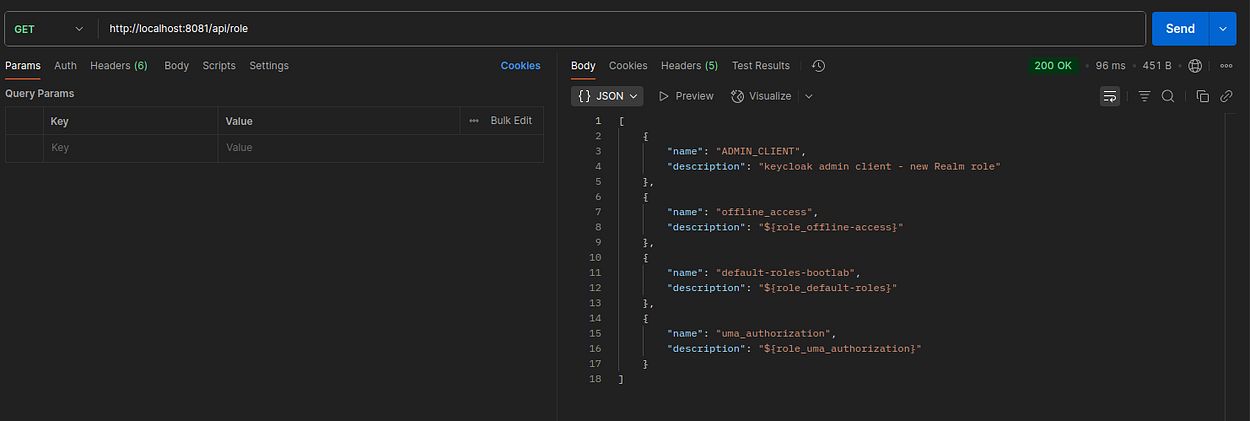
- Get all roles
- Create a new user


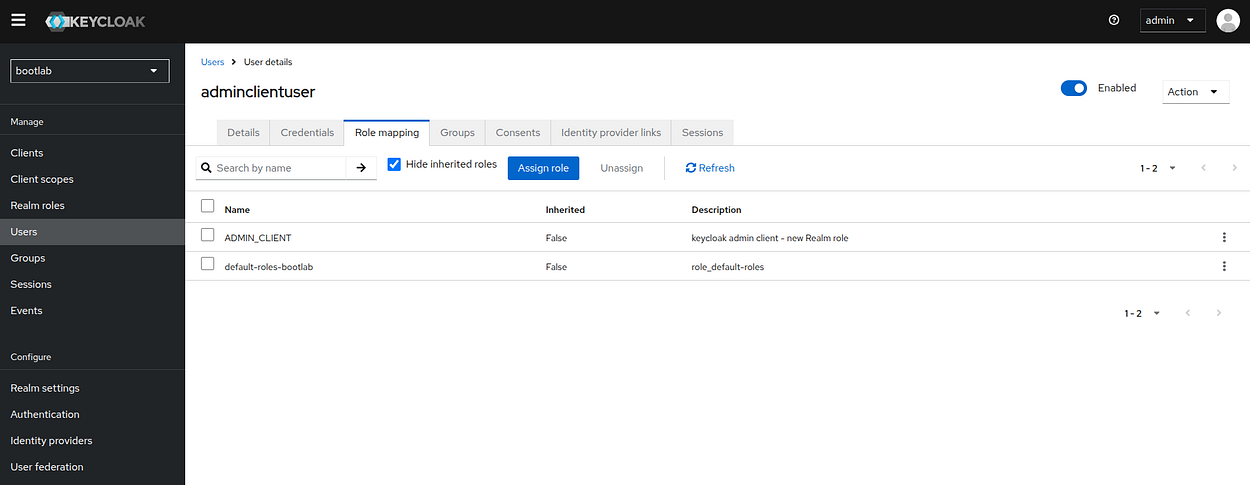
- Assign a role to the user

Conclusion
Well done! We’ve learned how to implement the Keycloak admin client with Spring Boot. It provides powerful programmatic access to Keycloak’s features while handling the complexity of authentication and request formatting behind the scenes.
The complete source code is available on GitHub.
Support me through GitHub Sponsors.
Thank you for reading!! See you in the next post.

